Recipe · Claude and ChatGPT
Conversion tracking alerts in Slack, set up from your favorite AI tools.
Set the recipe up in Claude or ChatGPT and your client’s Slack channel hears about a broken conversion within a day or two: what stopped or doubled, the numbers, why it matters and who fixes it. Every Monday, a digest ranks what’s still open.
What comes back
Broken tracking, flagged before the monthly report.
What arrives in the client’s channel, from the sample.
An alert when tracking breaks.
When a conversion stops, jumps or loses its source, the channel gets the numbers against the usual level, why it matters, the likely fix and who owns it.Fixes confirmed in the thread.
The agency and the client’s developer reply under the alert, and the fix is marked resolved once the next day’s numbers are back to normal.A Monday digest with a health score.
Five checks scored out of 100, the week’s value at risk (ad spend on missing or doubled conversions, plus revenue with no source) and what was fixed.Open fixes, ranked by what’s at risk.
Each open fix with its owner, the day it started and this week’s value at risk, so the costliest one gets done first.
The sample
All 9 messages from Rendlo Athletics’ September channel.
Rendlo Athletics, an athletic apparel store on Shopify, and its agency, Cobaltway Demand, are fictional, and every number is illustrative. Open a message to see it full size with its numbers.
Message 1 of 9Cover
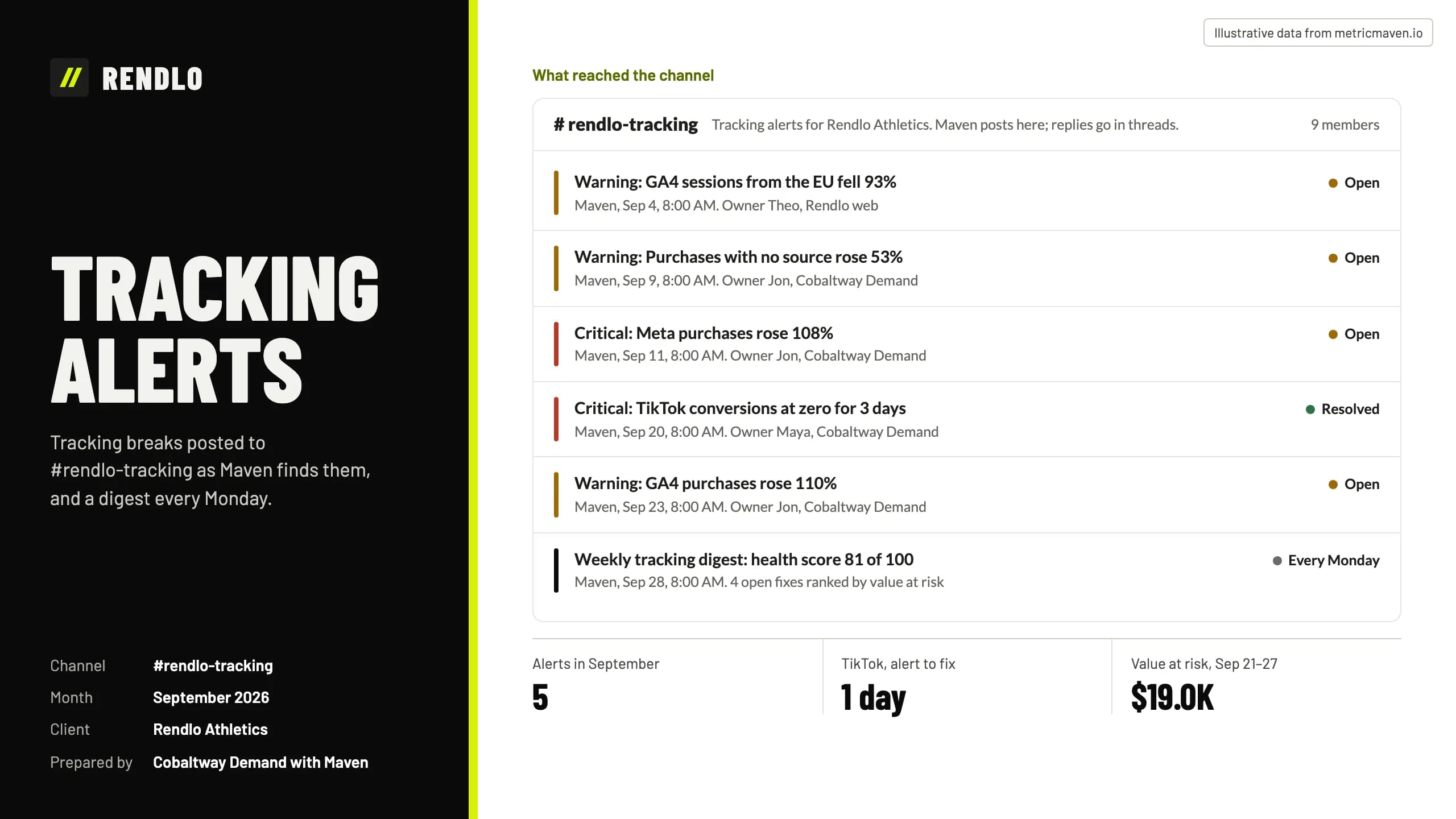
Tracking alerts
Tracking breaks posted to #rendlo-tracking as Maven finds them, and a digest every Monday.
- Warning: GA4 sessions from the EU fell 93% Maven, Sep 4, 8:00 AM. Owner Theo, Rendlo web Open
- Warning: Purchases with no source rose 53% Maven, Sep 9, 8:00 AM. Owner Jon, Cobaltway Demand Open
- Critical: Meta purchases rose 108% Maven, Sep 11, 8:00 AM. Owner Jon, Cobaltway Demand Open
- Critical: TikTok conversions at zero for 3 days Maven, Sep 20, 8:00 AM. Owner Maya, Cobaltway Demand Resolved
- Warning: GA4 purchases rose 110% Maven, Sep 23, 8:00 AM. Owner Jon, Cobaltway Demand Open
- Weekly tracking digest: health score 81 of 100 Maven, Sep 28, 8:00 AM. 4 open fixes ranked by value at risk Every Monday
Message 2 of 9Consent alert
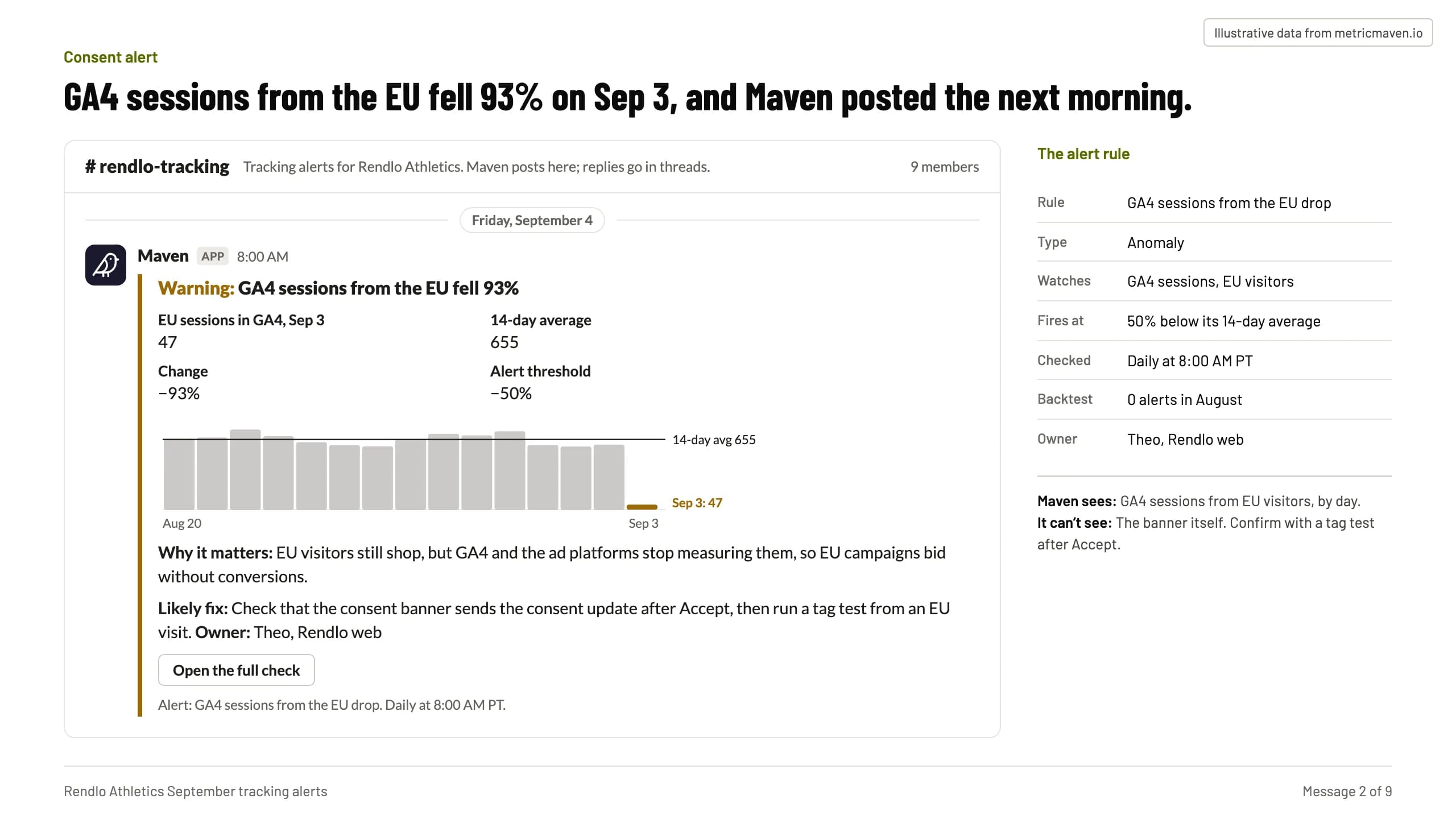
GA4 sessions from the EU fell 93% on Sep 3, and Maven posted the next morning.
| Rule | GA4 sessions from the EU drop |
|---|---|
| Type | Anomaly |
| Watches | GA4 sessions, EU visitors |
| Fires at | 50% below its 14-day average |
| Checked | Daily at 8:00 AM PT |
| Backtest | 0 alerts in August |
| Owner | Theo, Rendlo web |
- Maven APP 8:00 AM Warning: GA4 sessions from the EU fell 93% EU sessions in GA4, Sep 3 47 14-day average 655 Change −93% Alert threshold −50% 14-day avg 655 Sep 3: 47 Aug 20 Sep 3 Why it matters: EU visitors still shop, but GA4 and the ad platforms stop measuring them, so EU campaigns bid without conversions. Likely fix: Check that the consent banner sends the consent update after Accept, then run a tag test from an EU visit. Owner: Theo, Rendlo web Open the full check Alert: GA4 sessions from the EU drop. Daily at 8:00 AM PT.
- Maven sees: GA4 sessions from EU visitors, by day. It can’t see: The banner itself. Confirm with a tag test after Accept.
Message 3 of 9Checkout alert
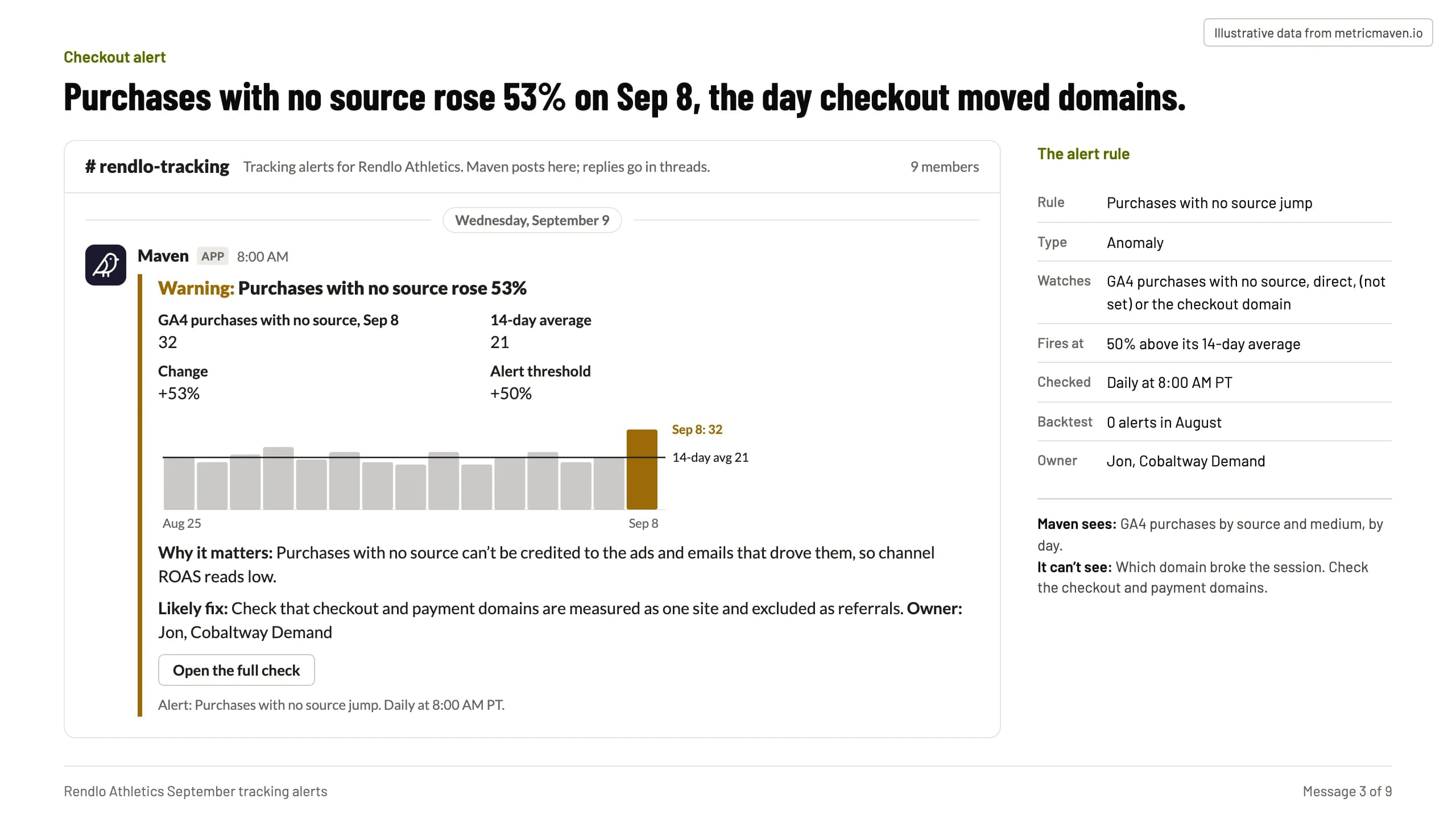
Purchases with no source rose 53% on Sep 8, the day checkout moved domains.
| Rule | Purchases with no source jump |
|---|---|
| Type | Anomaly |
| Watches | GA4 purchases with no source, direct, (not set) or the checkout domain |
| Fires at | 50% above its 14-day average |
| Checked | Daily at 8:00 AM PT |
| Backtest | 0 alerts in August |
| Owner | Jon, Cobaltway Demand |
- Maven APP 8:00 AM Warning: Purchases with no source rose 53% GA4 purchases with no source, Sep 8 32 14-day average 21 Change +53% Alert threshold +50% 14-day avg 21 Sep 8: 32 Aug 25 Sep 8 Why it matters: Purchases with no source can’t be credited to the ads and emails that drove them, so channel ROAS reads low. Likely fix: Check that checkout and payment domains are measured as one site and excluded as referrals. Owner: Jon, Cobaltway Demand Open the full check Alert: Purchases with no source jump. Daily at 8:00 AM PT.
- Maven sees: GA4 purchases by source and medium, by day. It can’t see: Which domain broke the session. Check the checkout and payment domains.
Message 4 of 9Duplicate alert
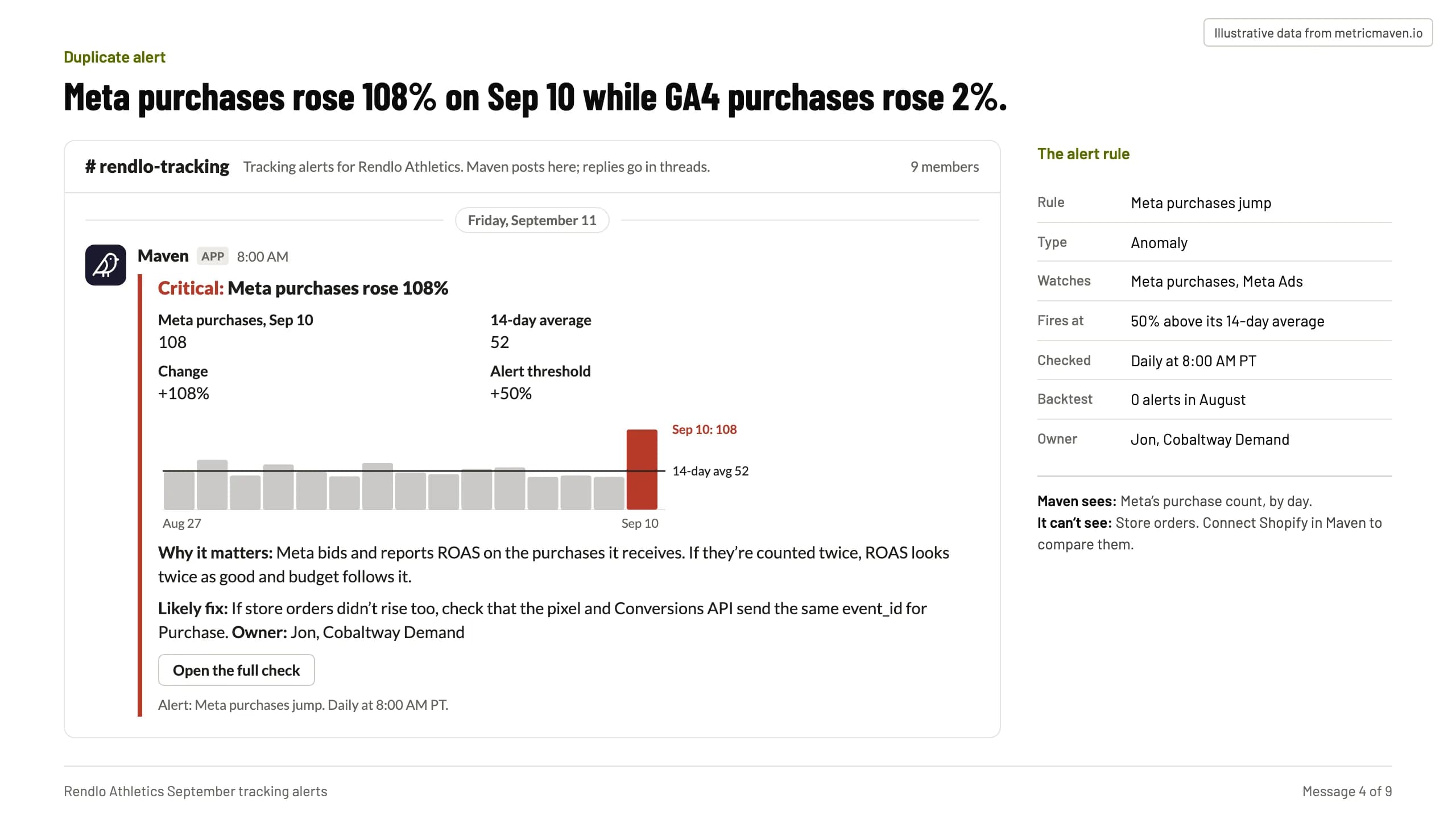
Meta purchases rose 108% on Sep 10 while GA4 purchases rose 2%.
| Rule | Meta purchases jump |
|---|---|
| Type | Anomaly |
| Watches | Meta purchases, Meta Ads |
| Fires at | 50% above its 14-day average |
| Checked | Daily at 8:00 AM PT |
| Backtest | 0 alerts in August |
| Owner | Jon, Cobaltway Demand |
- Maven APP 8:00 AM Critical: Meta purchases rose 108% Meta purchases, Sep 10 108 14-day average 52 Change +108% Alert threshold +50% 14-day avg 52 Sep 10: 108 Aug 27 Sep 10 Why it matters: Meta bids and reports ROAS on the purchases it receives. If they’re counted twice, ROAS looks twice as good and budget follows it. Likely fix: If store orders didn’t rise too, check that the pixel and Conversions API send the same event_id for Purchase. Owner: Jon, Cobaltway Demand Open the full check Alert: Meta purchases jump. Daily at 8:00 AM PT.
- Maven sees: Meta’s purchase count, by day. It can’t see: Store orders. Connect Shopify in Maven to compare them.
Message 5 of 9Stopped conversions
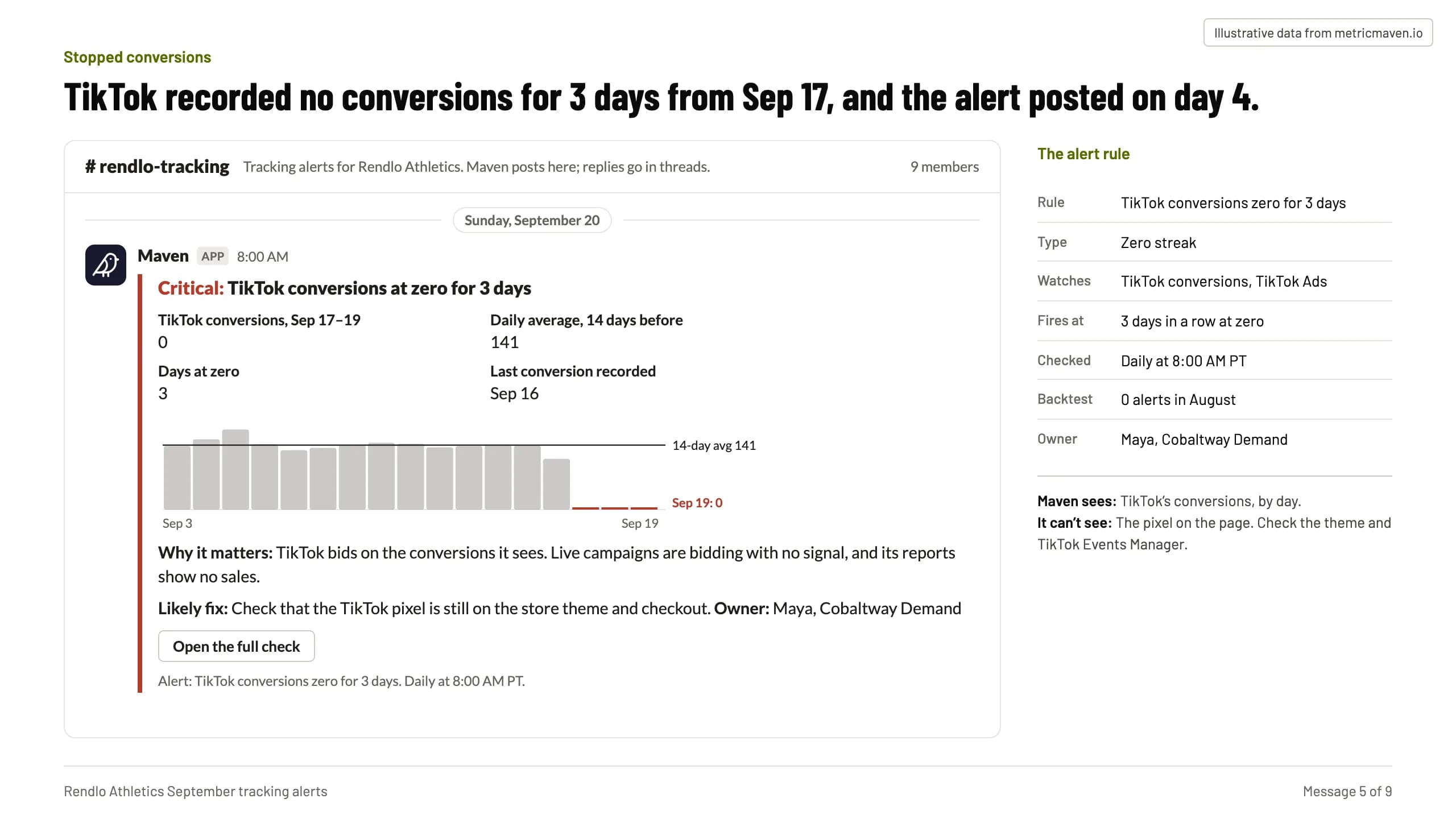
TikTok recorded no conversions for 3 days from Sep 17, and the alert posted on day 4.
| Rule | TikTok conversions zero for 3 days |
|---|---|
| Type | Zero streak |
| Watches | TikTok conversions, TikTok Ads |
| Fires at | 3 days in a row at zero |
| Checked | Daily at 8:00 AM PT |
| Backtest | 0 alerts in August |
| Owner | Maya, Cobaltway Demand |
- Maven APP 8:00 AM Critical: TikTok conversions at zero for 3 days TikTok conversions, Sep 17–19 0 Daily average, 14 days before 141 Days at zero 3 Last conversion recorded Sep 16 14-day avg 141 Sep 19: 0 Sep 3 Sep 19 Why it matters: TikTok bids on the conversions it sees. Live campaigns are bidding with no signal, and its reports show no sales. Likely fix: Check that the TikTok pixel is still on the store theme and checkout. Owner: Maya, Cobaltway Demand Open the full check Alert: TikTok conversions zero for 3 days. Daily at 8:00 AM PT.
- Maven sees: TikTok’s conversions, by day. It can’t see: The pixel on the page. Check the theme and TikTok Events Manager.
Message 6 of 9Fix thread
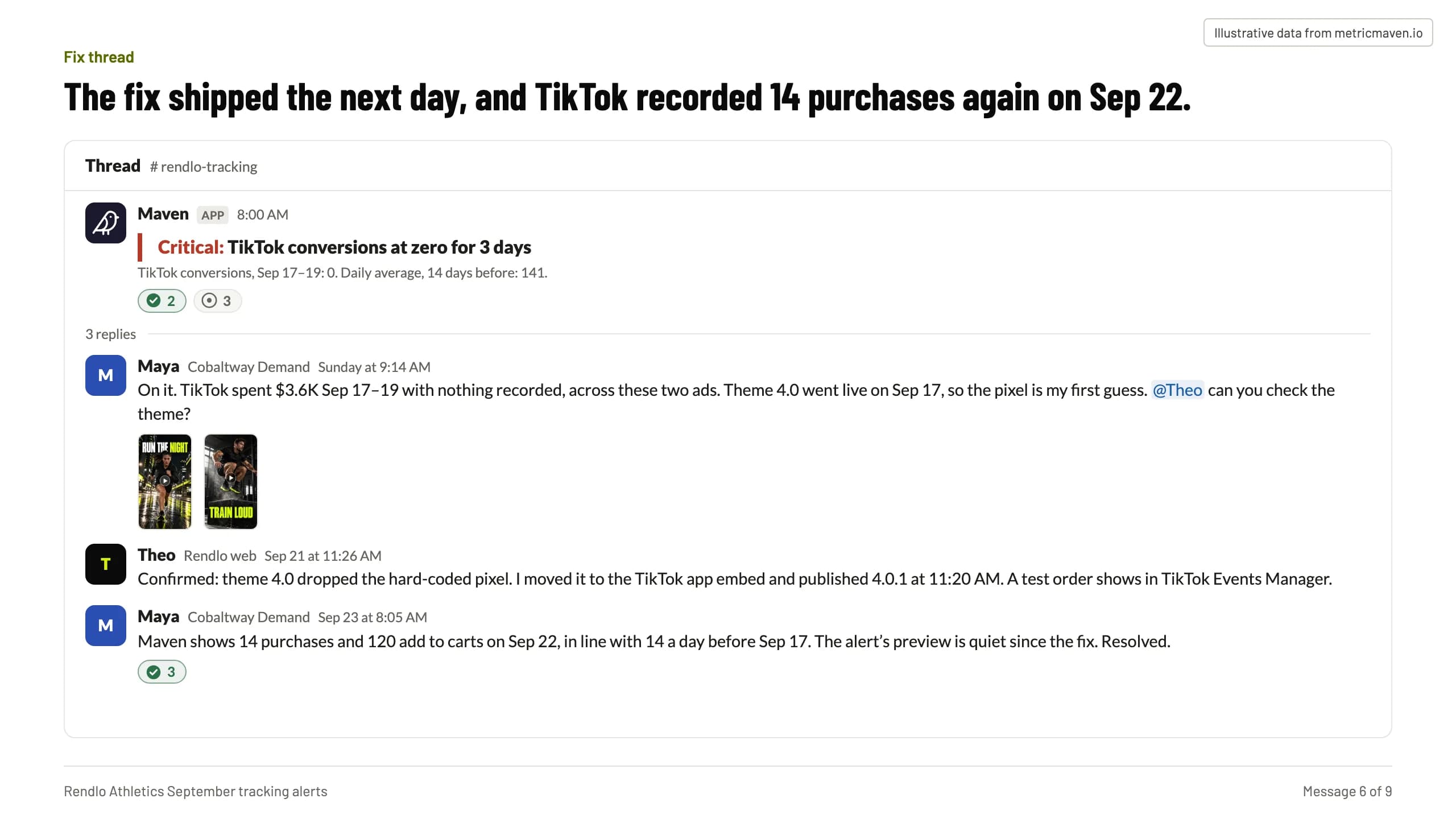
The fix shipped the next day, and TikTok recorded 14 purchases again on Sep 22.
- Maven APP 8:00 AM Critical: TikTok conversions at zero for 3 days TikTok conversions, Sep 17–19: 0. Daily average, 14 days before: 141. 2 3
- M Maya Cobaltway Demand Sunday at 9:14 AM On it. TikTok spent $3.6K Sep 17–19 with nothing recorded, across these two ads. Theme 4.0 went live on Sep 17, so the pixel is my first guess. @Theo can you check the theme?
- T Theo Rendlo web Sep 21 at 11:26 AM Confirmed: theme 4.0 dropped the hard-coded pixel. I moved it to the TikTok app embed and published 4.0.1 at 11:20 AM. A test order shows in TikTok Events Manager.
- M Maya Cobaltway Demand Sep 23 at 8:05 AM Maven shows 14 purchases and 120 add to carts on Sep 22, in line with 14 a day before Sep 17. The alert’s preview is quiet since the fix. Resolved. 3
Message 7 of 9Double count alert
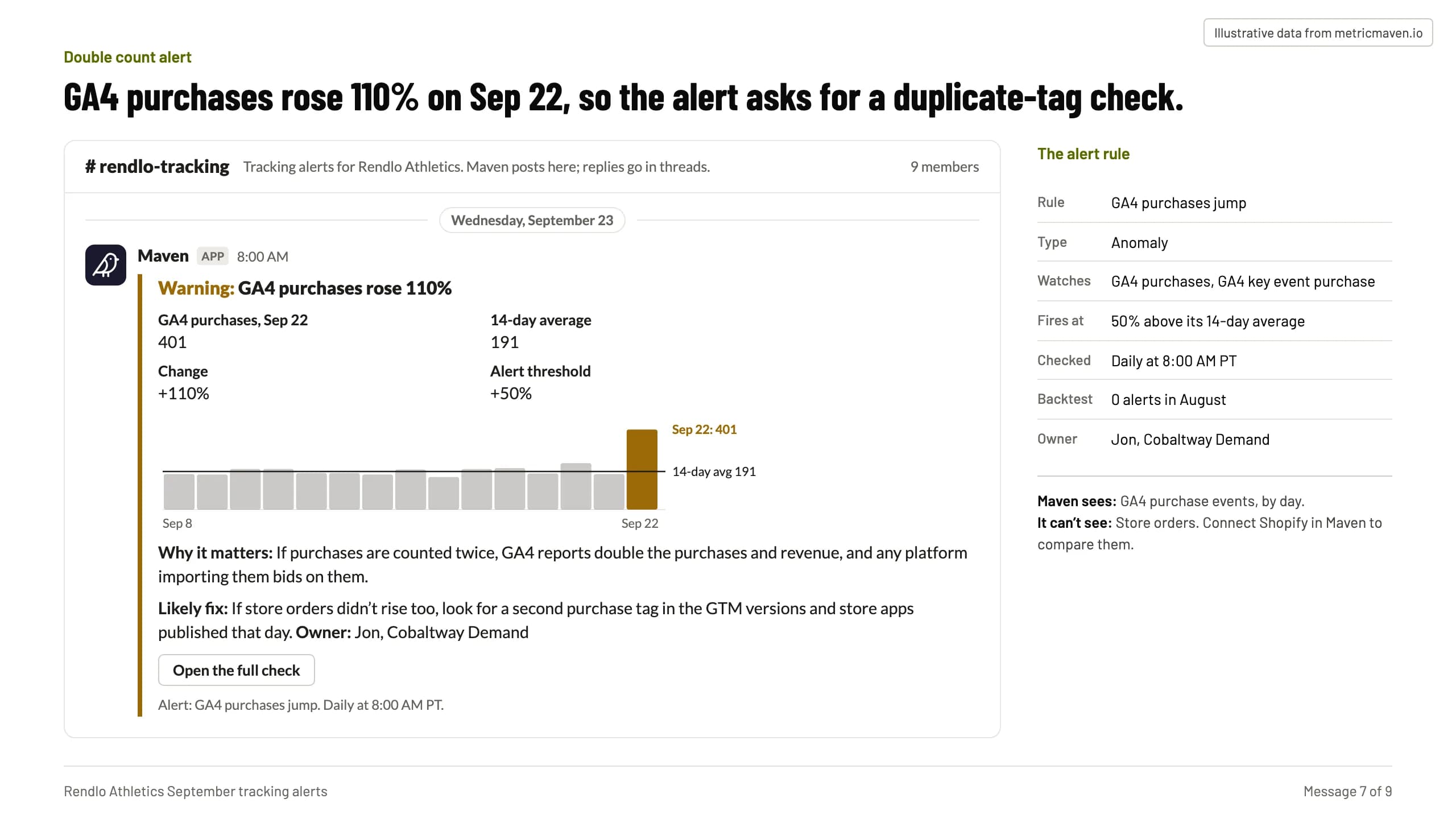
GA4 purchases rose 110% on Sep 22, so the alert asks for a duplicate-tag check.
| Rule | GA4 purchases jump |
|---|---|
| Type | Anomaly |
| Watches | GA4 purchases, GA4 key event purchase |
| Fires at | 50% above its 14-day average |
| Checked | Daily at 8:00 AM PT |
| Backtest | 0 alerts in August |
| Owner | Jon, Cobaltway Demand |
- Maven APP 8:00 AM Warning: GA4 purchases rose 110% GA4 purchases, Sep 22 401 14-day average 191 Change +110% Alert threshold +50% 14-day avg 191 Sep 22: 401 Sep 8 Sep 22 Why it matters: If purchases are counted twice, GA4 reports double the purchases and revenue, and any platform importing them bids on them. Likely fix: If store orders didn’t rise too, look for a second purchase tag in the GTM versions and store apps published that day. Owner: Jon, Cobaltway Demand Open the full check Alert: GA4 purchases jump. Daily at 8:00 AM PT.
- Maven sees: GA4 purchase events, by day. It can’t see: Store orders. Connect Shopify in Maven to compare them.
Message 8 of 9Weekly digest
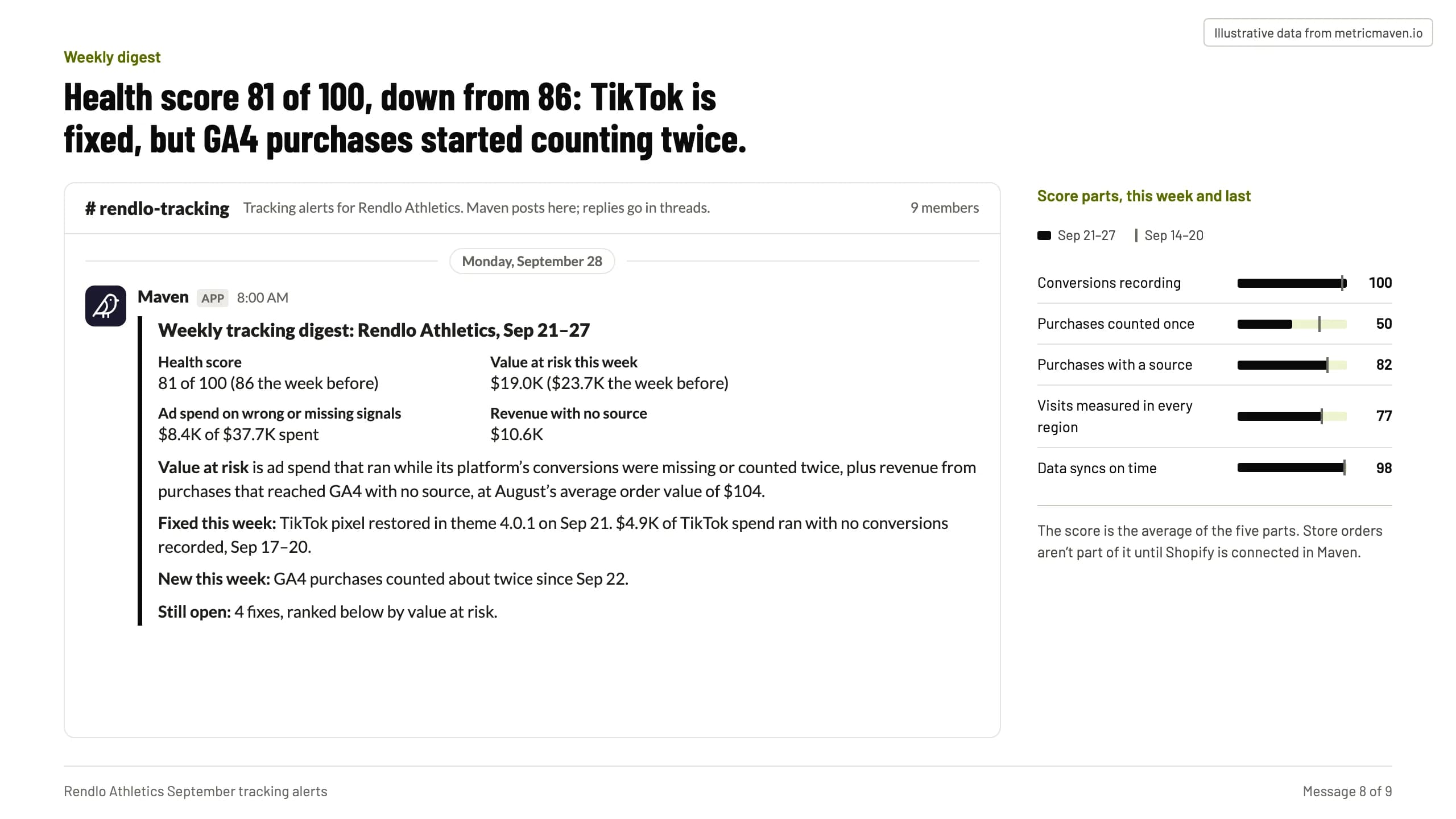
Health score 81 of 100, down from 86: TikTok is fixed, but GA4 purchases started counting twice.
- Maven APP 8:00 AM Weekly tracking digest: Rendlo Athletics, Sep 21–27 Health score 81 of 100 (86 the week before) Value at risk this week $19.0K ($23.7K the week before) Ad spend on wrong or missing signals $8.4K of $37.7K spent Revenue with no source $10.6K Value at risk is ad spend that ran while its platform’s conversions were missing or counted twice, plus revenue from purchases that reached GA4 with no source, at August’s average order value of $104. Fixed this week: TikTok pixel restored in theme 4.0.1 on Sep 21. $4.9K of TikTok spend ran with no conversions recorded, Sep 17–20. New this week: GA4 purchases counted about twice since Sep 22. Still open: 4 fixes, ranked below by value at risk.
- Conversions recording 100
- Purchases counted once 50
- Purchases with a source 82
- Visits measured in every region 77
- Data syncs on time 98
- The score is the average of the five parts. Store orders aren’t part of it until Shopify is connected in Maven.
Message 9 of 9Open fixes
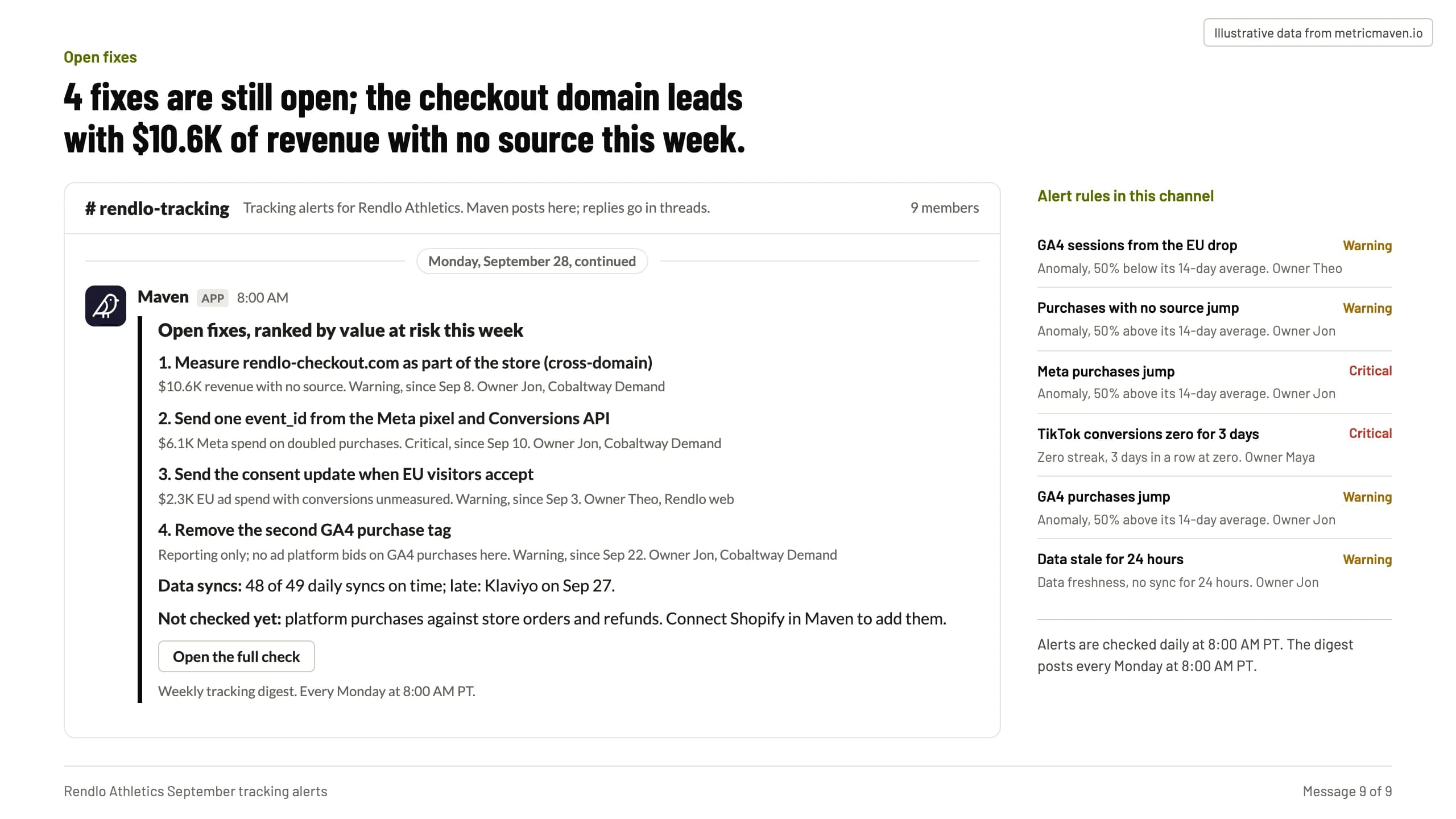
4 fixes are still open; the checkout domain leads with $10.6K of revenue with no source this week.
- Maven APP 8:00 AM Open fixes, ranked by value at risk this week 1. Measure rendlo-checkout.com as part of the store (cross-domain) $10.6K revenue with no source. Warning, since Sep 8. Owner Jon, Cobaltway Demand 2. Send one event_id from the Meta pixel and Conversions API $6.1K Meta spend on doubled purchases. Critical, since Sep 10. Owner Jon, Cobaltway Demand 3. Send the consent update when EU visitors accept $2.3K EU ad spend with conversions unmeasured. Warning, since Sep 3. Owner Theo, Rendlo web 4. Remove the second GA4 purchase tag Reporting only; no ad platform bids on GA4 purchases here. Warning, since Sep 22. Owner Jon, Cobaltway Demand Data syncs: 48 of 49 daily syncs on time; late: Klaviyo on Sep 27. Not checked yet: platform purchases against store orders and refunds. Connect Shopify in Maven to add them. Open the full check Weekly tracking digest. Every Monday at 8:00 AM PT.
- GA4 sessions from the EU drop Warning Anomaly, 50% below its 14-day average. Owner Theo
- Purchases with no source jump Warning Anomaly, 50% above its 14-day average. Owner Jon
- Meta purchases jump Critical Anomaly, 50% above its 14-day average. Owner Jon
- TikTok conversions zero for 3 days Critical Zero streak, 3 days in a row at zero. Owner Maya
- GA4 purchases jump Warning Anomaly, 50% above its 14-day average. Owner Jon
- Data stale for 24 hours Warning Data freshness, no sync for 24 hours. Owner Jon
- Alerts are checked daily at 8:00 AM PT. The digest posts every Monday at 8:00 AM PT.
Get started
Three steps to your first alert.
Connect once. The alerts check every morning and the digest posts every Monday.
- 1
Connect the client’s accounts.
GA4, the ad platforms and Klaviyo, connected in Maven, plus the client’s Slack channel for the alerts. - 2
Add Maven to ChatGPT or Claude.
Claude: Settings → Connectors. ChatGPT: Settings → Apps & Connectors, as a custom connector. The steps are in the Maven connector guide. - 3
Set up the alerts.
Open the recipe in Claude or ChatGPT with the prompt filled in, name the client and the channel, check each alert’s backtest, and approve it.






Set up tracking alerts for your next client.
It opens Claude or ChatGPT with the prompt filled in. Maven needs to be connected there first.