Recipe · Claude and ChatGPT
A lead-to-revenue dashboard from your favorite AI tools.
Run the recipe in Claude or ChatGPT and get a dashboard in the client portal that marketing and sales keep open: which ads produced SQLs, pipeline and closed-won deals, and what each one cost, from channel down to the ad.
What comes back
Cost per closed-won deal, not cost per lead.
What marketing and sales see when they open it, from the sample.
The whole funnel on one screen.
Six numbers up top, each against the month before, then every stage of the funnel with its step rate and its cost. Pick a date range, channel or segment and every number follows.From channel to campaign to ad.
Open a channel to see its campaigns, then a campaign to see its ads with their images, ranked by cost per SQL or cost per closed-won deal. Cheap leads that never become SQLs stand out.Pipeline, with the largest deal split out.
One enterprise opportunity can carry a channel. Switch it off and the summary and that channel’s pipeline per $1 show what’s left.A check on the data underneath.
Each lead is matched to a CRM contact and account, and each platform’s returned SQLs and won deals are counted, so a data gap isn’t read as a weak channel.
The sample
10 views of Brisavel’s lead-to-revenue dashboard.
Brisavel, a cloud CRM company, its agency and its campaigns are fictional, and every number is illustrative. Each view is the dashboard with a filter, tab or drill-down applied. Open one to see it full size with its numbers.
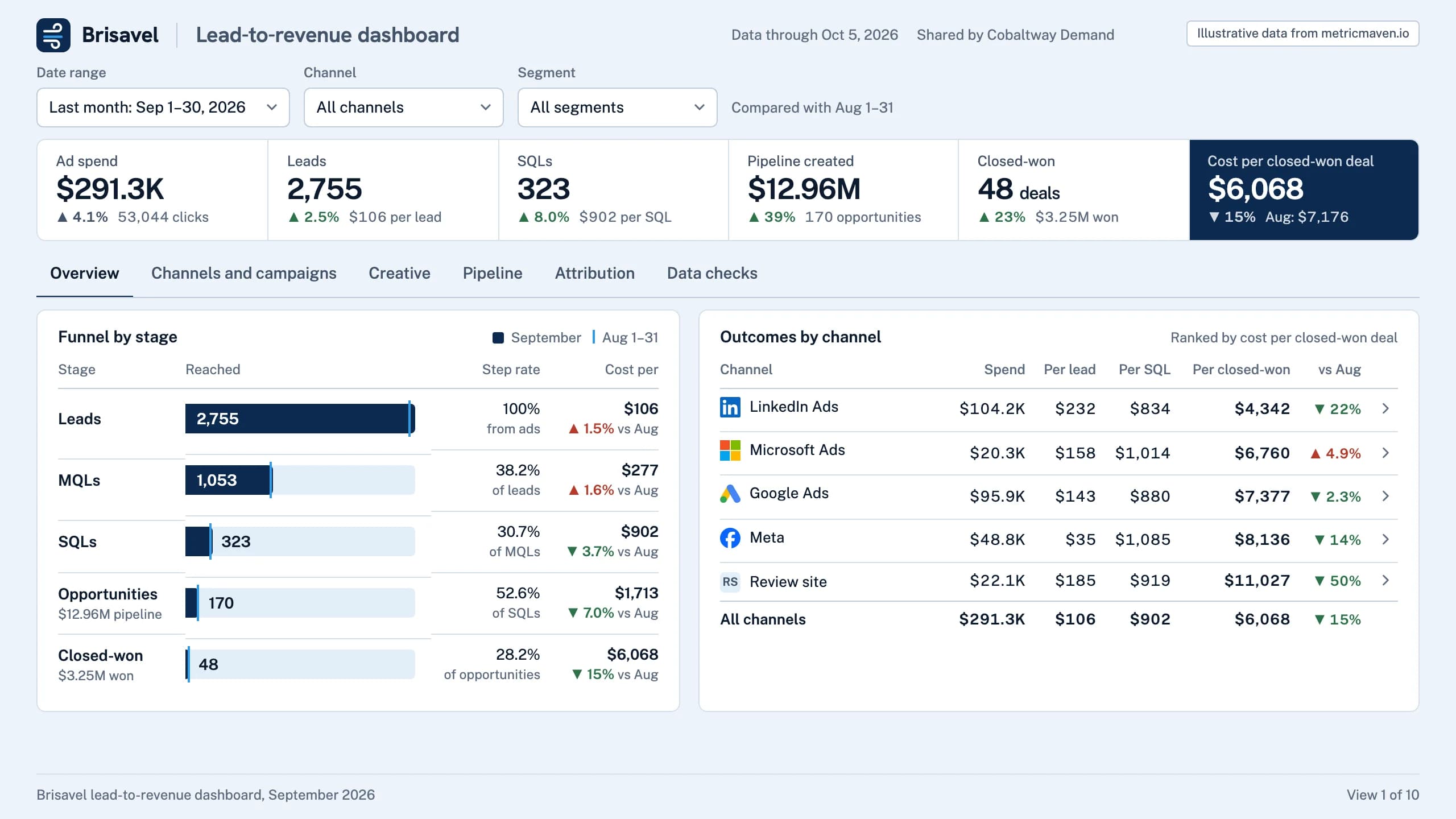
View 1 of 10Overview
48 closed-won deals at $6,068 each, down 15% from August, with $12.96M of new pipeline.
Spend, the funnel by stage and outcomes by channel, for September against August.
| Stage | Reached | Step rate | Cost per |
|---|---|---|---|
| Leads | 2,755 | 100% from ads | $106 ▲ 1.5% vs Aug |
| MQLs | 1,053 | 38.2% of leads | $277 ▲ 1.6% vs Aug |
| SQLs | 323 | 30.7% of MQLs | $902 ▼ 3.7% vs Aug |
| Opportunities $12.96M pipeline | 170 | 52.6% of SQLs | $1,713 ▼ 7.0% vs Aug |
| Closed-won $3.25M won | 48 | 28.2% of opportunities | $6,068 ▼ 15% vs Aug |
| Channel | Spend | Per lead | Per SQL | Per closed-won | vs Aug |
|---|---|---|---|---|---|
| LinkedIn Ads | $104.2K | $232 | $834 | $4,342 | ▼ 22% |
| Microsoft Ads | $20.3K | $158 | $1,014 | $6,760 | ▲ 4.9% |
| Google Ads | $95.9K | $143 | $880 | $7,377 | ▼ 2.3% |
| Meta | $48.8K | $35 | $1,085 | $8,136 | ▼ 14% |
| Review site | $22.1K | $185 | $919 | $11,027 | ▼ 50% |
| All channels | $291.3K | $106 | $902 | $6,068 | ▼ 15% |
- Ad spend $291.3K ▲ 4.1% 53,044 clicks
- Leads 2,755 ▲ 2.5% $106 per lead
- SQLs 323 ▲ 8.0% $902 per SQL
- Pipeline created $12.96M ▲ 39% 170 opportunities
- Closed-won 48 deals ▲ 23% $3.25M won
- Cost per closed-won deal $6,068 ▼ 15% Aug: $7,176
View 2 of 10Overview by channel
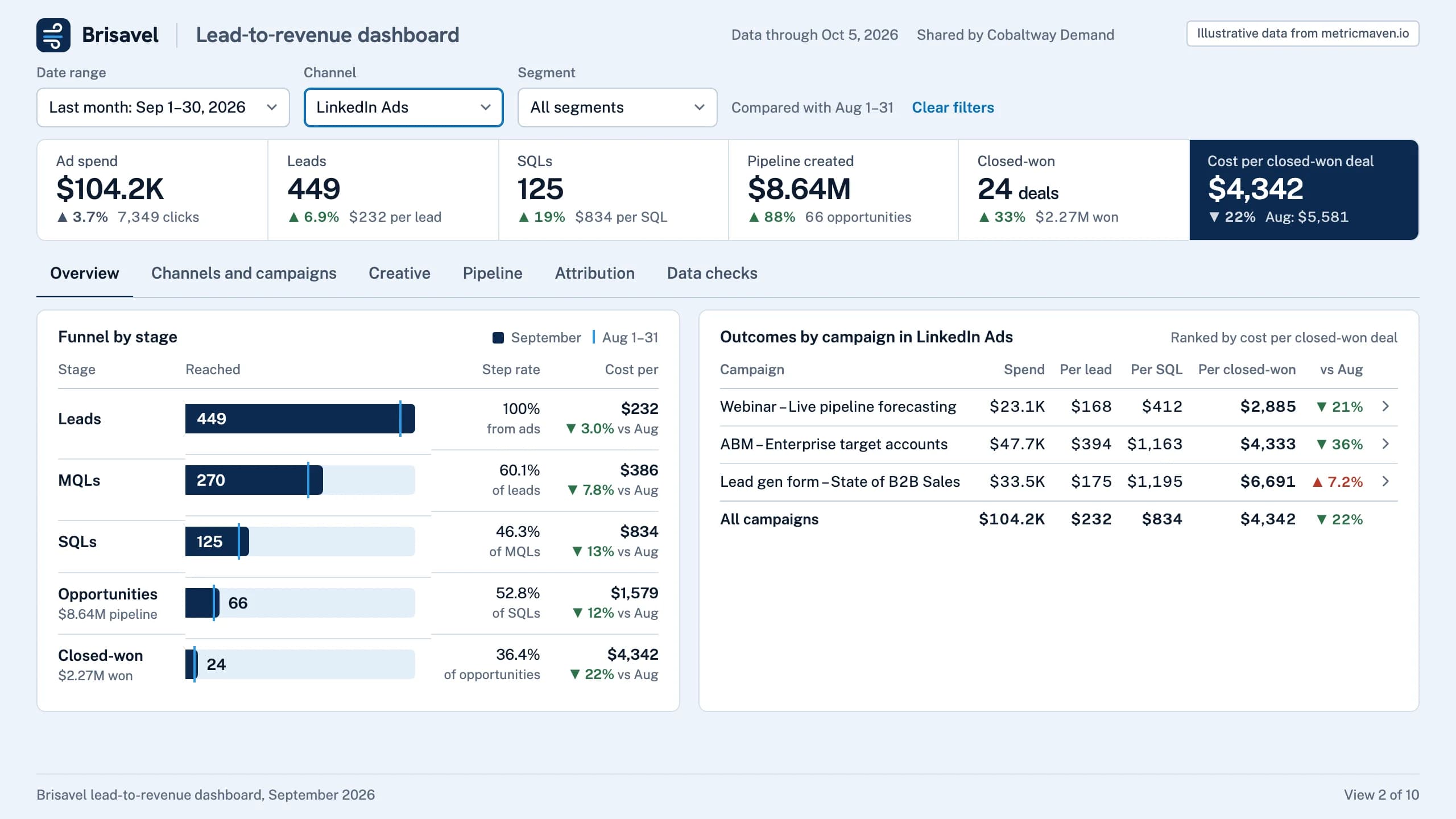
LinkedIn Ads had the most expensive leads ($232) and the lowest cost per closed-won deal: $4,342, against $6,068 overall.
The channel filter set to LinkedIn Ads: every number and table scopes to it.
| Stage | Reached | Step rate | Cost per |
|---|---|---|---|
| Leads | 449 | 100% from ads | $232 ▼ 3.0% vs Aug |
| MQLs | 270 | 60.1% of leads | $386 ▼ 7.8% vs Aug |
| SQLs | 125 | 46.3% of MQLs | $834 ▼ 13% vs Aug |
| Opportunities $8.64M pipeline | 66 | 52.8% of SQLs | $1,579 ▼ 12% vs Aug |
| Closed-won $2.27M won | 24 | 36.4% of opportunities | $4,342 ▼ 22% vs Aug |
| Campaign | Spend | Per lead | Per SQL | Per closed-won | vs Aug |
|---|---|---|---|---|---|
| Webinar – Live pipeline forecasting | $23.1K | $168 | $412 | $2,885 | ▼ 21% |
| ABM – Enterprise target accounts | $47.7K | $394 | $1,163 | $4,333 | ▼ 36% |
| Lead gen form – State of B2B Sales | $33.5K | $175 | $1,195 | $6,691 | ▲ 7.2% |
| All campaigns | $104.2K | $232 | $834 | $4,342 | ▼ 22% |
- Ad spend $104.2K ▲ 3.7% 7,349 clicks
- Leads 449 ▲ 6.9% $232 per lead
- SQLs 125 ▲ 19% $834 per SQL
- Pipeline created $8.64M ▲ 88% 66 opportunities
- Closed-won 24 deals ▲ 33% $2.27M won
- Cost per closed-won deal $4,342 ▼ 22% Aug: $5,581
View 3 of 10Overview by segment
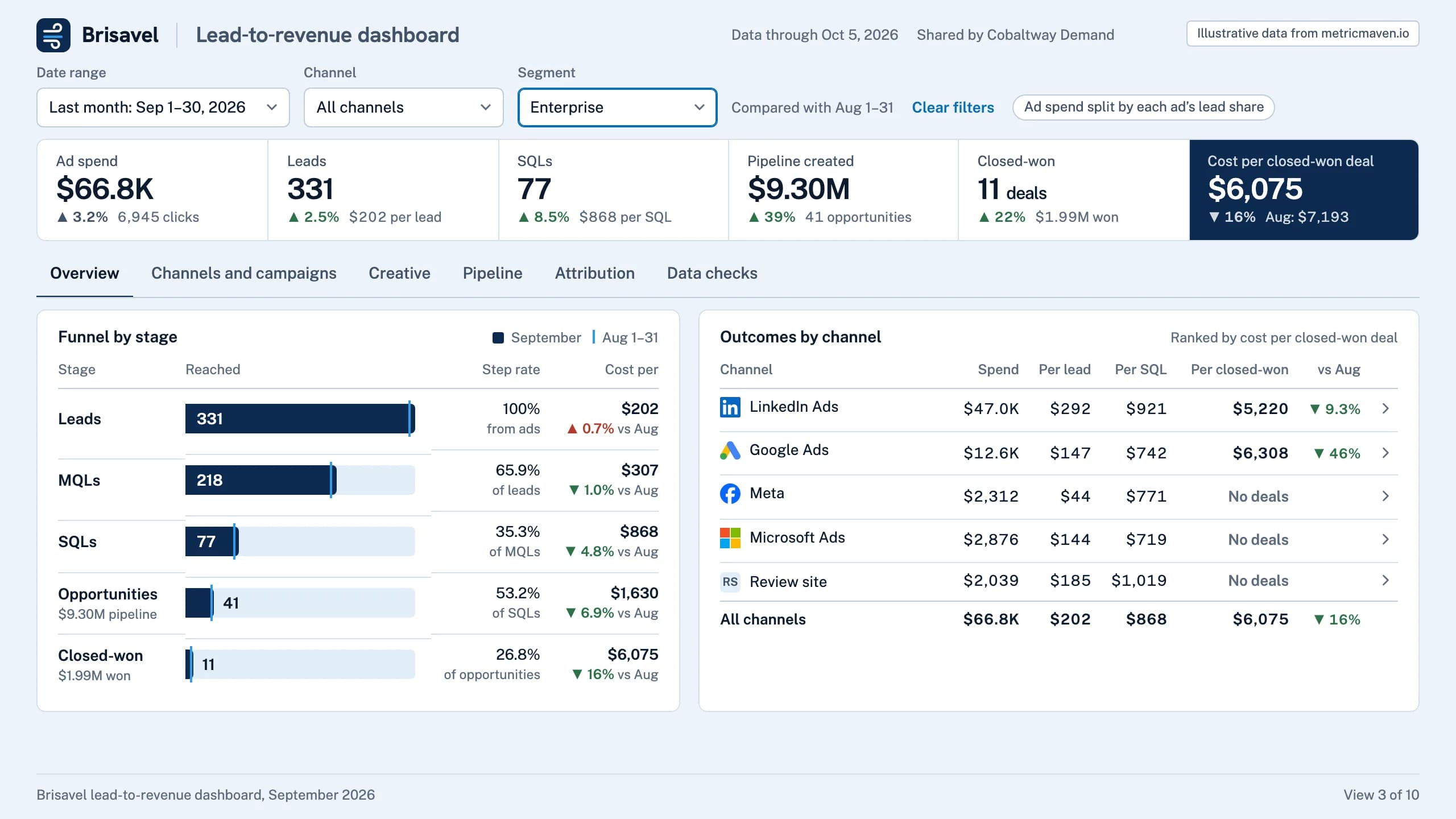
Enterprise deals averaged $181.1K, 3.6× mid-market, from 12% of leads.
The segment filter set to enterprise accounts. Ad spend is split by each ad’s lead share.
| Stage | Reached | Step rate | Cost per |
|---|---|---|---|
| Leads | 331 | 100% from ads | $202 ▲ 0.7% vs Aug |
| MQLs | 218 | 65.9% of leads | $307 ▼ 1.0% vs Aug |
| SQLs | 77 | 35.3% of MQLs | $868 ▼ 4.8% vs Aug |
| Opportunities $9.30M pipeline | 41 | 53.2% of SQLs | $1,630 ▼ 6.9% vs Aug |
| Closed-won $1.99M won | 11 | 26.8% of opportunities | $6,075 ▼ 16% vs Aug |
| Channel | Spend | Per lead | Per SQL | Per closed-won | vs Aug |
|---|---|---|---|---|---|
| LinkedIn Ads | $47.0K | $292 | $921 | $5,220 | ▼ 9.3% |
| Google Ads | $12.6K | $147 | $742 | $6,308 | ▼ 46% |
| Meta | $2,312 | $44 | $771 | No deals | |
| Microsoft Ads | $2,876 | $144 | $719 | No deals | |
| Review site | $2,039 | $185 | $1,019 | No deals | |
| All channels | $66.8K | $202 | $868 | $6,075 | ▼ 16% |
- Ad spend $66.8K ▲ 3.2% 6,945 clicks
- Leads 331 ▲ 2.5% $202 per lead
- SQLs 77 ▲ 8.5% $868 per SQL
- Pipeline created $9.30M ▲ 39% 41 opportunities
- Closed-won 11 deals ▲ 22% $1.99M won
- Cost per closed-won deal $6,075 ▼ 16% Aug: $7,193
View 4 of 10Campaigns in a channel
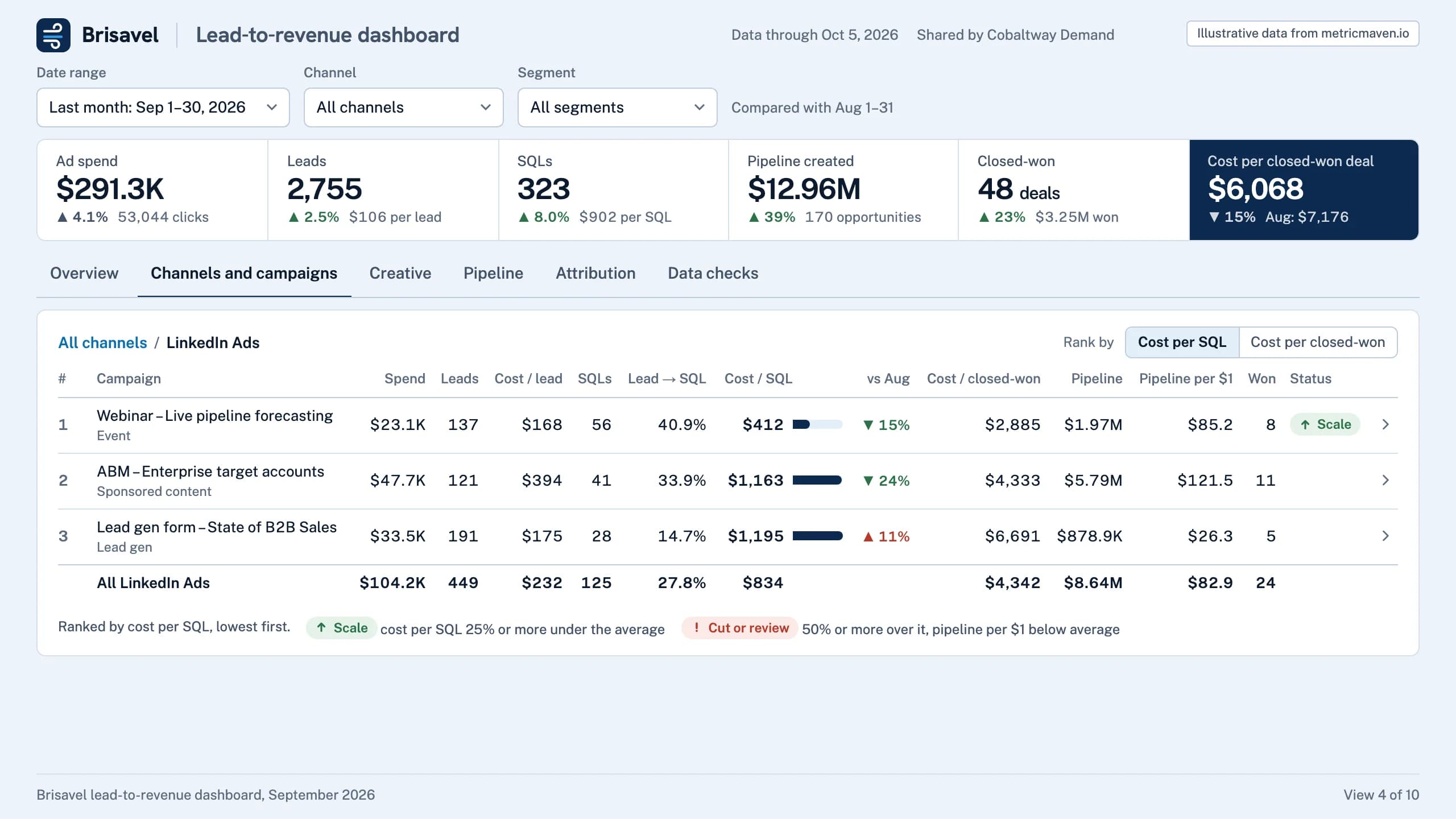
Webinar – Live pipeline forecasting (LinkedIn Ads) led non-brand campaigns at $412 per SQL, with $85.2 of pipeline per $1.
Drilled from channel to LinkedIn Ads campaigns, ranked by cost per SQL.
| Campaign | Spend | Leads | Cost / lead | SQLs | Lead → SQL | Cost / SQL | vs Aug | Cost / closed-won | Pipeline | Pipeline per $1 | Won | Status |
|---|---|---|---|---|---|---|---|---|---|---|---|---|
| Webinar – Live pipeline forecasting Event | $23.1K | 137 | $168 | 56 | 40.9% | $412 | ▼ 15% | $2,885 | $1.97M | $85.2 | 8 | Scale |
| ABM – Enterprise target accounts Sponsored content | $47.7K | 121 | $394 | 41 | 33.9% | $1,163 | ▼ 24% | $4,333 | $5.79M | $121.5 | 11 | |
| Lead gen form – State of B2B Sales Lead gen | $33.5K | 191 | $175 | 28 | 14.7% | $1,195 | ▲ 11% | $6,691 | $878.9K | $26.3 | 5 | |
| All LinkedIn Ads | $104.2K | 449 | $232 | 125 | 27.8% | $834 | $4,342 | $8.64M | $82.9 | 24 |
- Ad spend $291.3K ▲ 4.1% 53,044 clicks
- Leads 2,755 ▲ 2.5% $106 per lead
- SQLs 323 ▲ 8.0% $902 per SQL
- Pipeline created $12.96M ▲ 39% 170 opportunities
- Closed-won 48 deals ▲ 23% $3.25M won
- Cost per closed-won deal $6,068 ▼ 15% Aug: $7,176
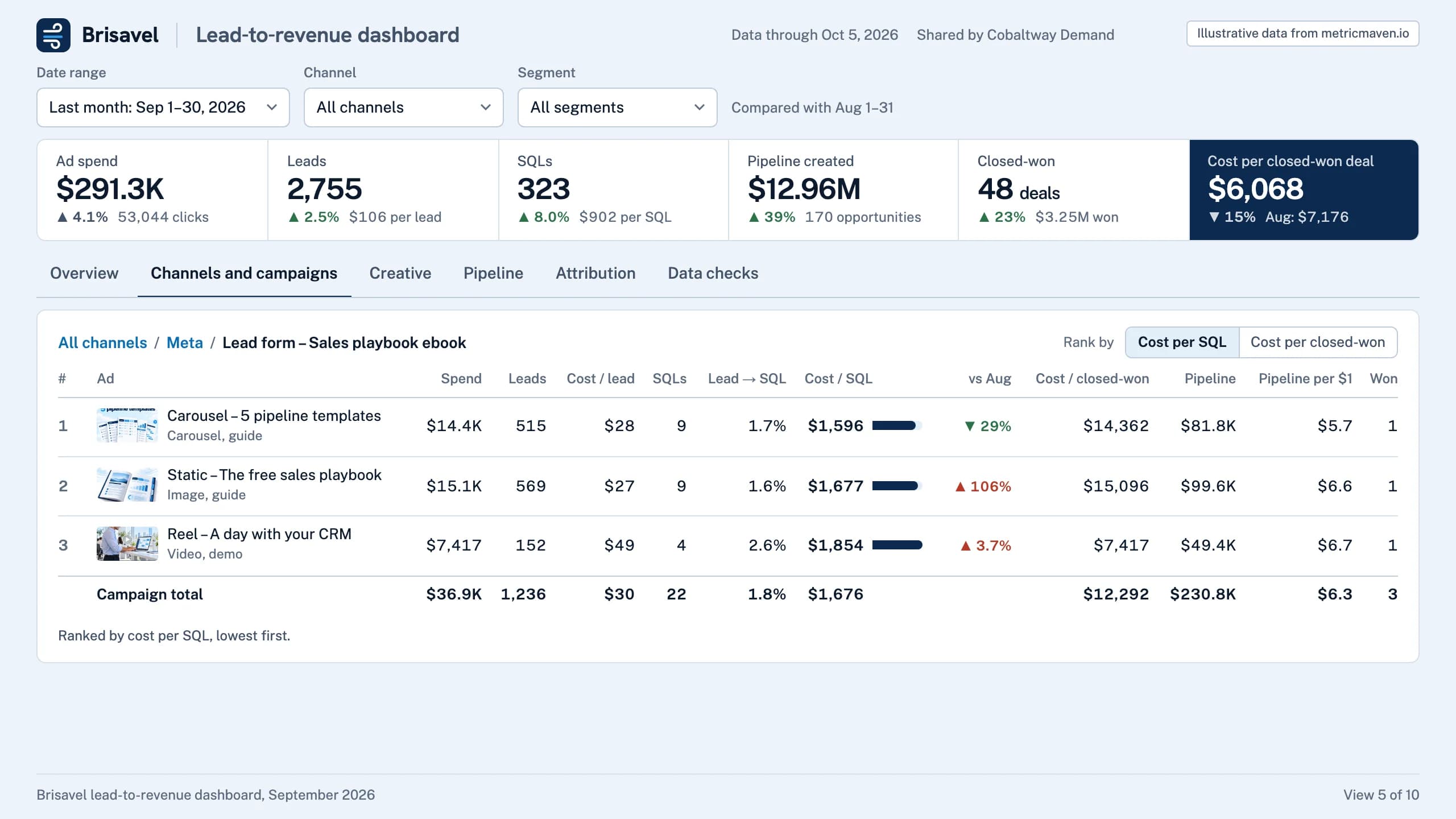
View 5 of 10Ads in a campaign
Lead form – Sales playbook ebook had the cheapest leads at $30, but 1.8% became SQLs: it ranks 11 of 11 on cost per SQL.
Drilled into one Meta campaign: its ads, with the images that ran.
| Ad | Spend | Leads | Cost / lead | SQLs | Lead → SQL | Cost / SQL | vs Aug | Cost / closed-won | Pipeline | Pipeline per $1 | Won |
|---|---|---|---|---|---|---|---|---|---|---|---|
| Carousel – 5 pipeline templates Carousel, guide | $14.4K | 515 | $28 | 9 | 1.7% | $1,596 | ▼ 29% | $14,362 | $81.8K | $5.7 | 1 |
| Static – The free sales playbook Image, guide | $15.1K | 569 | $27 | 9 | 1.6% | $1,677 | ▲ 106% | $15,096 | $99.6K | $6.6 | 1 |
| Reel – A day with your CRM Video, demo | $7,417 | 152 | $49 | 4 | 2.6% | $1,854 | ▲ 3.7% | $7,417 | $49.4K | $6.7 | 1 |
| Campaign total | $36.9K | 1,236 | $30 | 22 | 1.8% | $1,676 | $12,292 | $230.8K | $6.3 | 3 |
- Ad spend $291.3K ▲ 4.1% 53,044 clicks
- Leads 2,755 ▲ 2.5% $106 per lead
- SQLs 323 ▲ 8.0% $902 per SQL
- Pipeline created $12.96M ▲ 39% 170 opportunities
- Closed-won 48 deals ▲ 23% $3.25M won
- Cost per closed-won deal $6,068 ▼ 15% Aug: $7,176
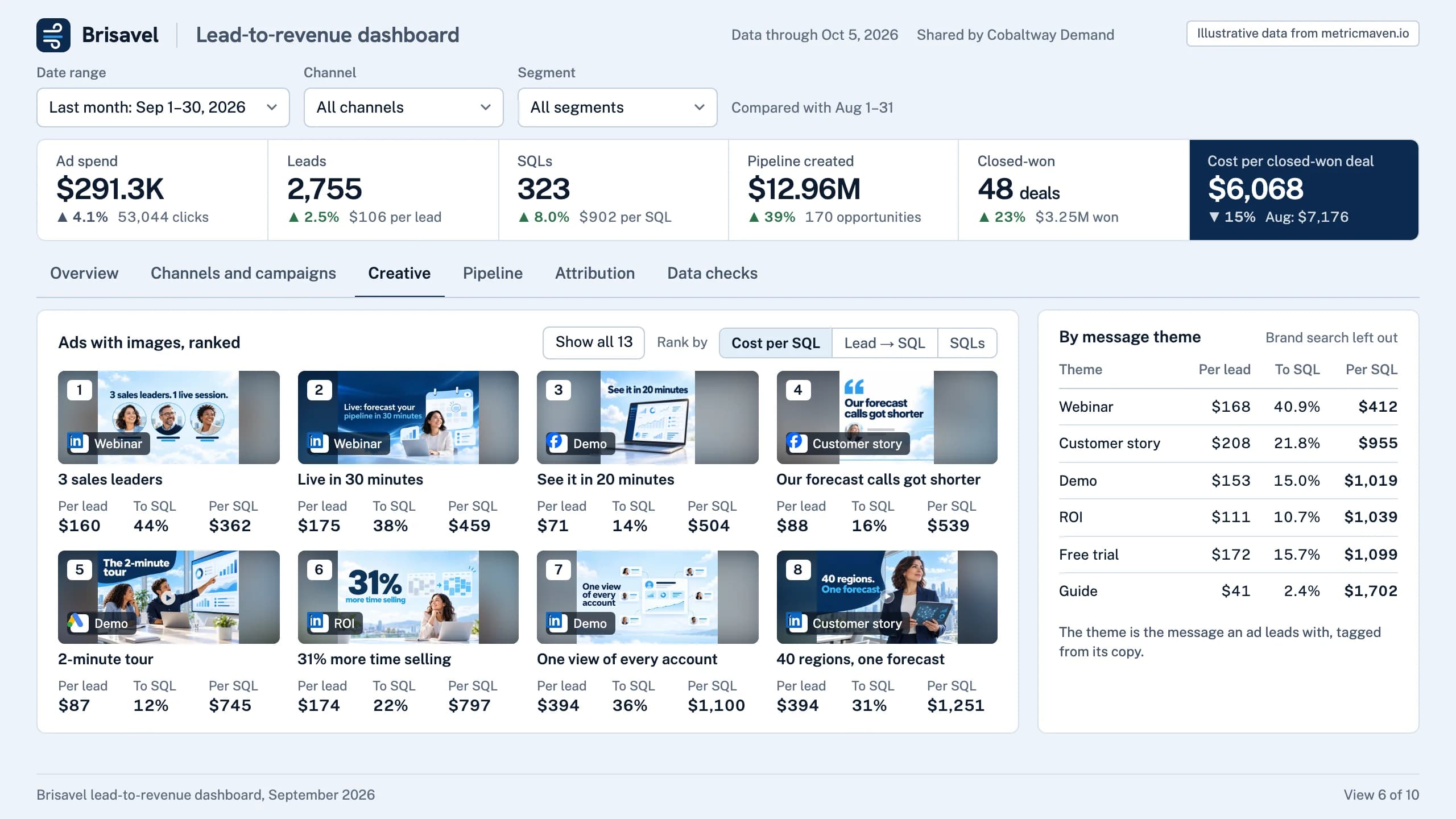
View 6 of 10Creative
Webinar ads turned 41% of leads into SQLs at $412 each; guide ads had the cheapest leads, and 2.4% became SQLs.
Every ad with an image, ranked by cost per SQL, beside the message themes.
| Theme | Per lead | To SQL | Per SQL |
|---|---|---|---|
| Webinar | $168 | 40.9% | $412 |
| Customer story | $208 | 21.8% | $955 |
| Demo | $153 | 15.0% | $1,019 |
| ROI | $111 | 10.7% | $1,039 |
| Free trial | $172 | 15.7% | $1,099 |
| Guide | $41 | 2.4% | $1,702 |
- Ad spend $291.3K ▲ 4.1% 53,044 clicks
- Leads 2,755 ▲ 2.5% $106 per lead
- SQLs 323 ▲ 8.0% $902 per SQL
- Pipeline created $12.96M ▲ 39% 170 opportunities
- Closed-won 48 deals ▲ 23% $3.25M won
- Cost per closed-won deal $6,068 ▼ 15% Aug: $7,176
- 1 Webinar 3 sales leaders Per lead $160 To SQL 44% Per SQL $362
- 2 Webinar Live in 30 minutes Per lead $175 To SQL 38% Per SQL $459
- 3 Demo See it in 20 minutes Per lead $71 To SQL 14% Per SQL $504
- 4 Customer story Our forecast calls got shorter Per lead $88 To SQL 16% Per SQL $539
- 5 Demo 2-minute tour Per lead $87 To SQL 12% Per SQL $745
- 6 ROI 31% more time selling Per lead $174 To SQL 22% Per SQL $797
- 7 Demo One view of every account Per lead $394 To SQL 36% Per SQL $1,100
- 8 Customer story 40 regions, one forecast Per lead $394 To SQL 31% Per SQL $1,251
View 7 of 10Pipeline
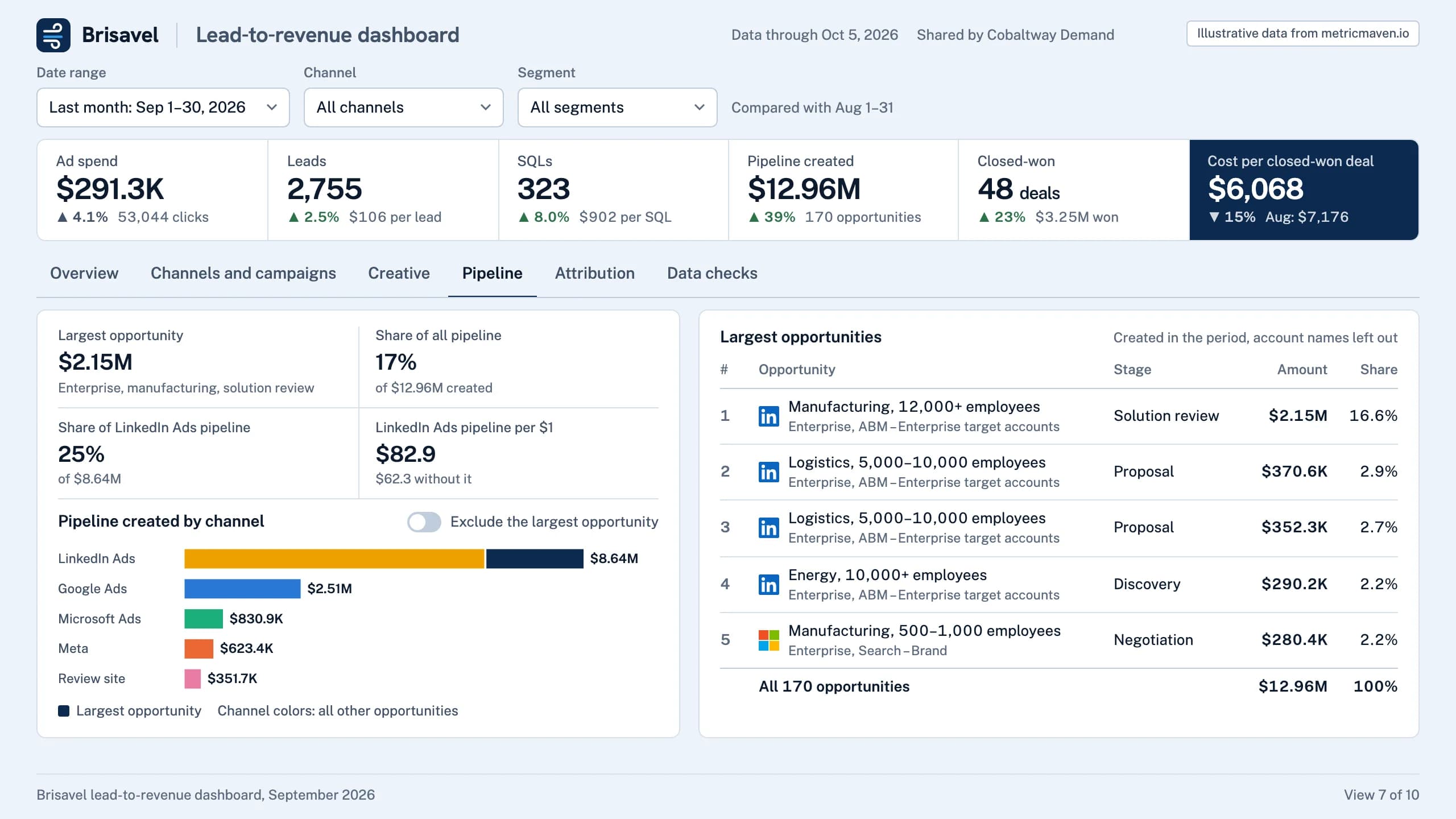
One $2.15M enterprise opportunity is 17% of September pipeline and 25% of the pipeline from LinkedIn Ads.
Pipeline created by channel, with the largest opportunity split out. Account names left out.
| Opportunity | Stage | Amount | Share |
|---|---|---|---|
| Manufacturing, 12,000+ employees Enterprise, ABM – Enterprise target accounts | Solution review | $2.15M | 16.6% |
| Logistics, 5,000–10,000 employees Enterprise, ABM – Enterprise target accounts | Proposal | $370.6K | 2.9% |
| Logistics, 5,000–10,000 employees Enterprise, ABM – Enterprise target accounts | Proposal | $352.3K | 2.7% |
| Energy, 10,000+ employees Enterprise, ABM – Enterprise target accounts | Discovery | $290.2K | 2.2% |
| Manufacturing, 500–1,000 employees Enterprise, Search – Brand | Negotiation | $280.4K | 2.2% |
| All 170 opportunities | $12.96M | 100% |
- Ad spend $291.3K ▲ 4.1% 53,044 clicks
- Leads 2,755 ▲ 2.5% $106 per lead
- SQLs 323 ▲ 8.0% $902 per SQL
- Pipeline created $12.96M ▲ 39% 170 opportunities
- Closed-won 48 deals ▲ 23% $3.25M won
- Cost per closed-won deal $6,068 ▼ 15% Aug: $7,176
- Largest opportunity $2.15M Enterprise, manufacturing, solution review
- Share of all pipeline 17% of $12.96M created
- Share of LinkedIn Ads pipeline 25% of $8.64M
- LinkedIn Ads pipeline per $1 $82.9 $62.3 without it
View 8 of 10Pipeline without the largest deal
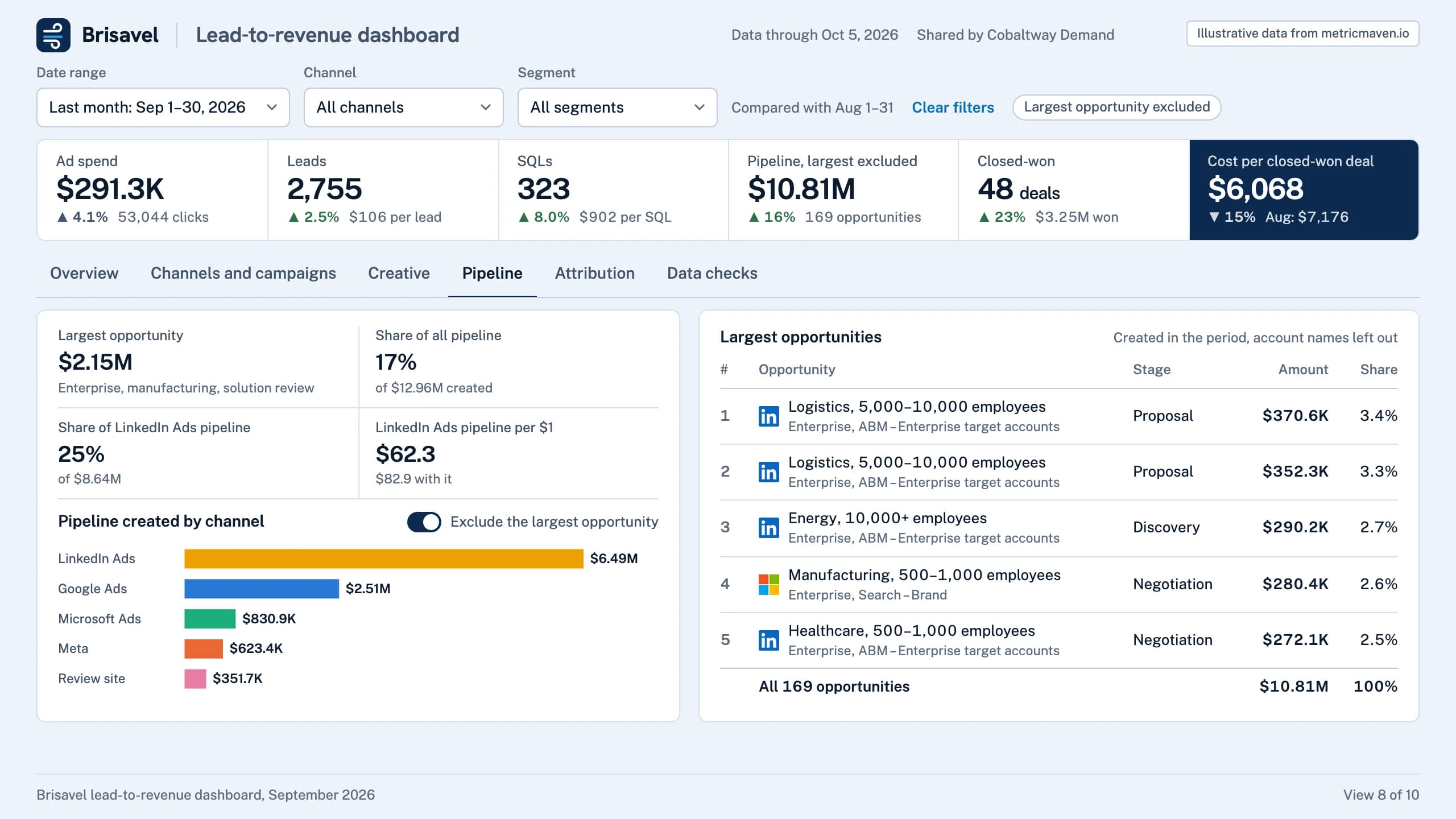
Without the $2.15M opportunity, LinkedIn Ads falls from $82.9 to $62.3 of pipeline per $1.
The same view with the largest opportunity excluded, across the summary row and the pipeline tab.
| Opportunity | Stage | Amount | Share |
|---|---|---|---|
| Logistics, 5,000–10,000 employees Enterprise, ABM – Enterprise target accounts | Proposal | $370.6K | 3.4% |
| Logistics, 5,000–10,000 employees Enterprise, ABM – Enterprise target accounts | Proposal | $352.3K | 3.3% |
| Energy, 10,000+ employees Enterprise, ABM – Enterprise target accounts | Discovery | $290.2K | 2.7% |
| Manufacturing, 500–1,000 employees Enterprise, Search – Brand | Negotiation | $280.4K | 2.6% |
| Healthcare, 500–1,000 employees Enterprise, ABM – Enterprise target accounts | Negotiation | $272.1K | 2.5% |
| All 169 opportunities | $10.81M | 100% |
- Ad spend $291.3K ▲ 4.1% 53,044 clicks
- Leads 2,755 ▲ 2.5% $106 per lead
- SQLs 323 ▲ 8.0% $902 per SQL
- Pipeline, largest excluded $10.81M ▲ 16% 169 opportunities
- Closed-won 48 deals ▲ 23% $3.25M won
- Cost per closed-won deal $6,068 ▼ 15% Aug: $7,176
- Largest opportunity $2.15M Enterprise, manufacturing, solution review
- Share of all pipeline 17% of $12.96M created
- Share of LinkedIn Ads pipeline 25% of $8.64M
- LinkedIn Ads pipeline per $1 $62.3 $82.9 with it
View 9 of 10Attribution
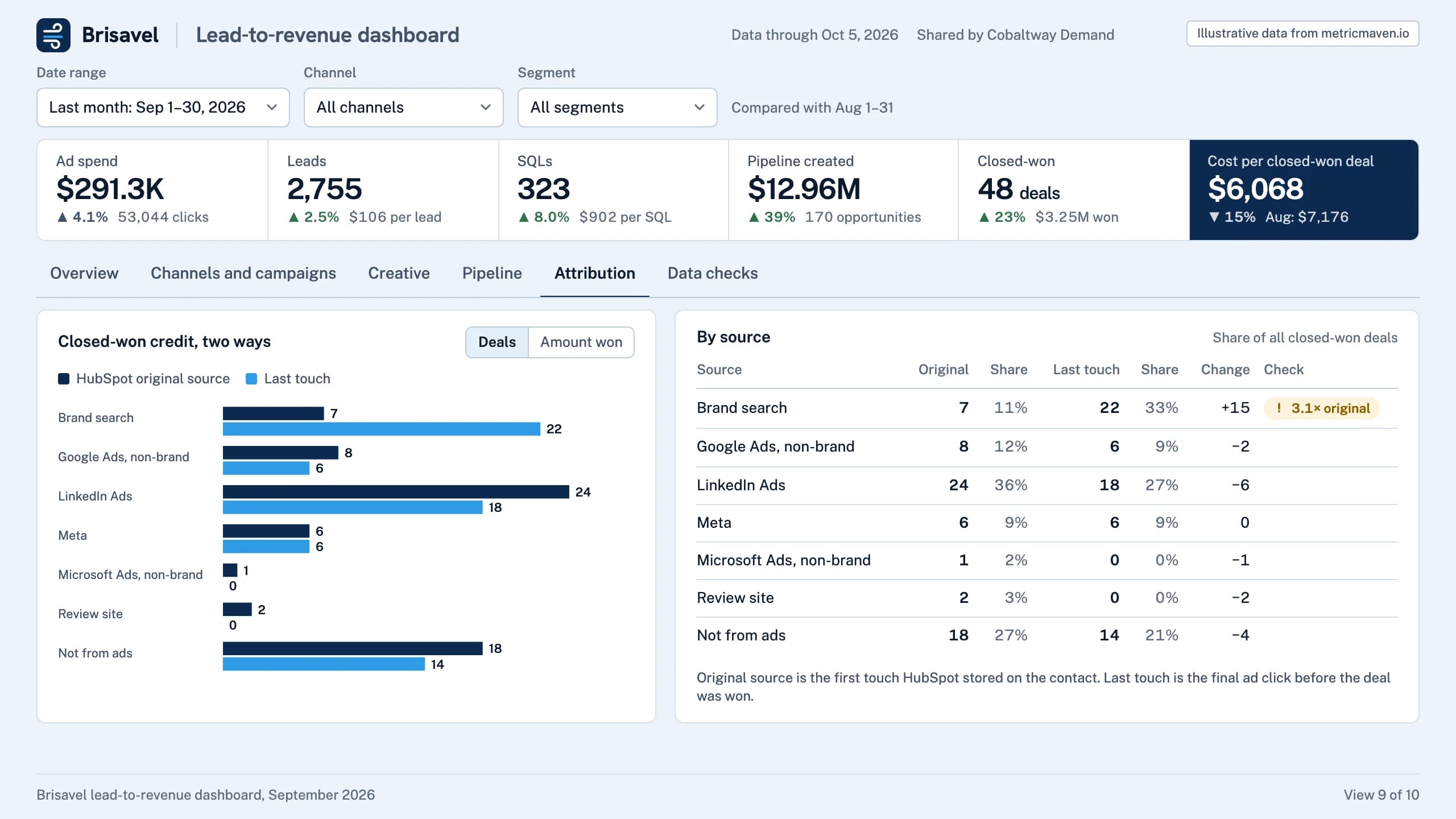
Last touch credits brand search with 22 of 66 closed-won deals (33%); HubSpot original source gives it 7 (11%).
Closed-won deals by source under the CRM’s original source and under last touch.
| Source | Original | Share | Last touch | Share | Change | Check |
|---|---|---|---|---|---|---|
| Brand search | 7 | 11% | 22 | 33% | +15 | 3.1× original |
| Google Ads, non-brand | 8 | 12% | 6 | 9% | −2 | |
| LinkedIn Ads | 24 | 36% | 18 | 27% | −6 | |
| Meta | 6 | 9% | 6 | 9% | 0 | |
| Microsoft Ads, non-brand | 1 | 2% | 0 | 0% | −1 | |
| Review site | 2 | 3% | 0 | 0% | −2 | |
| Not from ads | 18 | 27% | 14 | 21% | −4 |
- Ad spend $291.3K ▲ 4.1% 53,044 clicks
- Leads 2,755 ▲ 2.5% $106 per lead
- SQLs 323 ▲ 8.0% $902 per SQL
- Pipeline created $12.96M ▲ 39% 170 opportunities
- Closed-won 48 deals ▲ 23% $3.25M won
- Cost per closed-won deal $6,068 ▼ 15% Aug: $7,176
View 10 of 10Data checks
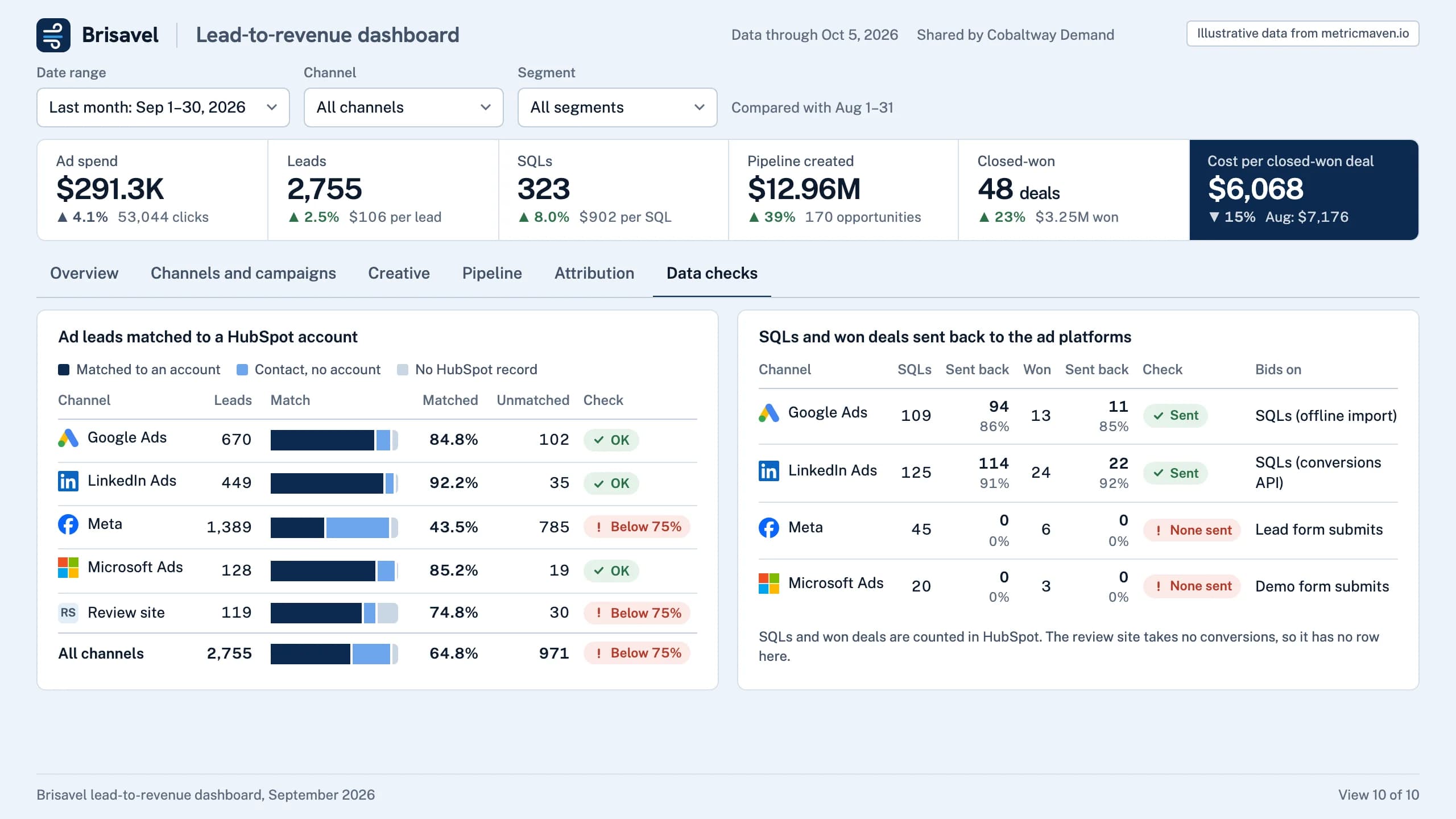
971 of 2,755 ad leads never matched a HubSpot account; Meta matched only 43%.
Meta bids on lead form submits: none of its 45 SQLs reached the platform.
| Channel | Leads | Matched | Unmatched | Check |
|---|---|---|---|---|
| Google Ads | 670 | 84.8% | 102 | OK |
| LinkedIn Ads | 449 | 92.2% | 35 | OK |
| Meta | 1,389 | 43.5% | 785 | Below 75% |
| Microsoft Ads | 128 | 85.2% | 19 | OK |
| Review site | 119 | 74.8% | 30 | Below 75% |
| All channels | 2,755 | 64.8% | 971 | Below 75% |
| Channel | SQLs | Sent back | Won | Sent back | Check | Bids on |
|---|---|---|---|---|---|---|
| Google Ads | 109 | 94 86% | 13 | 11 85% | Sent | SQLs (offline import) |
| LinkedIn Ads | 125 | 114 91% | 24 | 22 92% | Sent | SQLs (conversions API) |
| Meta | 45 | 0 0% | 6 | 0 0% | None sent | Lead form submits |
| Microsoft Ads | 20 | 0 0% | 3 | 0 0% | None sent | Demo form submits |
- Ad spend $291.3K ▲ 4.1% 53,044 clicks
- Leads 2,755 ▲ 2.5% $106 per lead
- SQLs 323 ▲ 8.0% $902 per SQL
- Pipeline created $12.96M ▲ 39% 170 opportunities
- Closed-won 48 deals ▲ 23% $3.25M won
- Cost per closed-won deal $6,068 ▼ 15% Aug: $7,176
Get started
Three steps to your first lead-to-revenue dashboard.
Connect once and run the recipe. The dashboard stays in the client portal.
- 1
Connect the client’s accounts and CRM.
Ad platforms, the CRM and analytics, connected in Maven with each lead matched to its source and account. - 2
Add Maven to ChatGPT or Claude.
Claude: Settings → Connectors. ChatGPT: Settings → Apps & Connectors, as a custom connector. The steps are in the Maven connector guide. - 3
Run the recipe.
Open it in Claude or ChatGPT with the prompt filled in and name the client. You check the draft, then publish it to the client portal for their marketing and sales teams.






Use the recipe for your next client dashboard.
It opens Claude or ChatGPT with the prompt filled in. Maven needs to be connected there first.