Recipe · Claude and ChatGPT
A pacing dashboard for every client, and a digest in Slack each morning.
Run the recipe once in Claude or ChatGPT. Your account team gets a live pacing dashboard across every client, and at 8am each weekday a digest in your Slack channel says who is over or under, which budgets passed 50% or 80%, and which data to fix.
What comes back
Pacing for your whole client list, checked before anyone moves money.
The dashboard your account managers keep open, and the messages your channel gets, from the sample.
Every client and channel on one screen.
Pace to date and projected month end for each client on each channel, with a status only on the cells that need action, beside a ranked list and what changed since yesterday’s check.Filters and a drill-down for each client.
Filter by client, channel or status, then open a client to see each channel against its budget, daily spend against the ideal line and the campaigns behind it.A check on budgets and syncs.
Channels spending with no budget set, and accounts that stopped syncing, so stale data isn’t read as underspend.A digest in Slack every weekday.
Who is over or under with projected month end, the daily figure that lands each one on budget, budgets past 50% and 80%, and the data to fix, with a link to the dashboard. A separate alert posts when a channel passes a milestone.
The sample
All 8 views of Cobaltway Demand’s October pacing.
Six views of the dashboard on Oct 20, then the morning digest and a budget alert in Slack. Cobaltway Demand and its 9 clients, Alderpoint Bank among them, are fictional, and every number is illustrative. Open a view to see it full size with its numbers.
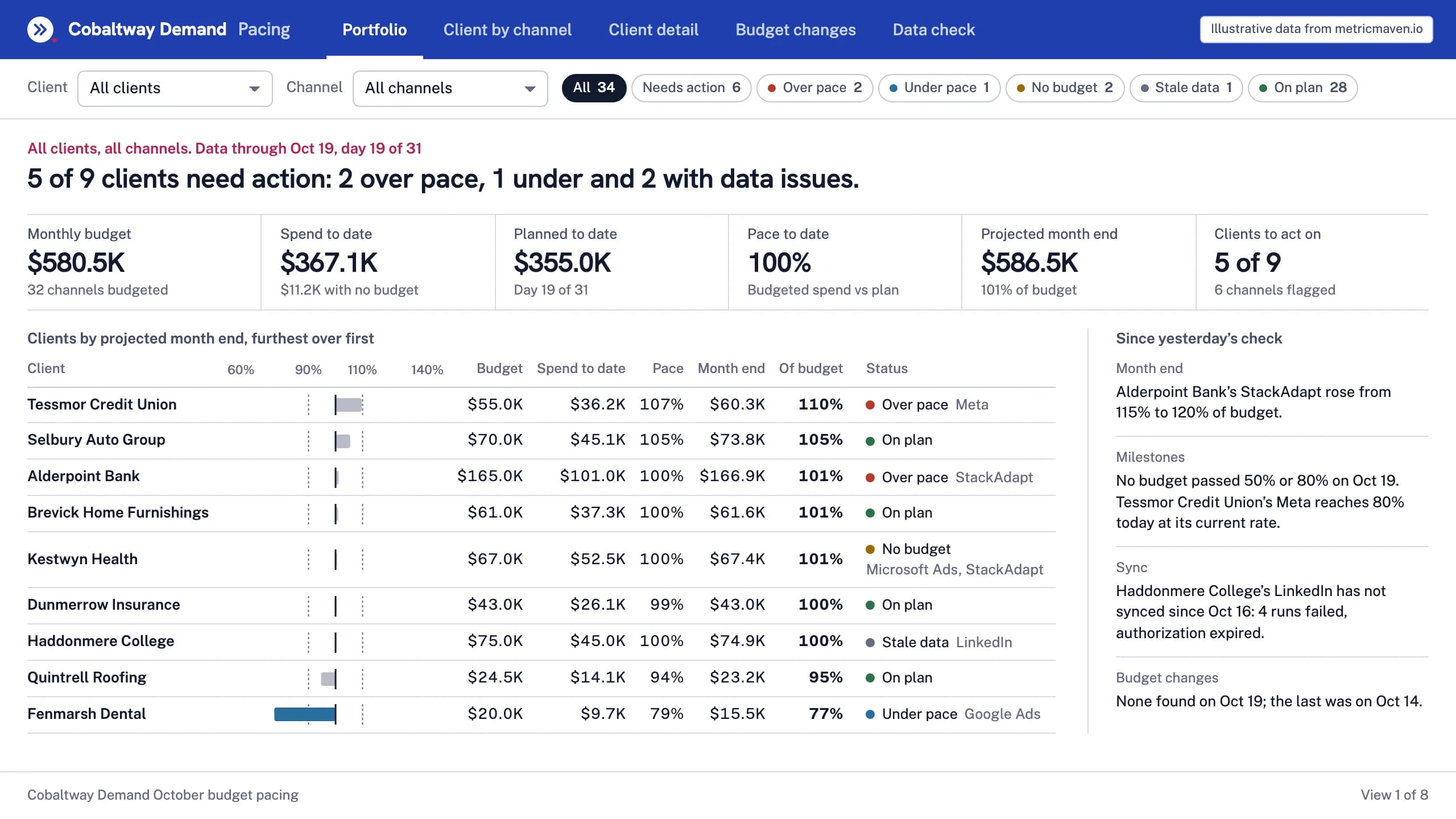
View 1 of 8Overview
5 of 9 clients need action: 2 over pace, 1 under and 2 with data issues.
| Client | Budget | Spend to date | Pace | Month end | Of budget | Status |
|---|---|---|---|---|---|---|
| Tessmor Credit Union | $55.0K | $36.2K | 107% | $60.3K | 110% | Over pace Meta |
| Selbury Auto Group | $70.0K | $45.1K | 105% | $73.8K | 105% | On plan |
| Alderpoint Bank | $165.0K | $101.0K | 100% | $166.9K | 101% | Over pace StackAdapt |
| Brevick Home Furnishings | $61.0K | $37.3K | 100% | $61.6K | 101% | On plan |
| Kestwyn Health | $67.0K | $52.5K | 100% | $67.4K | 101% | No budget Microsoft Ads, StackAdapt |
| Dunmerrow Insurance | $43.0K | $26.1K | 99% | $43.0K | 100% | On plan |
| Haddonmere College | $75.0K | $45.0K | 100% | $74.9K | 100% | Stale data LinkedIn |
| Quintrell Roofing | $24.5K | $14.1K | 94% | $23.2K | 95% | On plan |
| Fenmarsh Dental | $20.0K | $9.7K | 79% | $15.5K | 77% | Under pace Google Ads |
- Monthly budget $580.5K 32 channels budgeted
- Spend to date $367.1K $11.2K with no budget
- Planned to date $355.0K Day 19 of 31
- Pace to date 100% Budgeted spend vs plan
- Projected month end $586.5K 101% of budget
- Clients to act on 5 of 9 6 channels flagged
- Month end Alderpoint Bank’s StackAdapt rose from 115% to 120% of budget.
- Milestones No budget passed 50% or 80% on Oct 19. Tessmor Credit Union’s Meta reaches 80% today at its current rate.
- Sync Haddonmere College’s LinkedIn has not synced since Oct 16: 4 runs failed, authorization expired.
- Budget changes None found on Oct 19; the last was on Oct 14.
View 2 of 8Filtered to clients that need action
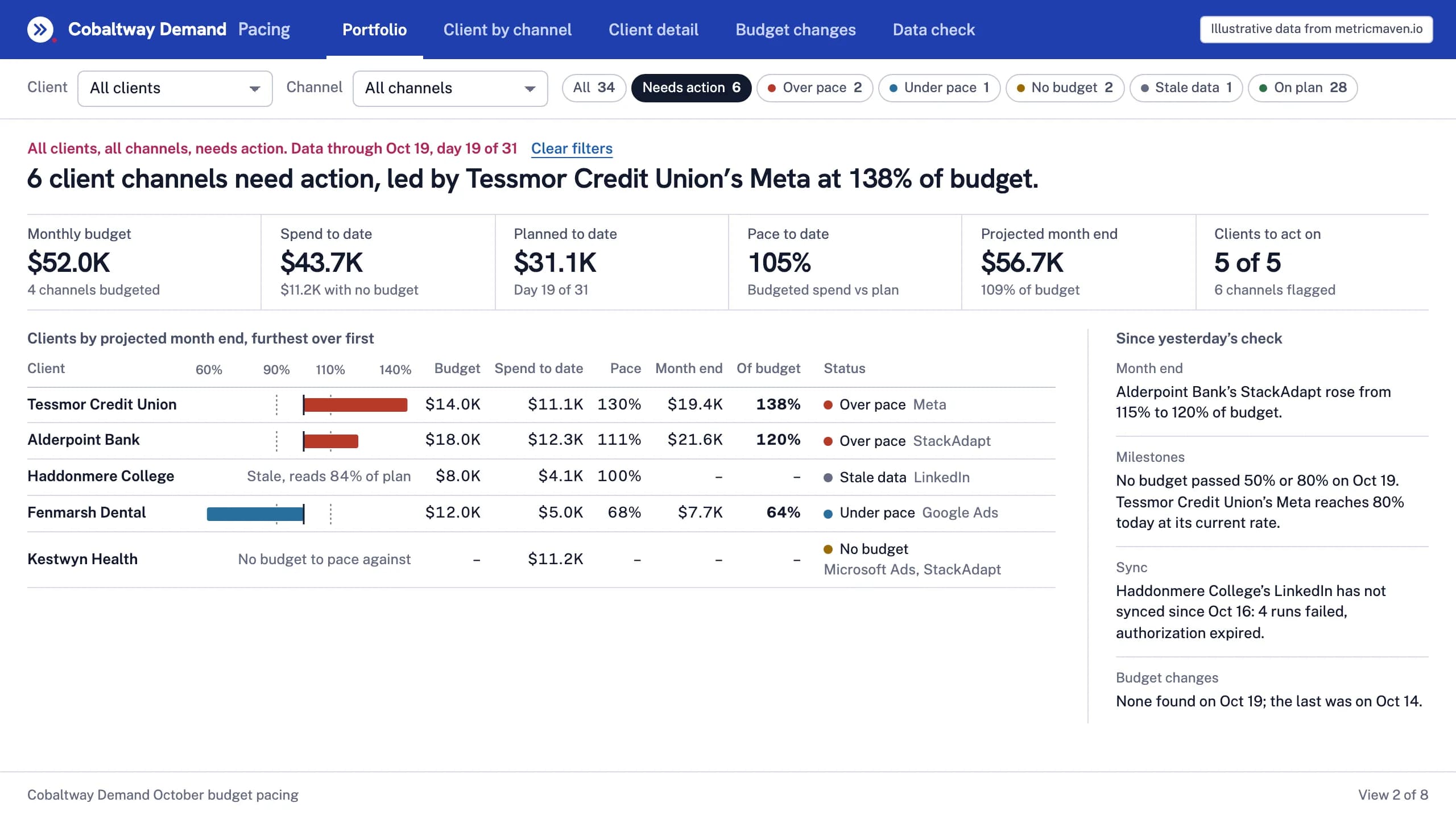
6 client channels need action, led by Tessmor Credit Union’s Meta at 138% of budget.
| Client | Month end against budget | Budget | Spend to date | Pace | Month end | Of budget | Status |
|---|---|---|---|---|---|---|---|
| Tessmor Credit Union | $14.0K | $11.1K | 130% | $19.4K | 138% | Over pace Meta | |
| Alderpoint Bank | $18.0K | $12.3K | 111% | $21.6K | 120% | Over pace StackAdapt | |
| Haddonmere College | Stale, reads 84% of plan | $8.0K | $4.1K | 100% | – | – | Stale data LinkedIn |
| Fenmarsh Dental | $12.0K | $5.0K | 68% | $7.7K | 64% | Under pace Google Ads | |
| Kestwyn Health | No budget to pace against | – | $11.2K | – | – | – | No budget Microsoft Ads, StackAdapt |
- Monthly budget $52.0K 4 channels budgeted
- Spend to date $43.7K $11.2K with no budget
- Planned to date $31.1K Day 19 of 31
- Pace to date 105% Budgeted spend vs plan
- Projected month end $56.7K 109% of budget
- Clients to act on 5 of 5 6 channels flagged
- Month end Alderpoint Bank’s StackAdapt rose from 115% to 120% of budget.
- Milestones No budget passed 50% or 80% on Oct 19. Tessmor Credit Union’s Meta reaches 80% today at its current rate.
- Sync Haddonmere College’s LinkedIn has not synced since Oct 16: 4 runs failed, authorization expired.
- Budget changes None found on Oct 19; the last was on Oct 14.
View 3 of 8Client by channel
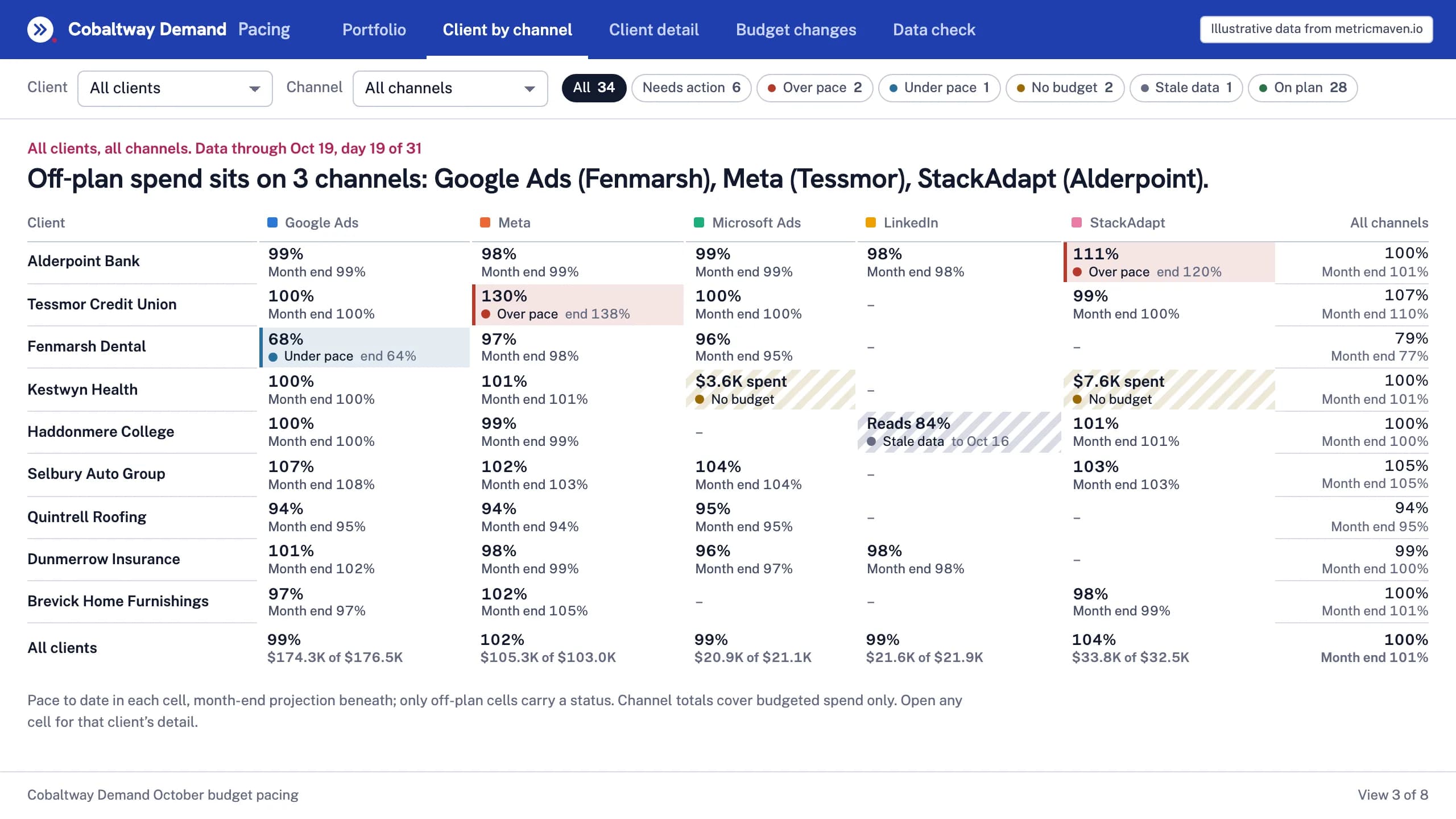
Off-plan spend sits on 3 channels: Google Ads (Fenmarsh), Meta (Tessmor), StackAdapt (Alderpoint).
| Client | Google Ads | Meta | Microsoft Ads | StackAdapt | All channels | |
|---|---|---|---|---|---|---|
| Alderpoint Bank | 99% Month end 99% | 98% Month end 99% | 99% Month end 99% | 98% Month end 98% | 111% Over pace end 120% | 100% Month end 101% |
| Tessmor Credit Union | 100% Month end 100% | 130% Over pace end 138% | 100% Month end 100% | – | 99% Month end 100% | 107% Month end 110% |
| Fenmarsh Dental | 68% Under pace end 64% | 97% Month end 98% | 96% Month end 95% | – | – | 79% Month end 77% |
| Kestwyn Health | 100% Month end 100% | 101% Month end 101% | $3.6K spent No budget | – | $7.6K spent No budget | 100% Month end 101% |
| Haddonmere College | 100% Month end 100% | 99% Month end 99% | – | Reads 84% Stale data to Oct 16 | 101% Month end 101% | 100% Month end 100% |
| Selbury Auto Group | 107% Month end 108% | 102% Month end 103% | 104% Month end 104% | – | 103% Month end 103% | 105% Month end 105% |
| Quintrell Roofing | 94% Month end 95% | 94% Month end 94% | 95% Month end 95% | – | – | 94% Month end 95% |
| Dunmerrow Insurance | 101% Month end 102% | 98% Month end 99% | 96% Month end 97% | 98% Month end 98% | – | 99% Month end 100% |
| Brevick Home Furnishings | 97% Month end 97% | 102% Month end 105% | – | – | 98% Month end 99% | 100% Month end 101% |
| All clients | 99% $174.3K of $176.5K | 102% $105.3K of $103.0K | 99% $20.9K of $21.1K | 99% $21.6K of $21.9K | 104% $33.8K of $32.5K | 100% Month end 101% |
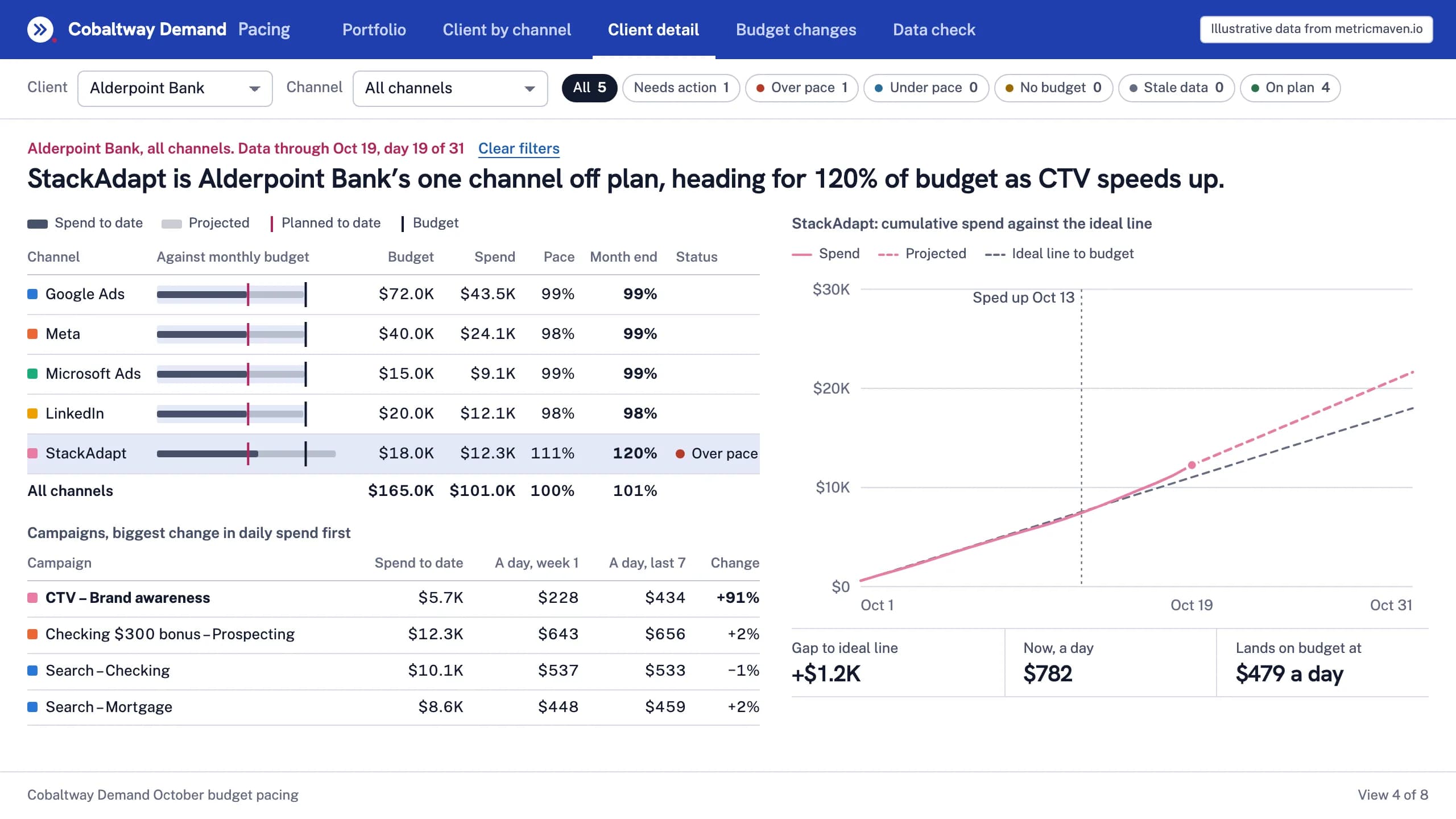
View 4 of 8Client drill-down
StackAdapt is Alderpoint Bank’s one channel off plan, heading for 120% of budget as CTV speeds up.
| Channel | Budget | Spend | Pace | Month end | Status |
|---|---|---|---|---|---|
| Google Ads | $72.0K | $43.5K | 99% | 99% | |
| Meta | $40.0K | $24.1K | 98% | 99% | |
| Microsoft Ads | $15.0K | $9.1K | 99% | 99% | |
| $20.0K | $12.1K | 98% | 98% | ||
| StackAdapt | $18.0K | $12.3K | 111% | 120% | Over pace |
| All channels | $165.0K | $101.0K | 100% | 101% |
| Campaign | Spend to date | A day, week 1 | A day, last 7 | Change |
|---|---|---|---|---|
| CTV – Brand awareness | $5.7K | $228 | $434 | +91% |
| Checking $300 bonus – Prospecting | $12.3K | $643 | $656 | +2% |
| Search – Checking | $10.1K | $537 | $533 | −1% |
| Search – Mortgage | $8.6K | $448 | $459 | +2% |
- Gap to ideal line +$1.2K
- Now, a day $782
- Lands on budget at $479 a day
View 5 of 8Budget changes
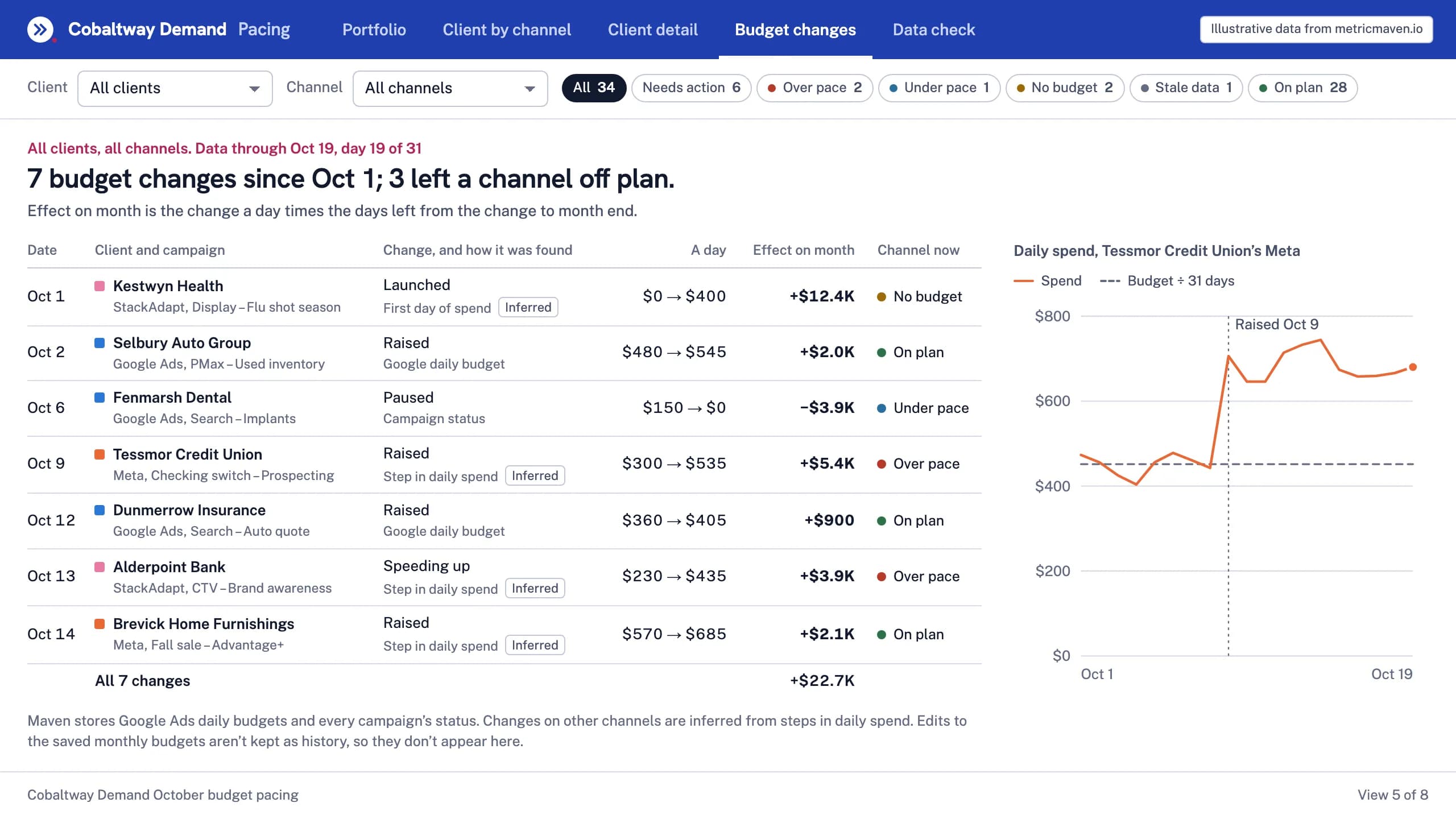
7 budget changes since Oct 1; 3 left a channel off plan.
Effect on month is the change a day times the days left from the change to month end.
| Date | Client and campaign | Change, and how it was found | A day | Effect on month | Channel now |
|---|---|---|---|---|---|
| Oct 1 | Kestwyn Health StackAdapt, Display – Flu shot season | Launched First day of spendInferred | $0 → $400 | +$12.4K | No budget |
| Oct 2 | Selbury Auto Group Google Ads, PMax – Used inventory | Raised Google daily budget | $480 → $545 | +$2.0K | On plan |
| Oct 6 | Fenmarsh Dental Google Ads, Search – Implants | Paused Campaign status | $150 → $0 | −$3.9K | Under pace |
| Oct 9 | Tessmor Credit Union Meta, Checking switch – Prospecting | Raised Step in daily spendInferred | $300 → $535 | +$5.4K | Over pace |
| Oct 12 | Dunmerrow Insurance Google Ads, Search – Auto quote | Raised Google daily budget | $360 → $405 | +$900 | On plan |
| Oct 13 | Alderpoint Bank StackAdapt, CTV – Brand awareness | Speeding up Step in daily spendInferred | $230 → $435 | +$3.9K | Over pace |
| Oct 14 | Brevick Home Furnishings Meta, Fall sale – Advantage+ | Raised Step in daily spendInferred | $570 → $685 | +$2.1K | On plan |
| All 7 changes | +$22.7K |
View 6 of 8Data check
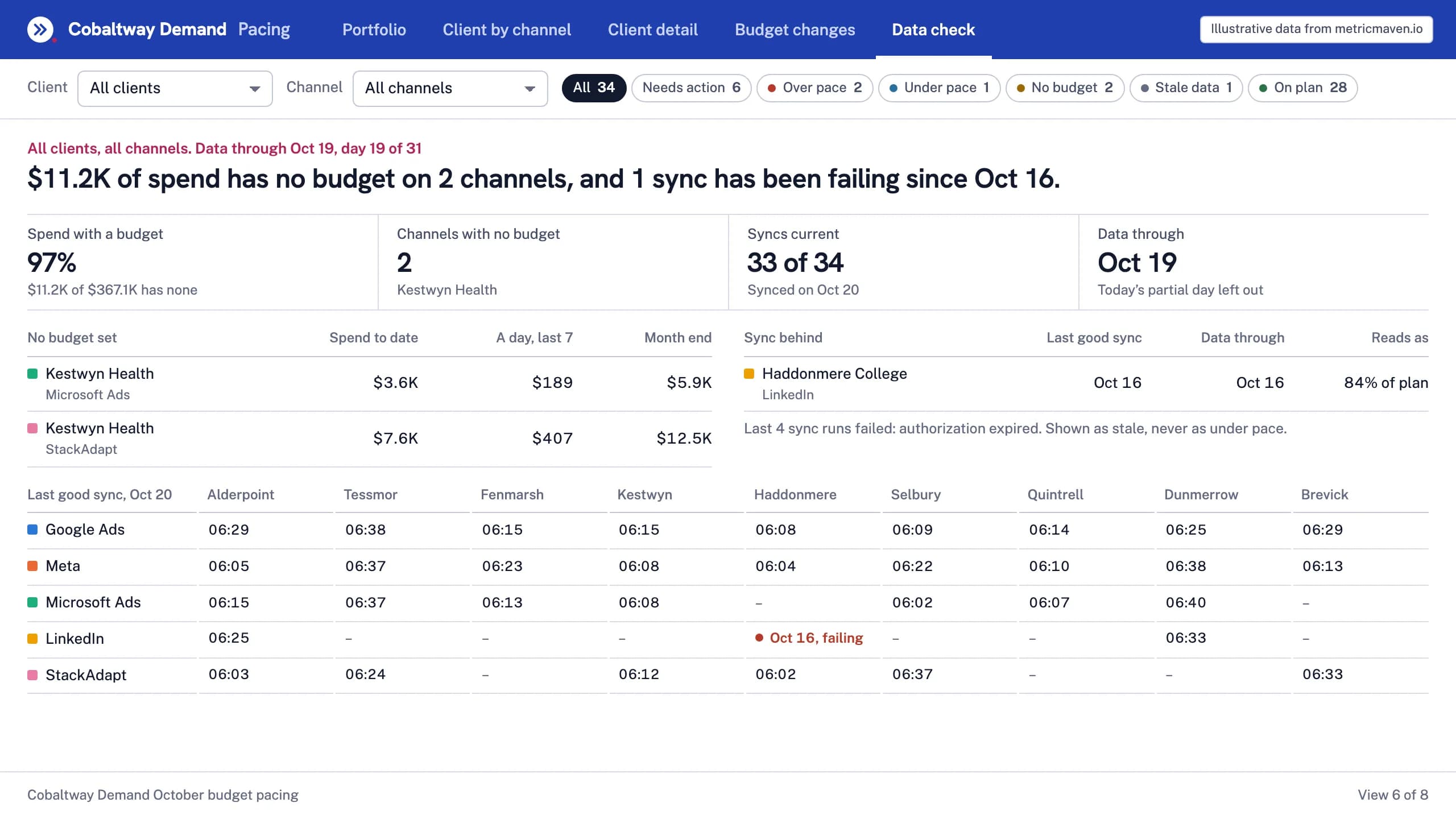
$11.2K of spend has no budget on 2 channels, and 1 sync has been failing since Oct 16.
| No budget set | Spend to date | A day, last 7 | Month end |
|---|---|---|---|
| Kestwyn Health Microsoft Ads | $3.6K | $189 | $5.9K |
| Kestwyn Health StackAdapt | $7.6K | $407 | $12.5K |
| Sync behind | Last good sync | Data through | Reads as |
|---|---|---|---|
| Haddonmere College LinkedIn | Oct 16 | Oct 16 | 84% of plan |
| Last good sync, Oct 20 | Alderpoint | Tessmor | Fenmarsh | Kestwyn | Haddonmere | Selbury | Quintrell | Dunmerrow | Brevick |
|---|---|---|---|---|---|---|---|---|---|
| Google Ads | 06:29 | 06:38 | 06:15 | 06:15 | 06:08 | 06:09 | 06:14 | 06:25 | 06:29 |
| Meta | 06:05 | 06:37 | 06:23 | 06:08 | 06:04 | 06:22 | 06:10 | 06:38 | 06:13 |
| Microsoft Ads | 06:15 | 06:37 | 06:13 | 06:08 | – | 06:02 | 06:07 | 06:40 | – |
| 06:25 | – | – | – | Oct 16, failing | – | – | 06:33 | – | |
| StackAdapt | 06:03 | 06:24 | – | 06:12 | 06:02 | 06:37 | – | – | 06:33 |
- Spend with a budget 97% $11.2K of $367.1K has none
- Channels with no budget 2 Kestwyn Health
- Syncs current 33 of 34 Synced on Oct 20
- Data through Oct 19 Today’s partial day left out
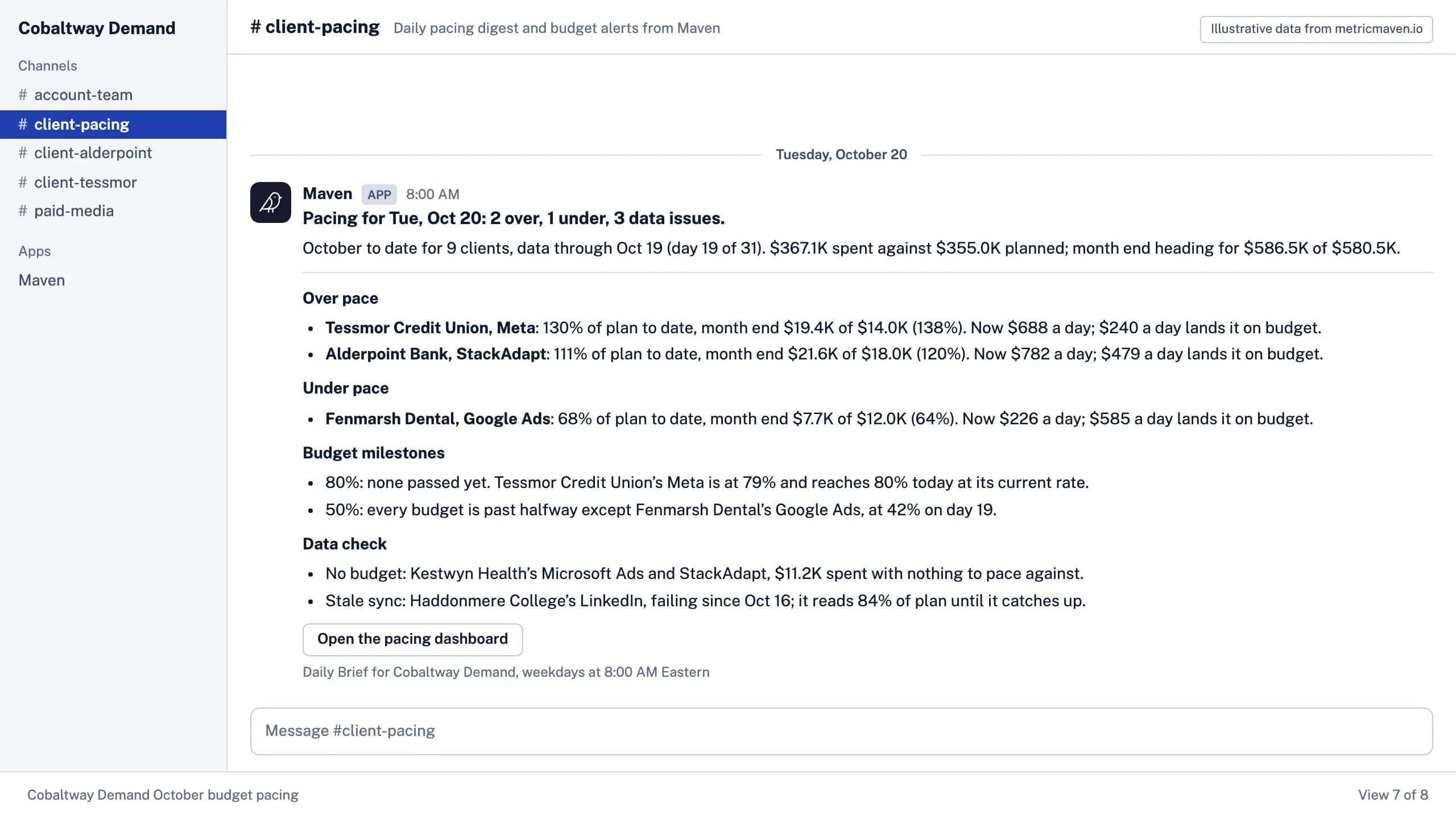
View 7 of 8Daily digest in Slack
Pacing for Tue, Oct 20: 2 over, 1 under, 3 data issues.
- October to date for 9 clients, data through Oct 19 (day 19 of 31). $367.1K spent against $355.0K planned; month end heading for $586.5K of $580.5K.
- Tessmor Credit Union, Meta: 130% of plan to date, month end $19.4K of $14.0K (138%). Now $688 a day; $240 a day lands it on budget.
- Alderpoint Bank, StackAdapt: 111% of plan to date, month end $21.6K of $18.0K (120%). Now $782 a day; $479 a day lands it on budget.
- Fenmarsh Dental, Google Ads: 68% of plan to date, month end $7.7K of $12.0K (64%). Now $226 a day; $585 a day lands it on budget.
- 80%: none passed yet. Tessmor Credit Union’s Meta is at 79% and reaches 80% today at its current rate.
- 50%: every budget is past halfway except Fenmarsh Dental’s Google Ads, at 42% on day 19.
- No budget: Kestwyn Health’s Microsoft Ads and StackAdapt, $11.2K spent with nothing to pace against.
- Stale sync: Haddonmere College’s LinkedIn, failing since Oct 16; it reads 84% of plan until it catches up.
View 8 of 8Budget alert in Slack
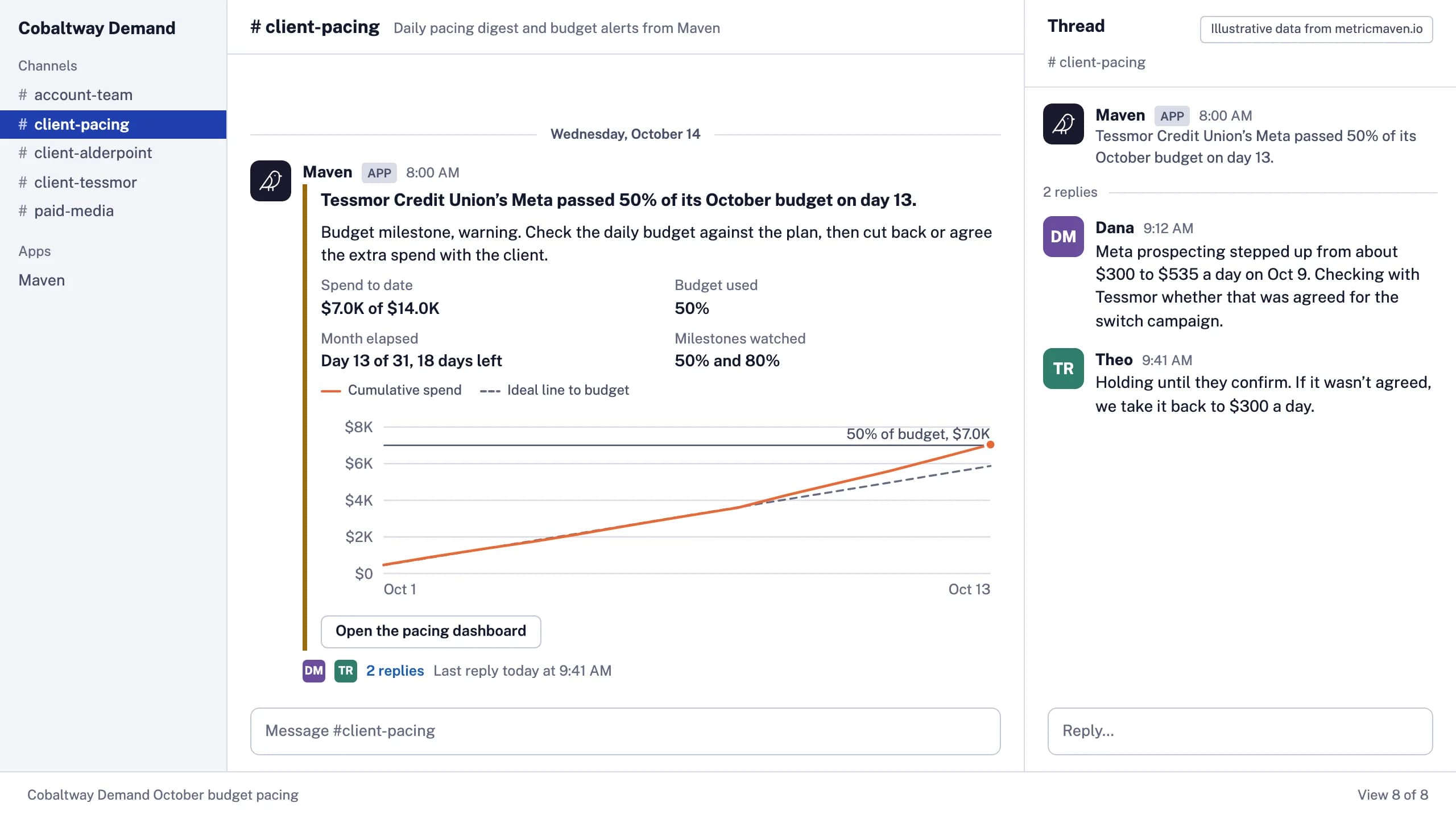
Tessmor Credit Union’s Meta passed 50% of its October budget on day 13.
- Budget milestone, warning. Check the daily budget against the plan, then cut back or agree the extra spend with the client.
- Spend to date $7.0K of $14.0K
- Budget used 50%
- Month elapsed Day 13 of 31, 18 days left
- Milestones watched 50% and 80%
- Meta prospecting stepped up from about $300 to $535 a day on Oct 9. Checking with Tessmor whether that was agreed for the switch campaign.
- Holding until they confirm. If it wasn’t agreed, we take it back to $300 a day.
Get started
Three steps to your pacing dashboard and digest.
Connect once, run the recipe once, and the digest arrives every weekday after that.
- 1
Connect each client’s ad accounts.
Every ad account connected in Maven, each client’s monthly budget saved by channel, and your team’s Slack channel linked to Maven. - 2
Add Maven to ChatGPT or Claude.
Claude: Settings → Connectors. ChatGPT: Settings → Apps & Connectors, as a custom connector. The steps are in the Maven connector guide. - 3
Run the recipe.
Open it in Claude or ChatGPT with the prompt filled in. The dashboard comes back, and you approve the digest and the alerts before anything posts to Slack.





Set up pacing for this month’s budgets.
It opens Claude or ChatGPT with the prompt filled in. Maven needs to be connected there first.