Recipe · Claude and ChatGPT
A monthly client performance report from your favorite AI tools.
Run the recipe in Claude or ChatGPT and get last month’s review deck: how each campaign performed, what stands out, whether the data holds up, and what to do next.
What comes back
Client performance reporting, checked before your client reads it.
Each part of the deck, from the sample.
A high-level read on how the month went.
Spend, results and cost per conversion by campaign and platform, against last month and the same month last year.Flags on anything that stands out.
Big moves in campaigns, regions, creatives, headlines and landing pages, ranked so the review starts with what changed.A check on the data underneath.
Every conversion action and its setup is checked day by day, so a broken tag isn’t reported as lost customers.Recommendations for next month.
What to fix, what to refresh and what to build on, each tied to a finding.
The sample
All 13 pages of Alderpoint Bank’s September review.
Alderpoint Bank and its agency, Cobaltway Demand, are fictional, and every number is sample data. Open a page to see it full size with its numbers.
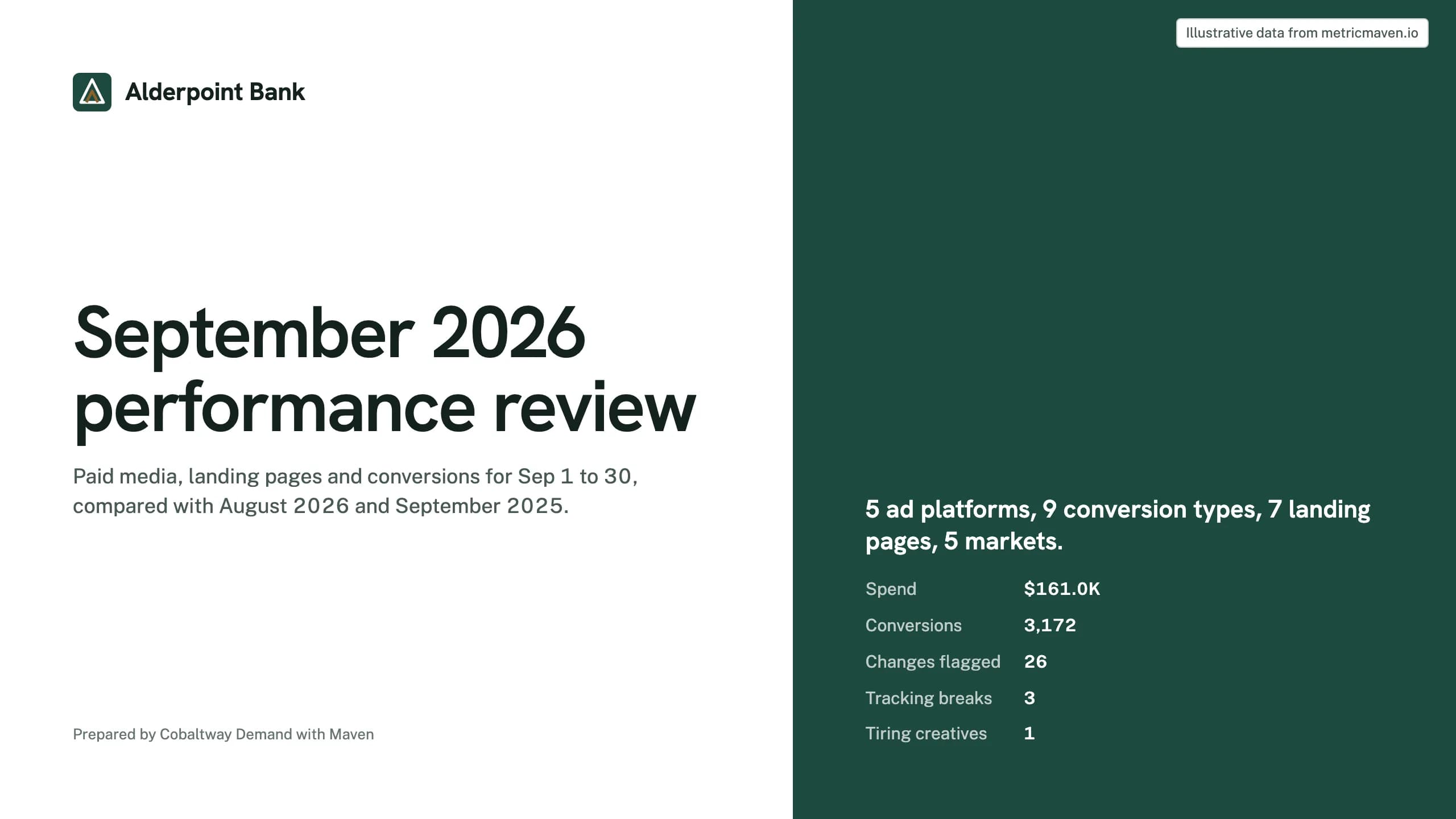
Page 1 of 13Cover
September 2026 performance review
Paid media, landing pages and conversions for Sep 1 to 30, compared with August 2026 and September 2025.
- Spend $161.0K Conversions 3,172 Changes flagged 26 Tracking breaks 3 Tiring creatives 1
Page 2 of 13Month at a glance
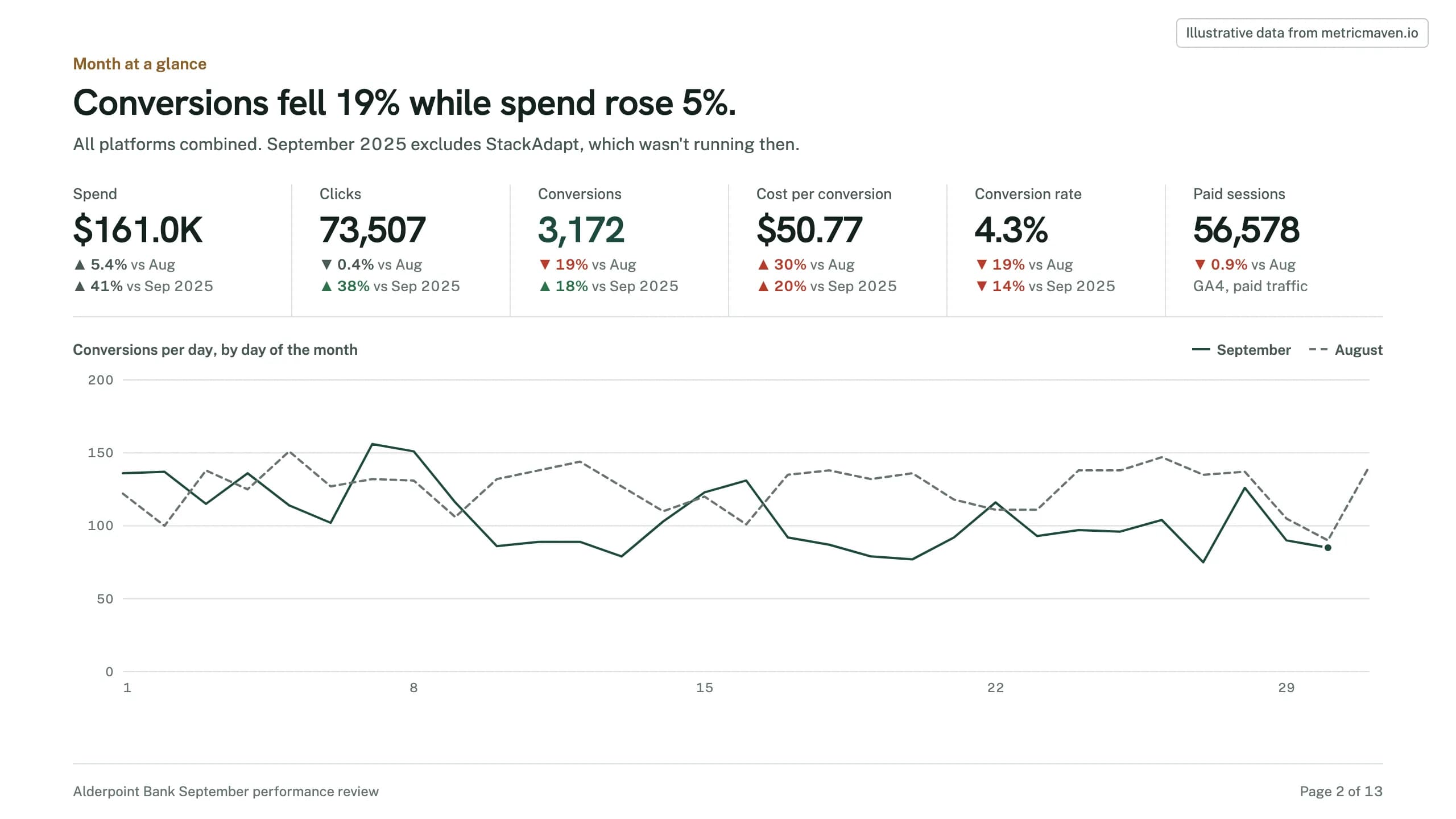
Conversions fell 19% while spend rose 5%.
All platforms combined. September 2025 excludes StackAdapt, which wasn't running then.
- Spend $161.0K ▲ 5.4% vs Aug ▲ 41% vs Sep 2025
- Clicks 73,507 ▼ 0.4% vs Aug ▲ 38% vs Sep 2025
- Conversions 3,172 ▼ 19% vs Aug ▲ 18% vs Sep 2025
- Cost per conversion $50.77 ▲ 30% vs Aug ▲ 20% vs Sep 2025
- Conversion rate 4.3% ▼ 19% vs Aug ▼ 14% vs Sep 2025
- Paid sessions 56,578 ▼ 0.9% vs Aug GA4, paid traffic
Page 3 of 13What moved
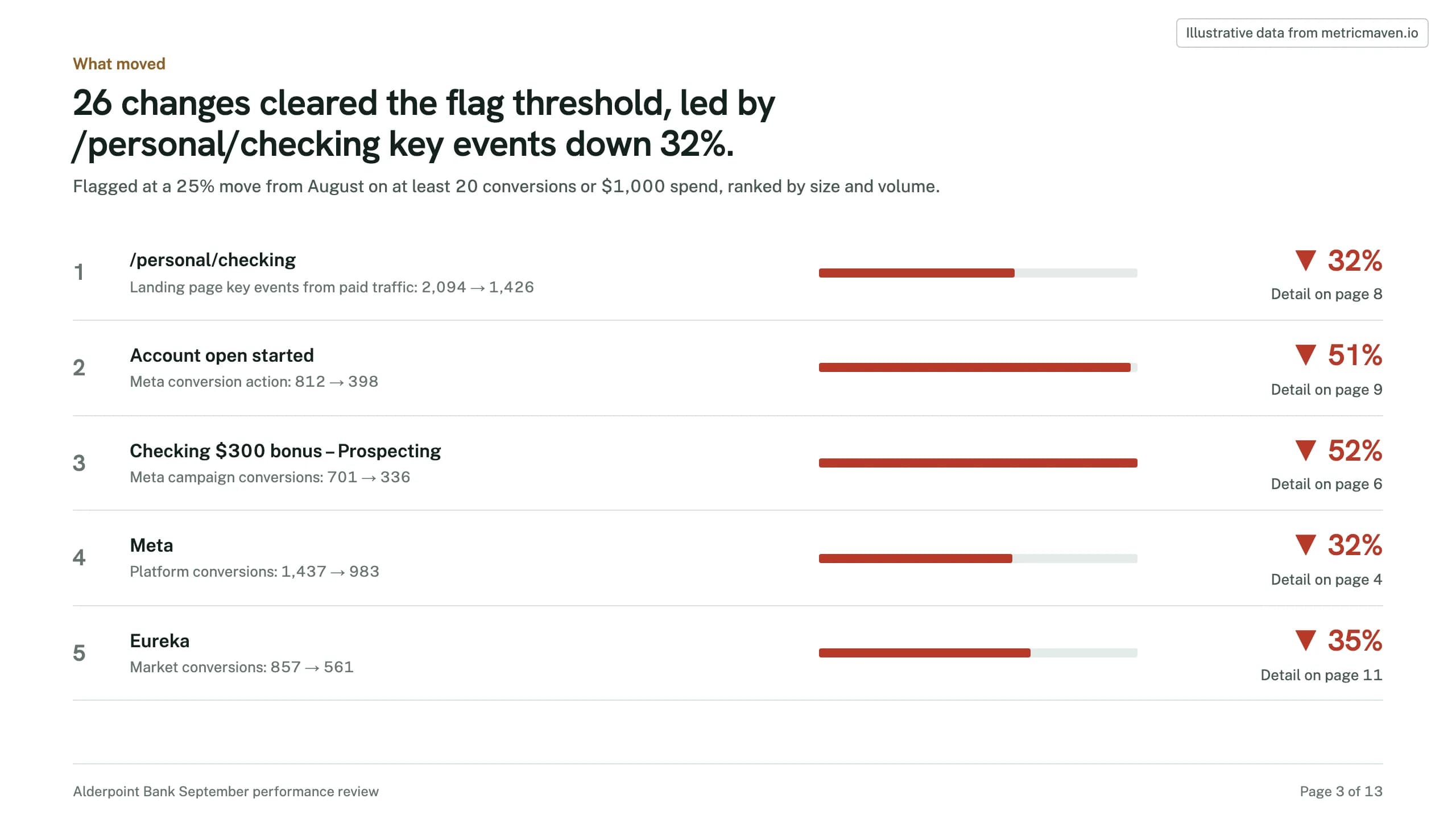
26 changes cleared the flag threshold, led by /personal/checking key events down 32%.
- 1 /personal/checking Landing page key events from paid traffic: 2,094 → 1,426 ▼ 32% Detail on page 8
- 2 Account open started Meta conversion action: 812 → 398 ▼ 51% Detail on page 9
- 3 Checking $300 bonus – Prospecting Meta campaign conversions: 701 → 336 ▼ 52% Detail on page 6
- 4 Meta Platform conversions: 1,437 → 983 ▼ 32% Detail on page 4
- 5 Eureka Market conversions: 857 → 561 ▼ 35% Detail on page 11
Page 4 of 13Channel mix
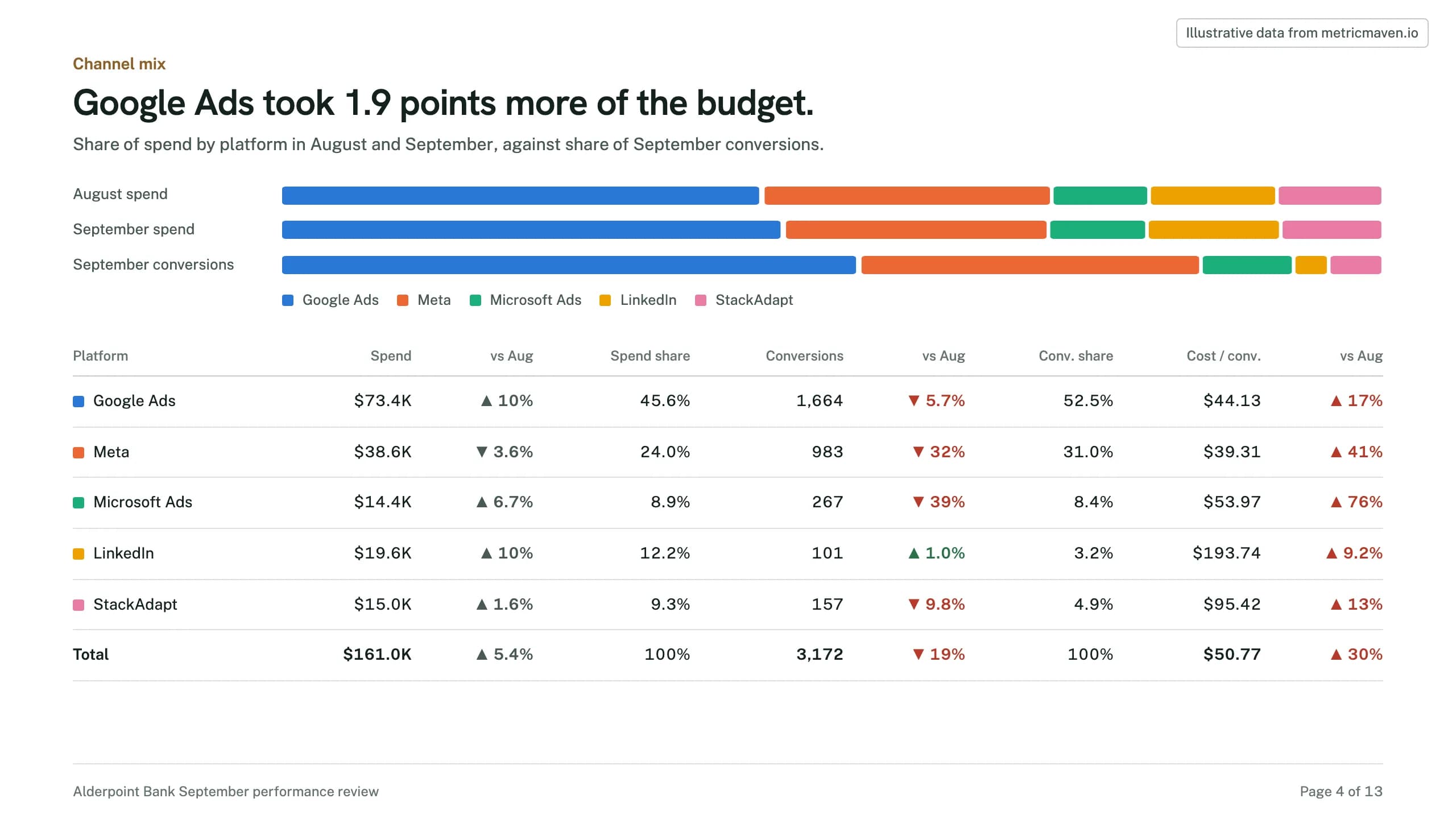
Google Ads took 1.9 points more of the budget.
Share of spend by platform in August and September, against share of September conversions.
| Platform | Spend | vs Aug | Spend share | Conversions | vs Aug | Conv. share | Cost / conv. | vs Aug |
|---|---|---|---|---|---|---|---|---|
| Google Ads | $73.4K | ▲ 10% | 45.6% | 1,664 | ▼ 5.7% | 52.5% | $44.13 | ▲ 17% |
| Meta | $38.6K | ▼ 3.6% | 24.0% | 983 | ▼ 32% | 31.0% | $39.31 | ▲ 41% |
| Microsoft Ads | $14.4K | ▲ 6.7% | 8.9% | 267 | ▼ 39% | 8.4% | $53.97 | ▲ 76% |
| $19.6K | ▲ 10% | 12.2% | 101 | ▲ 1.0% | 3.2% | $193.74 | ▲ 9.2% | |
| StackAdapt | $15.0K | ▲ 1.6% | 9.3% | 157 | ▼ 9.8% | 4.9% | $95.42 | ▲ 13% |
| Total | $161.0K | ▲ 5.4% | 100% | 3,172 | ▼ 19% | 100% | $50.77 | ▲ 30% |
Page 5 of 13Budget pacing
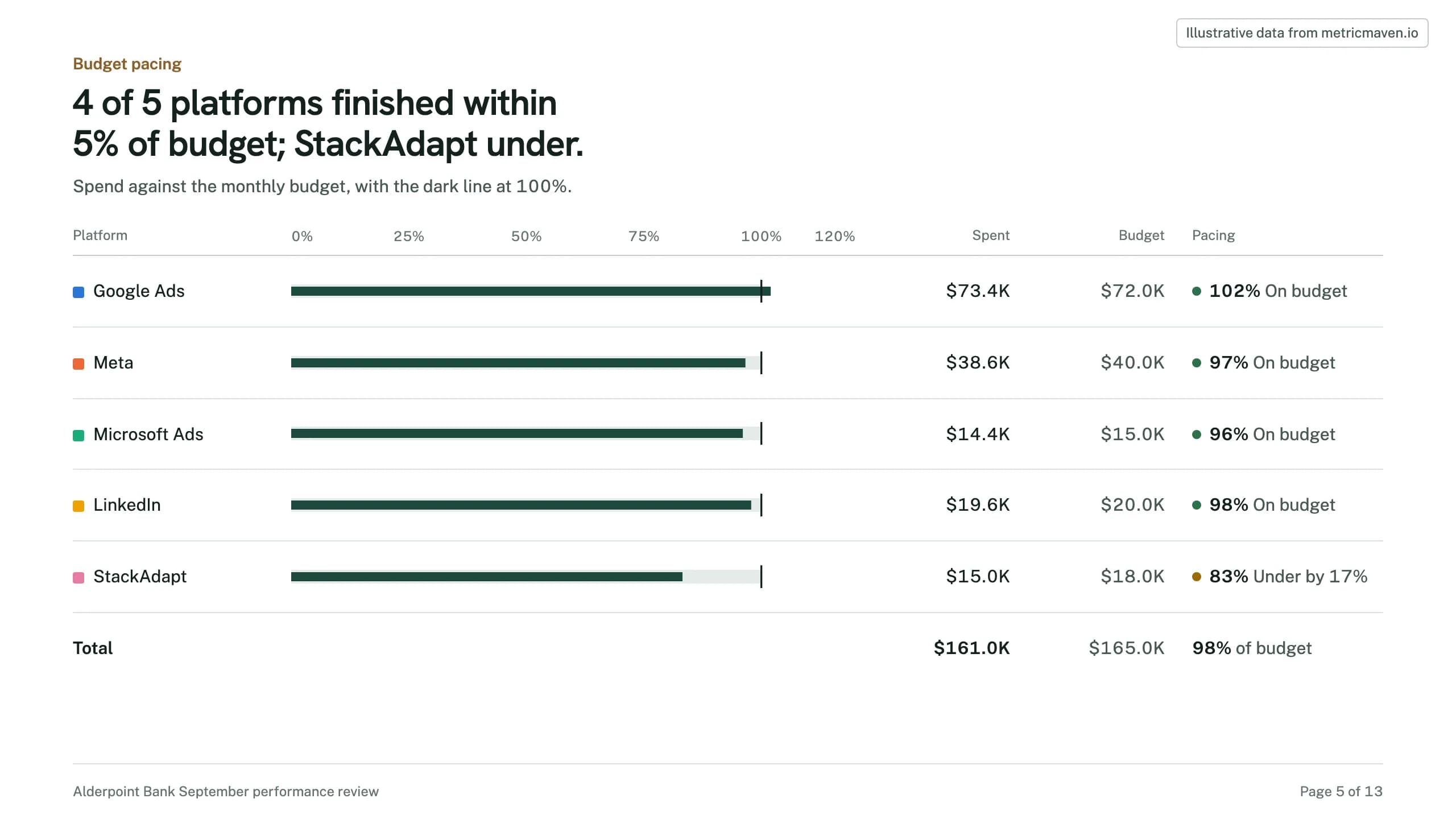
4 of 5 platforms finished within 5% of budget; StackAdapt under.
Spend against the monthly budget, with the dark line at 100%.
Page 6 of 13Campaigns
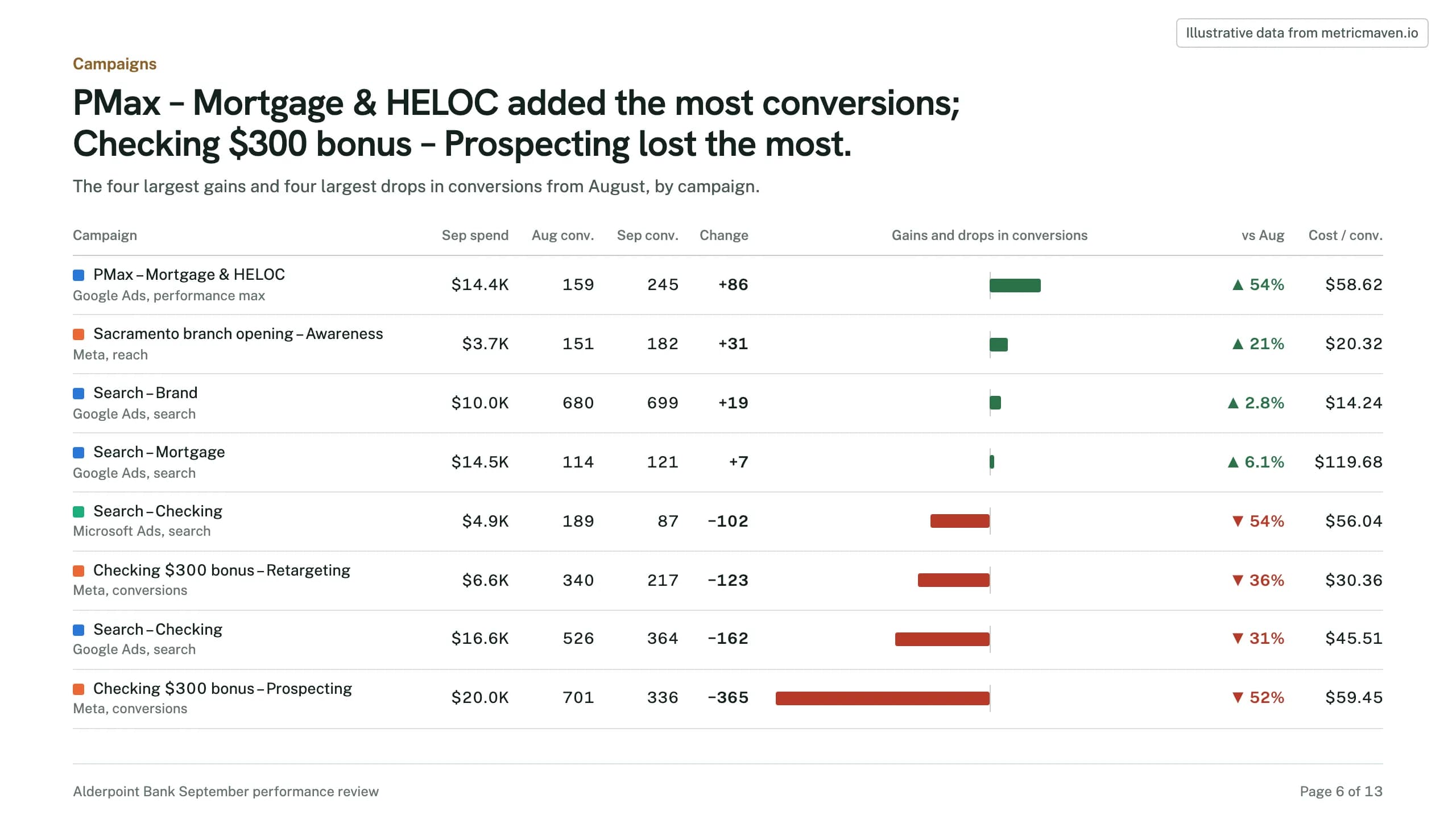
PMax – Mortgage & HELOC added the most conversions; Checking $300 bonus – Prospecting lost the most.
The four largest gains and four largest drops in conversions from August, by campaign.
| Campaign | Sep spend | Aug conv. | Sep conv. | Change | vs Aug | Cost / conv. |
|---|---|---|---|---|---|---|
| PMax – Mortgage & HELOC Google Ads, performance max | $14.4K | 159 | 245 | +86 | ▲ 54% | $58.62 |
| Sacramento branch opening – Awareness Meta, reach | $3.7K | 151 | 182 | +31 | ▲ 21% | $20.32 |
| Search – Brand Google Ads, search | $10.0K | 680 | 699 | +19 | ▲ 2.8% | $14.24 |
| Search – Mortgage Google Ads, search | $14.5K | 114 | 121 | +7 | ▲ 6.1% | $119.68 |
| Search – Checking Microsoft Ads, search | $4.9K | 189 | 87 | −102 | ▼ 54% | $56.04 |
| Checking $300 bonus – Retargeting Meta, conversions | $6.6K | 340 | 217 | −123 | ▼ 36% | $30.36 |
| Search – Checking Google Ads, search | $16.6K | 526 | 364 | −162 | ▼ 31% | $45.51 |
| Checking $300 bonus – Prospecting Meta, conversions | $20.0K | 701 | 336 | −365 | ▼ 52% | $59.45 |
Page 7 of 13Creative
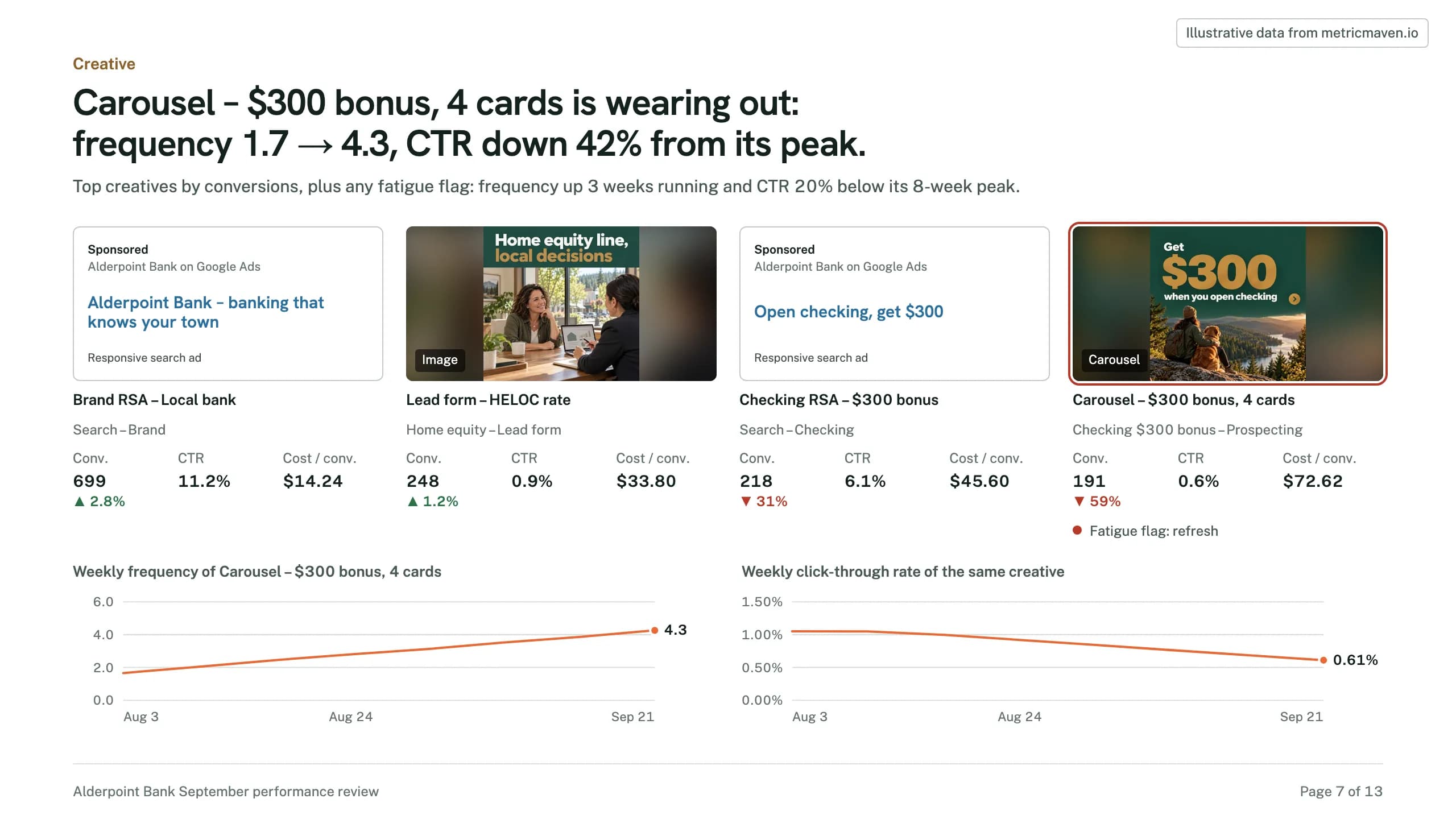
Carousel – $300 bonus, 4 cards is wearing out: frequency 1.7 → 4.3, CTR down 42% from its peak.
- Brand RSA – Local bank
- Lead form – HELOC rate
- Checking RSA – $300 bonus
- Carousel – $300 bonus, 4 cards
Page 8 of 13Landing pages
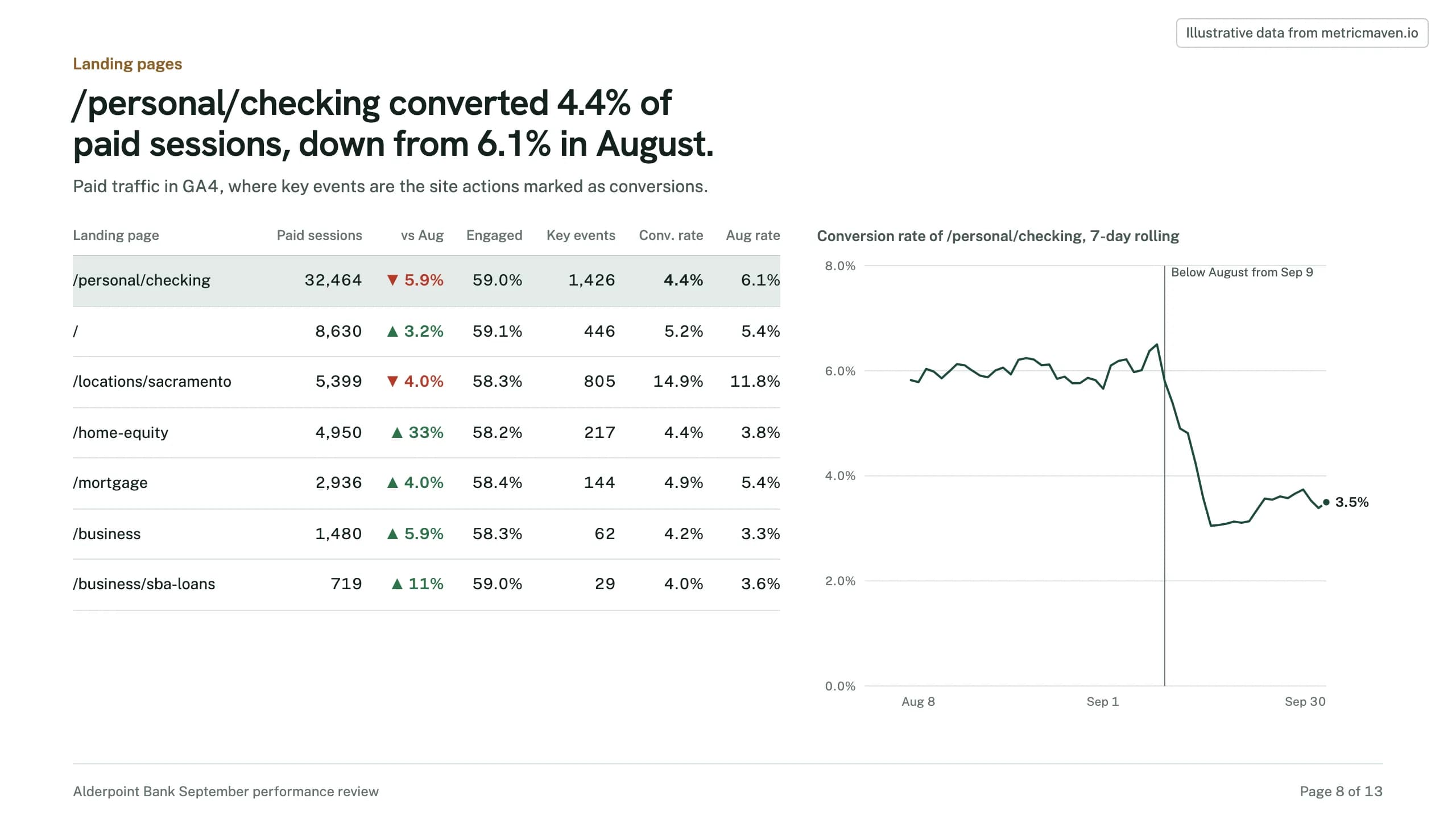
/personal/checking converted 4.4% of paid sessions, down from 6.1% in August.
Paid traffic in GA4, where key events are the site actions marked as conversions.
| Landing page | Paid sessions | vs Aug | Engaged | Key events | Conv. rate | Aug rate |
|---|---|---|---|---|---|---|
| /personal/checking | 32,464 | ▼ 5.9% | 59.0% | 1,426 | 4.4% | 6.1% |
| / | 8,630 | ▲ 3.2% | 59.1% | 446 | 5.2% | 5.4% |
| /locations/sacramento | 5,399 | ▼ 4.0% | 58.3% | 805 | 14.9% | 11.8% |
| /home-equity | 4,950 | ▲ 33% | 58.2% | 217 | 4.4% | 3.8% |
| /mortgage | 2,936 | ▲ 4.0% | 58.4% | 144 | 4.9% | 5.4% |
| /business | 1,480 | ▲ 5.9% | 58.3% | 62 | 4.2% | 3.3% |
| /business/sba-loans | 719 | ▲ 11% | 59.0% | 29 | 4.0% | 3.6% |
Page 9 of 13Conversions by type
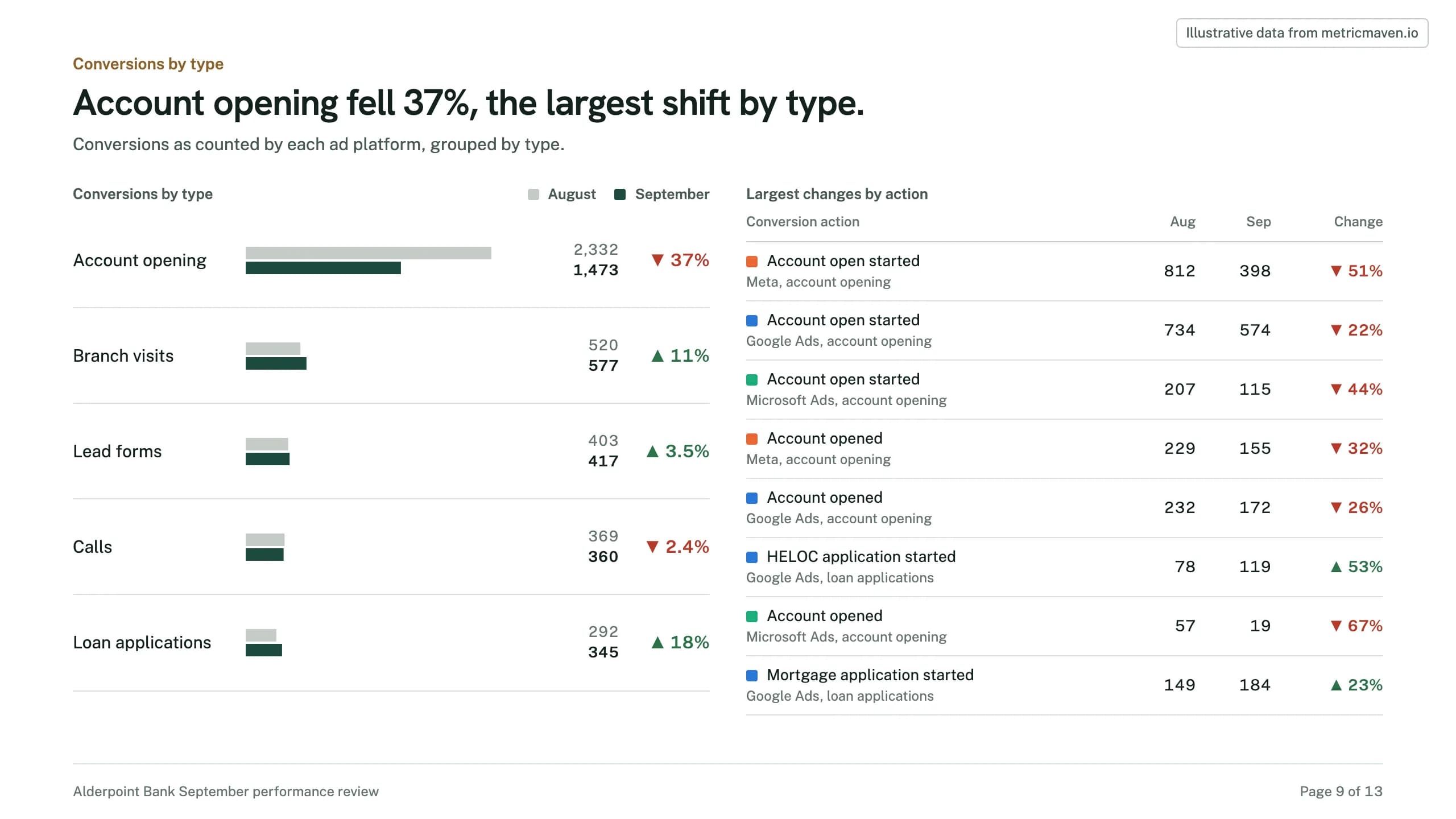
Account opening fell 37%, the largest shift by type.
Conversions as counted by each ad platform, grouped by type.
| Conversion action | Aug | Sep | Change |
|---|---|---|---|
| Account open started Meta, account opening | 812 | 398 | ▼ 51% |
| Account open started Google Ads, account opening | 734 | 574 | ▼ 22% |
| Account open started Microsoft Ads, account opening | 207 | 115 | ▼ 44% |
| Account opened Meta, account opening | 229 | 155 | ▼ 32% |
| Account opened Google Ads, account opening | 232 | 172 | ▼ 26% |
| HELOC application started Google Ads, loan applications | 78 | 119 | ▲ 53% |
| Account opened Microsoft Ads, account opening | 57 | 19 | ▼ 67% |
| Mortgage application started Google Ads, loan applications | 149 | 184 | ▲ 23% |
Page 10 of 13Real change or tracking break
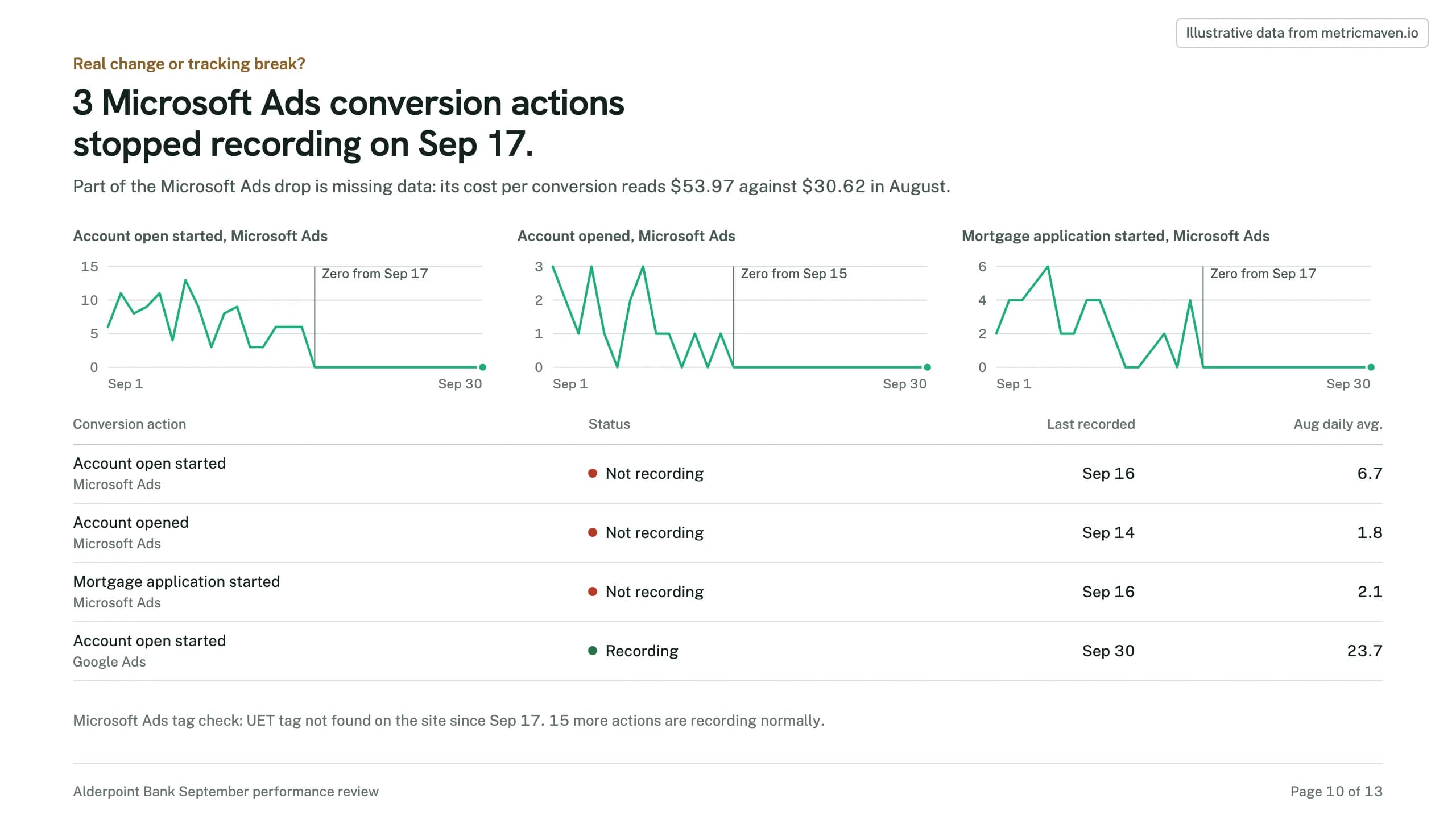
3 Microsoft Ads conversion actions stopped recording on Sep 17.
Part of the Microsoft Ads drop is missing data: its cost per conversion reads $53.97 against $30.62 in August.
| Conversion action | Status | Last recorded | Aug daily avg. |
|---|---|---|---|
| Account open started Microsoft Ads | Not recording | Sep 16 | 6.7 |
| Account opened Microsoft Ads | Not recording | Sep 14 | 1.8 |
| Mortgage application started Microsoft Ads | Not recording | Sep 16 | 2.1 |
| Account open started Google Ads | Recording | Sep 30 | 23.7 |
Page 11 of 13Geo performance
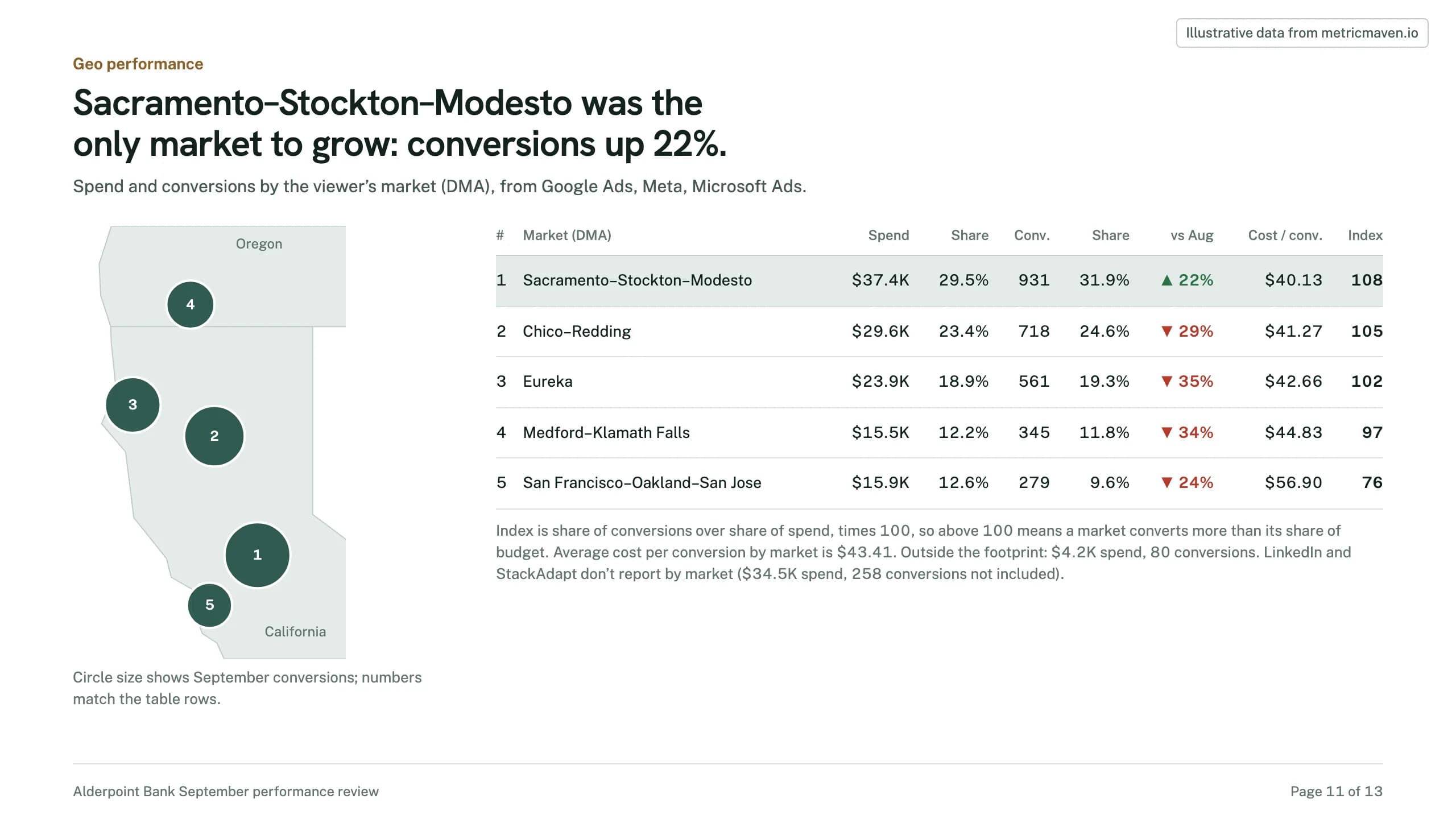
Sacramento–Stockton–Modesto was the only market to grow: conversions up 22%.
Spend and conversions by the viewer’s market (DMA), from Google Ads, Meta, Microsoft Ads.
| Market (DMA) | Spend | Share | Conv. | Share | vs Aug | Cost / conv. | Index |
|---|---|---|---|---|---|---|---|
| Sacramento–Stockton–Modesto | $37.4K | 29.5% | 931 | 31.9% | ▲ 22% | $40.13 | 108 |
| Chico–Redding | $29.6K | 23.4% | 718 | 24.6% | ▼ 29% | $41.27 | 105 |
| Eureka | $23.9K | 18.9% | 561 | 19.3% | ▼ 35% | $42.66 | 102 |
| Medford–Klamath Falls | $15.5K | 12.2% | 345 | 11.8% | ▼ 34% | $44.83 | 97 |
| San Francisco–Oakland–San Jose | $15.9K | 12.6% | 279 | 9.6% | ▼ 24% | $56.90 | 76 |
Page 12 of 13Geo by platform
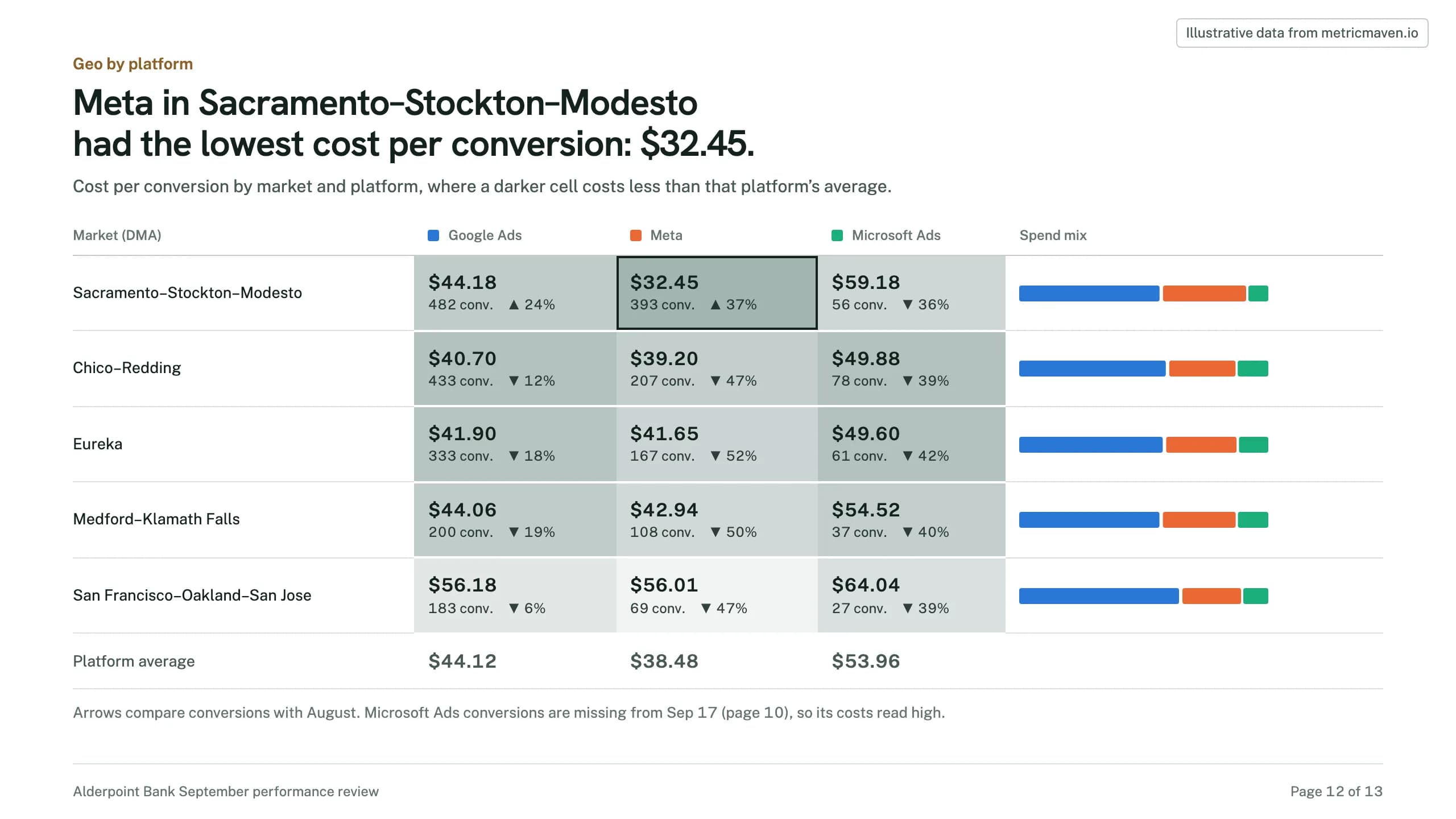
Meta in Sacramento–Stockton–Modesto had the lowest cost per conversion: $32.45.
Cost per conversion by market and platform, where a darker cell costs less than that platform’s average.
| Market (DMA) | Google Ads | Meta | Microsoft Ads |
|---|---|---|---|
| Sacramento–Stockton–Modesto | $44.18 482 conv. ▲ 24% | $32.45 393 conv. ▲ 37% | $59.18 56 conv. ▼ 36% |
| Chico–Redding | $40.70 433 conv. ▼ 12% | $39.20 207 conv. ▼ 47% | $49.88 78 conv. ▼ 39% |
| Eureka | $41.90 333 conv. ▼ 18% | $41.65 167 conv. ▼ 52% | $49.60 61 conv. ▼ 42% |
| Medford–Klamath Falls | $44.06 200 conv. ▼ 19% | $42.94 108 conv. ▼ 50% | $54.52 37 conv. ▼ 40% |
| San Francisco–Oakland–San Jose | $56.18 183 conv. ▼ 6% | $56.01 69 conv. ▼ 47% | $64.04 27 conv. ▼ 39% |
| Platform average | $44.12 | $38.48 | $53.96 |
Page 13 of 13Next month
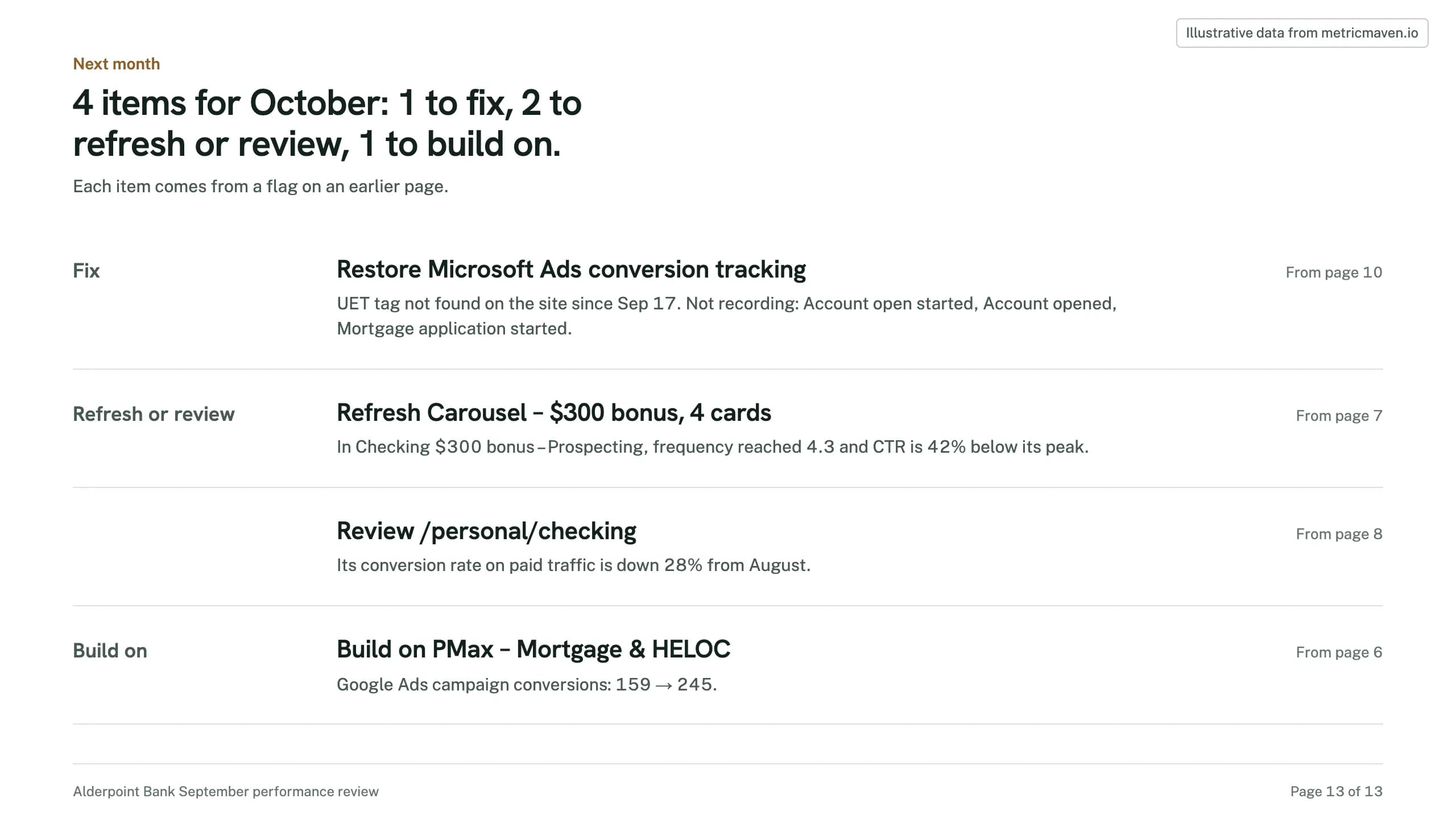
4 items for October: 1 to fix, 2 to refresh or review, 1 to build on.
Each item comes from a flag on an earlier page.
- Fix Restore Microsoft Ads conversion tracking UET tag not found on the site since Sep 17. Not recording: Account open started, Account opened, Mortgage application started. From page 10
- Refresh or review Refresh Carousel – $300 bonus, 4 cards In Checking $300 bonus – Prospecting, frequency reached 4.3 and CTR is 42% below its peak. From page 7
- Review /personal/checking Its conversion rate on paid traffic is down 28% from August. From page 8
- Build on Build on PMax – Mortgage & HELOC Google Ads campaign conversions: 159 → 245. From page 6
Get started
Three steps to your first client review.
Connect once, then run the recipe each month.
- 1
Connect the client’s accounts.
Ad platforms, GA4 and the CRM, connected in Maven with the tracking checked. - 2
Add Maven to ChatGPT or Claude.
Claude: Settings → Connectors. ChatGPT: Settings → Apps & Connectors, as a custom connector. The steps are in the Maven connector guide. - 3
Run the recipe.
Open it in Claude or ChatGPT with the prompt filled in, name the client, and the deck comes back.






Use the recipe on your next client review.
It opens Claude or ChatGPT with the prompt filled in. Maven needs to be connected there first.