Recipe · Claude and ChatGPT
A monthly SEO report in your client’s inbox on the 1st.
Set the recipe up once in Claude or ChatGPT. On the 1st of every month, your client gets last month’s organic search report by email, attached as a PDF to read or forward.
What comes back
An email your client reads, and the report behind it.
Each part of the monthly email, from the sample.
On the 1st, in their inbox.
The email arrives at the hour you choose, covering last month from the 1st to the last day. Each recipient gets their own copy, and anyone outside your Maven workspace confirms their address once before the first send.A short note, with the report attached.
The email names the report and its dates and carries the full report as a PDF and a PNG. The findings are in the report, refreshed with last month’s data each time it goes out.Easy to forward to people who never log in.
The PDF opens on a phone and the attachments travel with it, so store and regional leaders get the whole report from one forward.The full report, attached.
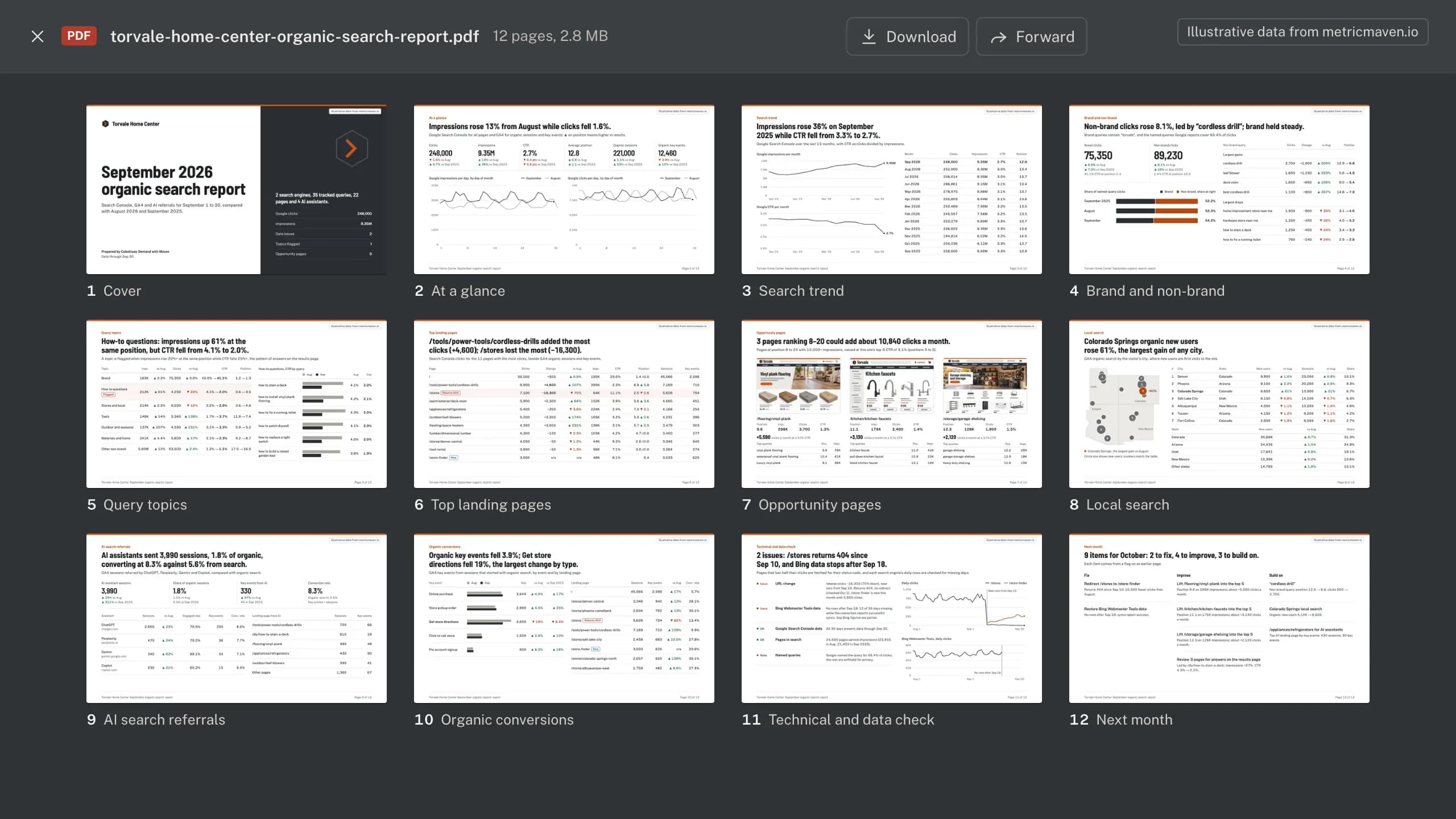
All 12 pages as a PDF, and the same report as one PNG: the queries and pages that moved, pages ranking 8 to 20, local and AI search, and a check for broken pages and missing data.
The sample
Torvale Home Center’s September SEO email, and its report.
The inbox, the email, the forward to the stores team, then 5 of the 12 attached pages. Torvale Home Center, its people and its agency, Cobaltway Demand, are fictional, and every number is illustrative. Open a section to see it full size with its text.
Section 1 of 9Inbox
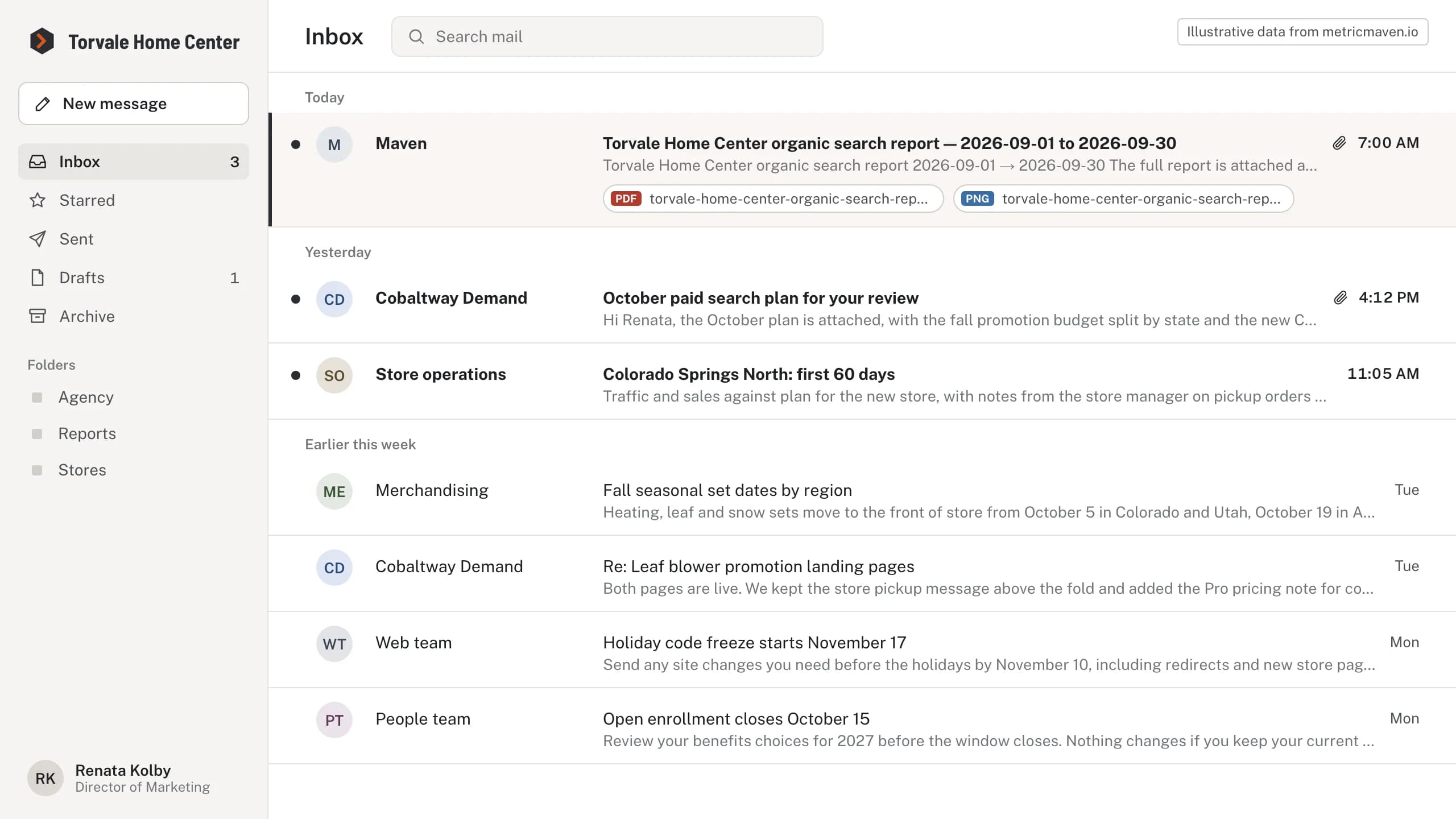
The September report lands in Renata Kolby’s inbox at 7:00 AM on October 1.
It comes from Maven on the 1st, with the report attached as a PDF and a PNG.
| From | Subject | Received |
|---|---|---|
| Maven | Torvale Home Center organic search report — 2026-09-01 to 2026-09-30 | Thu, Oct 1, 7:00 AM |
- Attachments: torvale-home-center-organic-search-report.pdf, torvale-home-center-organic-search-report.png
Section 2 of 9The email
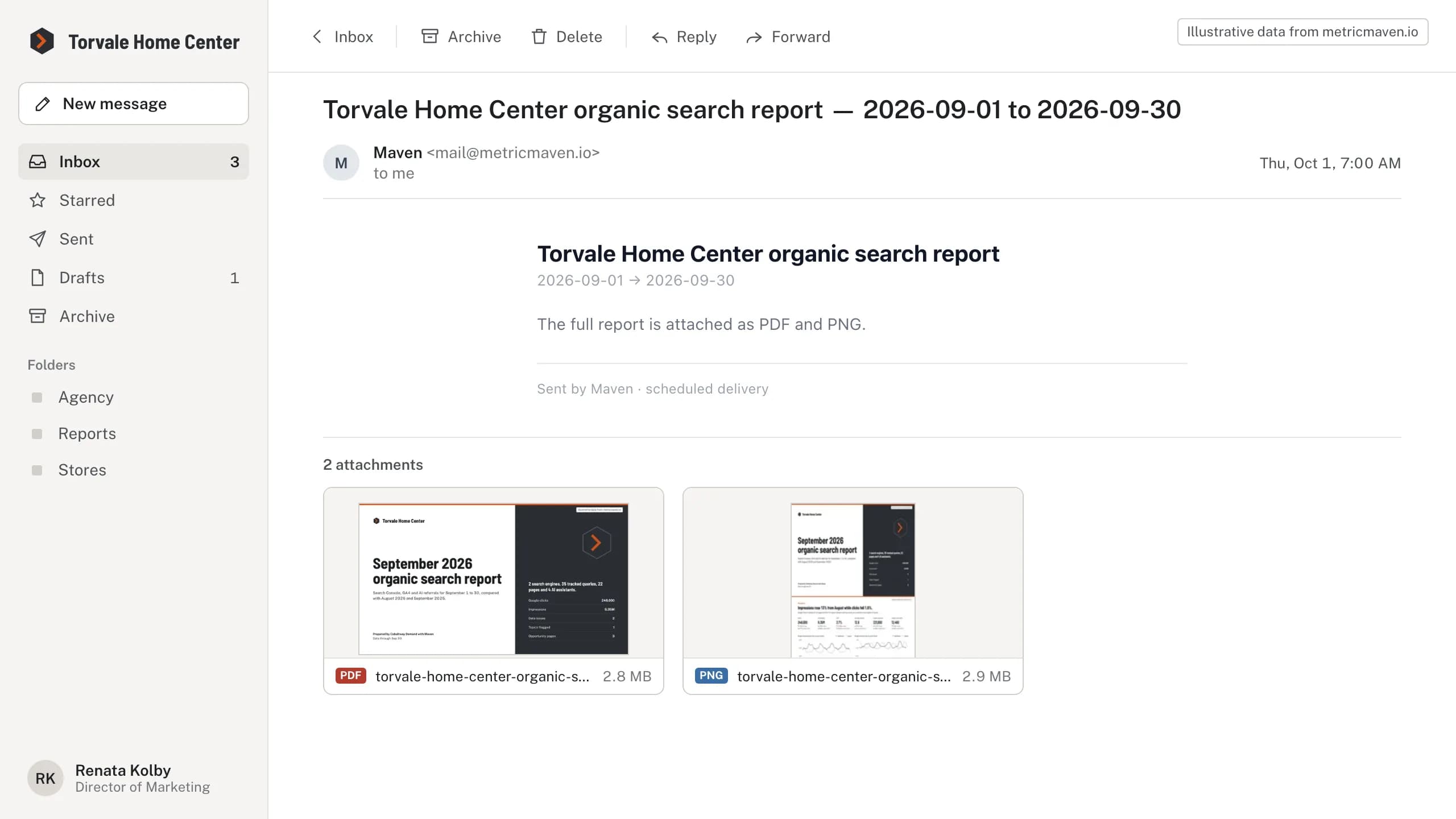
The email names the report and its dates, and attaches the full report as a PDF and a PNG.
The findings are in the attached report; the email body is Maven’s standard delivery note.
| Field | Value |
|---|---|
| From | Maven <mail@metricmaven.io> |
| To | Renata Kolby |
| Date | Thu, Oct 1, 2026, 7:00 AM |
| Subject | Torvale Home Center organic search report — 2026-09-01 to 2026-09-30 |
| Attachment | Size |
|---|---|
| torvale-home-center-organic-search-report.pdf | 2.8 MB |
| torvale-home-center-organic-search-report.png | 2.9 MB |
- Torvale Home Center organic search report
- 2026-09-01 → 2026-09-30
- The full report is attached as PDF and PNG.
- Sent by Maven · scheduled delivery
Section 3 of 9On a phone
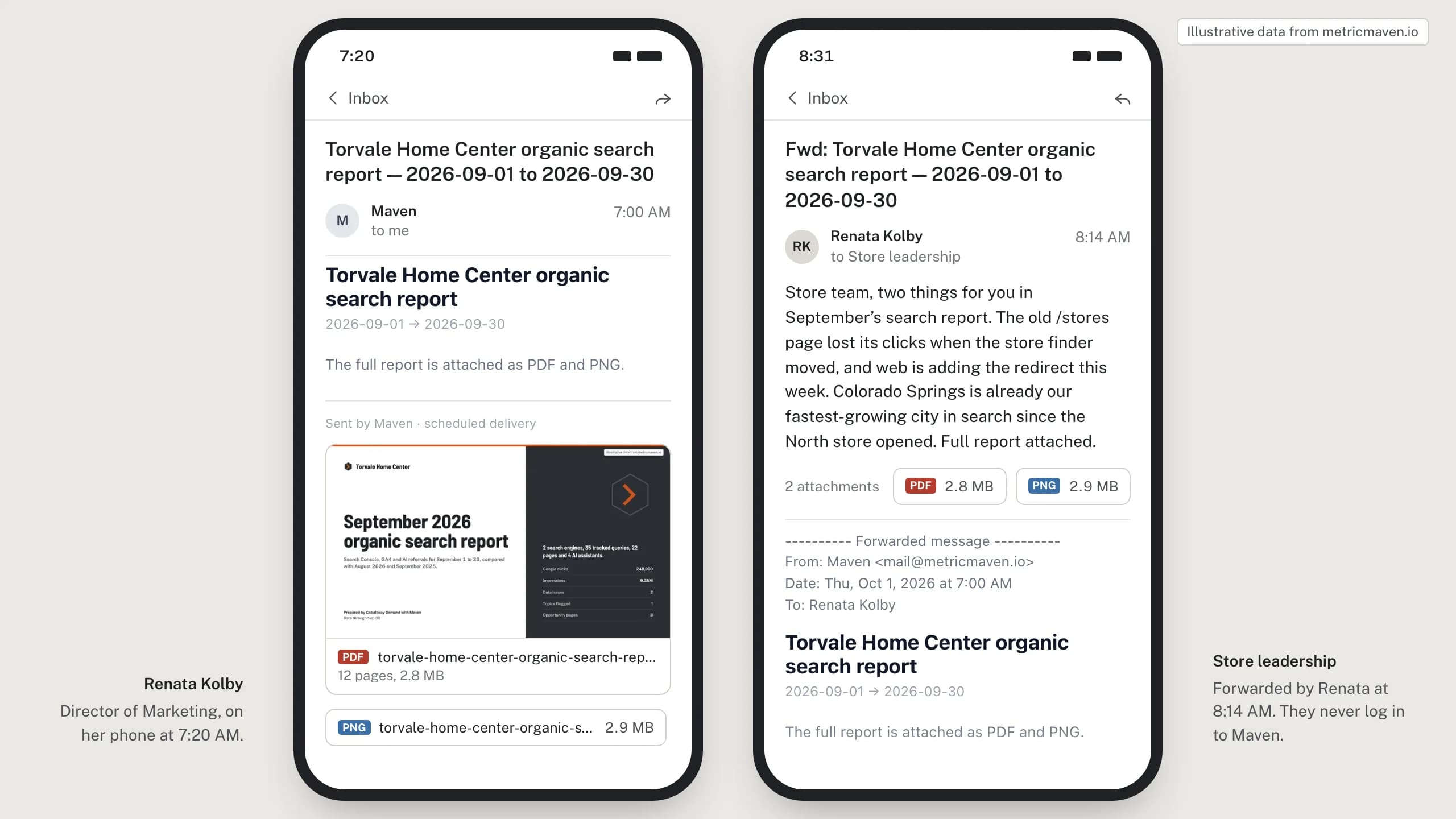
Renata opens the attached report on her phone and forwards it to store leadership by 8:14 AM.
Store leaders get the report without logging in to anything.
- Renata Kolby, Director of Marketing, opens the email on her phone at 7:20 AM, with the PDF preview inline.
- Forwarded to Store leadership: “The old /stores page lost its clicks when the store finder moved, and web is adding the redirect this week. Colorado Springs is already our fastest-growing city in search since the North store opened.”
Section 4 of 9The attached report
The attached PDF is the full 12-page September organic search report.
torvale-home-center-organic-search-report.pdf, 12 pages, 2.8 MB.
| Page | Section | Headline |
|---|---|---|
| 1 | Cover | September 2026 organic search report |
| 2 | At a glance | Impressions rose 13% from August while clicks fell 1.6%. |
| 3 | Search trend | Impressions rose 36% on September 2025 while CTR fell from 3.3% to 2.7%. |
| 4 | Brand and non-brand | Non-brand clicks rose 8.1%, led by “cordless drill”; brand held steady. |
| 5 | Query topics | How-to questions: impressions up 61% at the same position, but CTR fell from 4.1% to 2.0%. |
| 6 | Top landing pages | /tools/power-tools/cordless-drills added the most clicks (+4,600); /stores lost the most (−16,300). |
| 7 | Opportunity pages | 3 pages ranking 8–20 could add about 10,840 clicks a month. |
| 8 | Local search | Colorado Springs organic new users rose 61%, the largest gain of any city. |
| 9 | AI search referrals | AI assistants sent 3,990 sessions, 1.8% of organic, converting at 8.3% against 5.6% from search. |
| 10 | Organic conversions | Organic key events fell 3.9%; Get store directions fell 19%, the largest change by type. |
| 11 | Technical and data check | 2 issues: /stores returns 404 since Sep 10, and Bing data stops after Sep 18. |
| 12 | Next month | 9 items for October: 2 to fix, 4 to improve, 3 to build on. |
Section 5 of 9Attached report, page 5 of 12
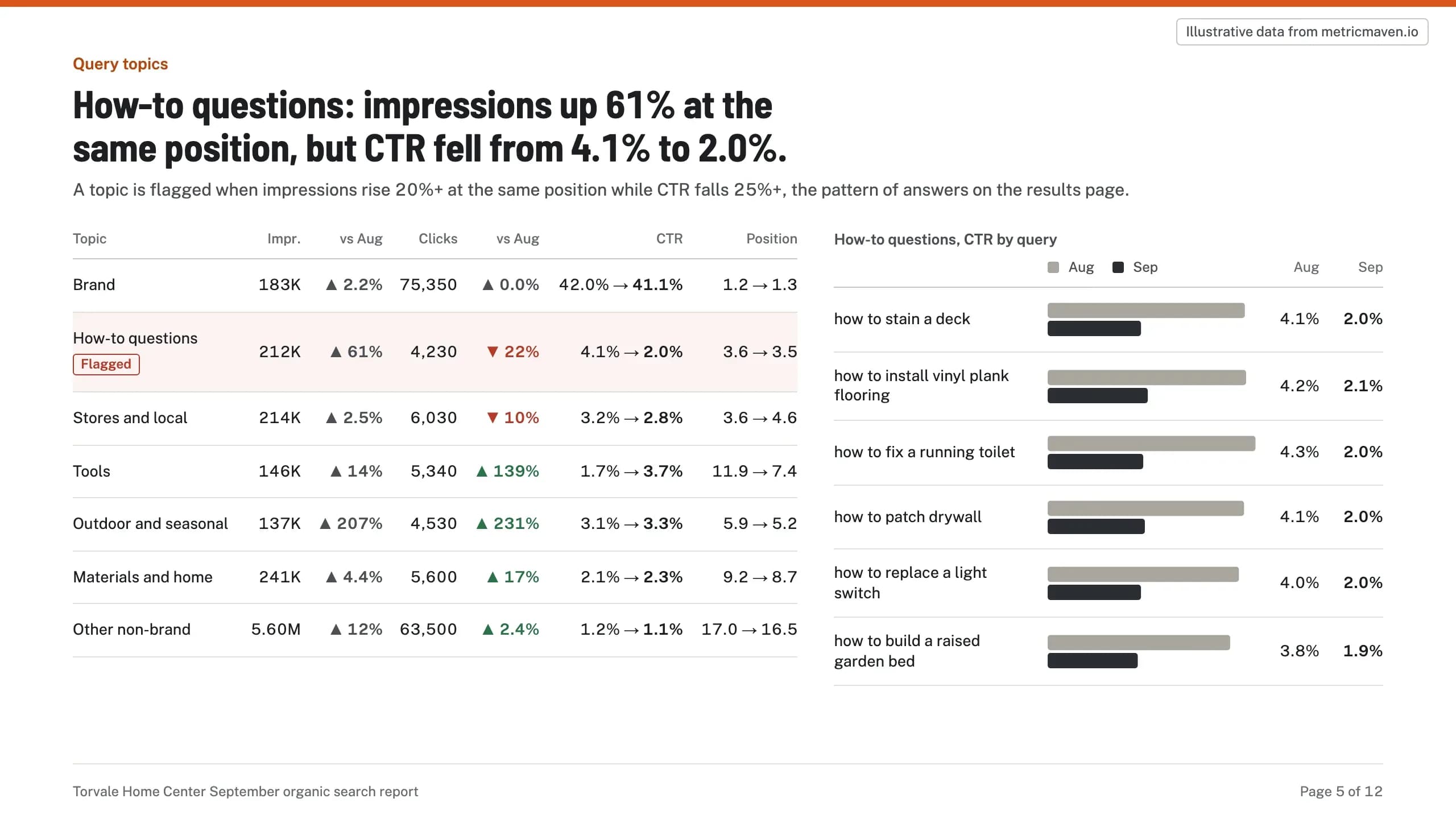
How-to questions: impressions up 61% at the same position, but CTR fell from 4.1% to 2.0%.
| Topic | Impr. | vs Aug | Clicks | vs Aug | CTR | Position |
|---|---|---|---|---|---|---|
| Brand | 183K | ▲ 2.2% | 75,350 | ▲ 0.0% | 42.0% → 41.1% | 1.2 → 1.3 |
| How-to questions Flagged | 212K | ▲ 61% | 4,230 | ▼ 22% | 4.1% → 2.0% | 3.6 → 3.5 |
| Stores and local | 214K | ▲ 2.5% | 6,030 | ▼ 10% | 3.2% → 2.8% | 3.6 → 4.6 |
| Tools | 146K | ▲ 14% | 5,340 | ▲ 139% | 1.7% → 3.7% | 11.9 → 7.4 |
| Outdoor and seasonal | 137K | ▲ 207% | 4,530 | ▲ 231% | 3.1% → 3.3% | 5.9 → 5.2 |
| Materials and home | 241K | ▲ 4.4% | 5,600 | ▲ 17% | 2.1% → 2.3% | 9.2 → 8.7 |
| Other non-brand | 5.60M | ▲ 12% | 63,500 | ▲ 2.4% | 1.2% → 1.1% | 17.0 → 16.5 |
- Aug Sep Aug Sep
- how to stain a deck 4.1% 2.0%
- how to install vinyl plank flooring 4.2% 2.1%
- how to fix a running toilet 4.3% 2.0%
- how to patch drywall 4.1% 2.0%
- how to replace a light switch 4.0% 2.0%
- how to build a raised garden bed 3.8% 1.9%
Section 6 of 9Attached report, page 6 of 12
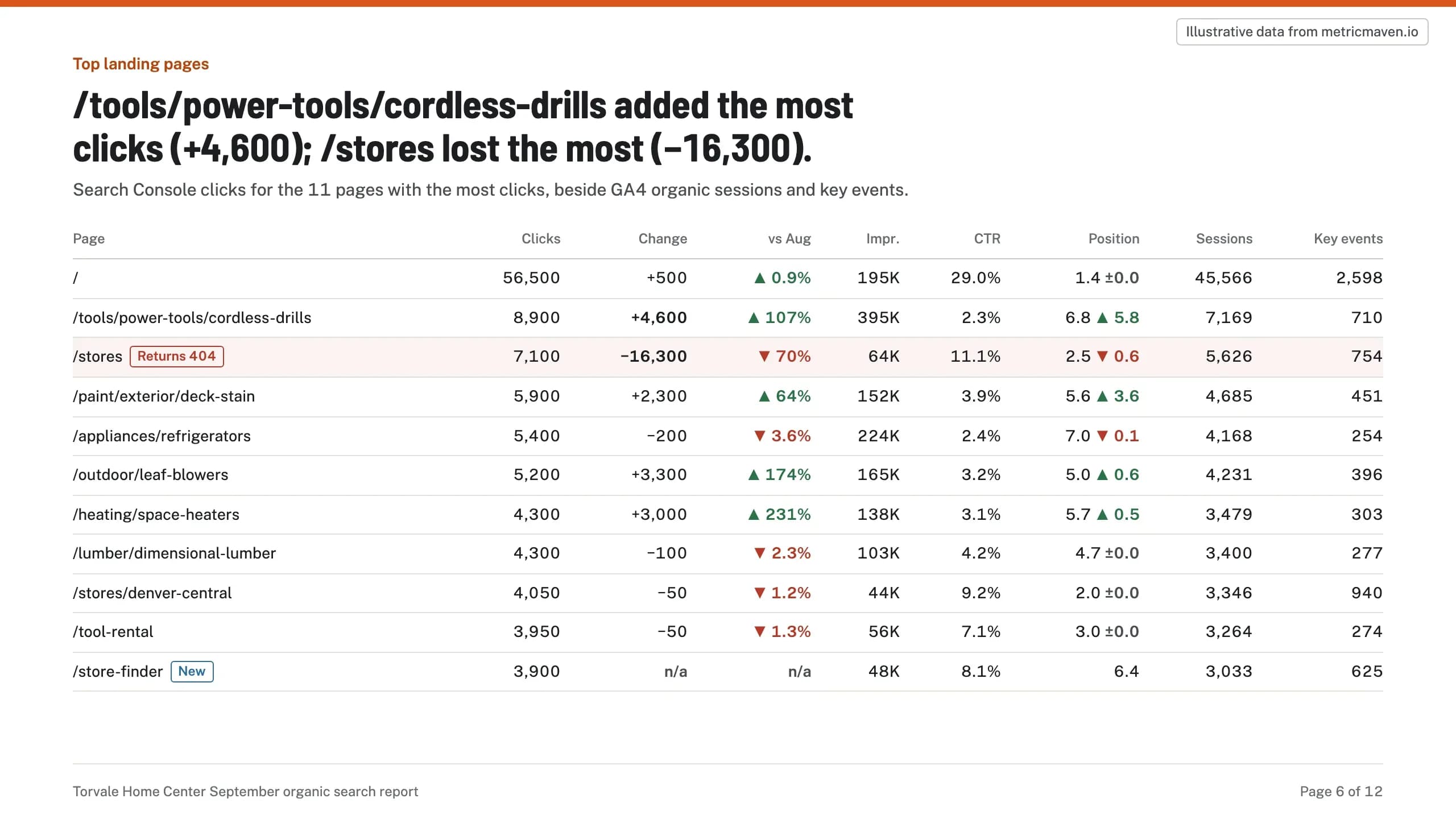
/tools/power-tools/cordless-drills added the most clicks (+4,600); /stores lost the most (−16,300).
Search Console clicks for the 11 pages with the most clicks, beside GA4 organic sessions and key events.
| Page | Clicks | Change | vs Aug | Impr. | CTR | Position | Sessions | Key events |
|---|---|---|---|---|---|---|---|---|
| / | 56,500 | +500 | ▲ 0.9% | 195K | 29.0% | 1.4 ±0.0 | 45,566 | 2,598 |
| /tools/power-tools/cordless-drills | 8,900 | +4,600 | ▲ 107% | 395K | 2.3% | 6.8 ▲ 5.8 | 7,169 | 710 |
| /storesReturns 404 | 7,100 | −16,300 | ▼ 70% | 64K | 11.1% | 2.5 ▼ 0.6 | 5,626 | 754 |
| /paint/exterior/deck-stain | 5,900 | +2,300 | ▲ 64% | 152K | 3.9% | 5.6 ▲ 3.6 | 4,685 | 451 |
| /appliances/refrigerators | 5,400 | −200 | ▼ 3.6% | 224K | 2.4% | 7.0 ▼ 0.1 | 4,168 | 254 |
| /outdoor/leaf-blowers | 5,200 | +3,300 | ▲ 174% | 165K | 3.2% | 5.0 ▲ 0.6 | 4,231 | 396 |
| /heating/space-heaters | 4,300 | +3,000 | ▲ 231% | 138K | 3.1% | 5.7 ▲ 0.5 | 3,479 | 303 |
| /lumber/dimensional-lumber | 4,300 | −100 | ▼ 2.3% | 103K | 4.2% | 4.7 ±0.0 | 3,400 | 277 |
| /stores/denver-central | 4,050 | −50 | ▼ 1.2% | 44K | 9.2% | 2.0 ±0.0 | 3,346 | 940 |
| /tool-rental | 3,950 | −50 | ▼ 1.3% | 56K | 7.1% | 3.0 ±0.0 | 3,264 | 274 |
| /store-finderNew | 3,900 | n/a | n/a | 48K | 8.1% | 6.4 | 3,033 | 625 |
Section 7 of 9Attached report, page 7 of 12
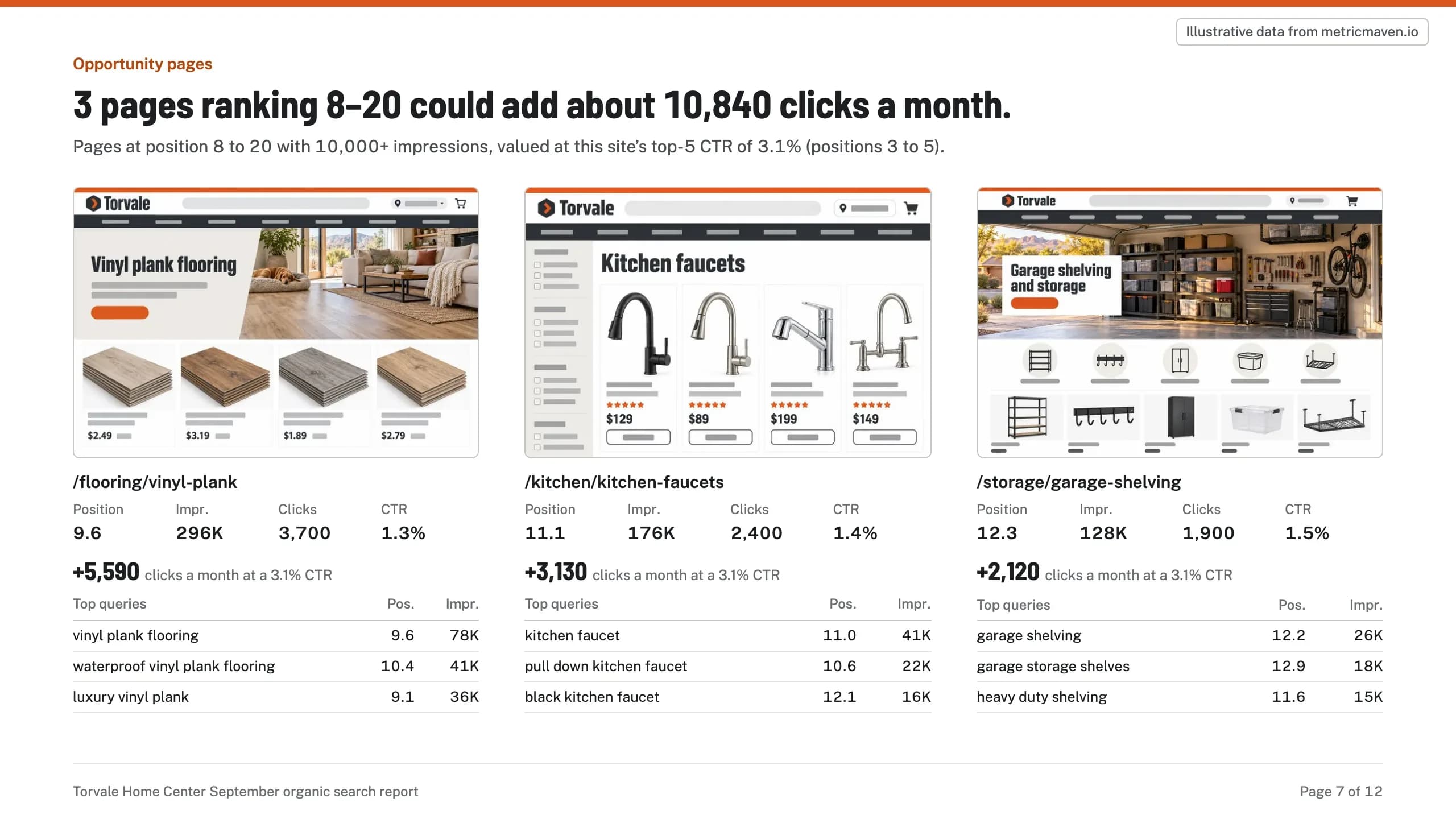
3 pages ranking 8–20 could add about 10,840 clicks a month.
| Top queries | Pos. | Impr. |
|---|---|---|
| vinyl plank flooring | 9.6 | 78K |
| waterproof vinyl plank flooring | 10.4 | 41K |
| luxury vinyl plank | 9.1 | 36K |
| Top queries | Pos. | Impr. |
|---|---|---|
| kitchen faucet | 11.0 | 41K |
| pull down kitchen faucet | 10.6 | 22K |
| black kitchen faucet | 12.1 | 16K |
| Top queries | Pos. | Impr. |
|---|---|---|
| garage shelving | 12.2 | 26K |
| garage storage shelves | 12.9 | 18K |
| heavy duty shelving | 11.6 | 15K |
- /flooring/vinyl-plank
- Position 9.6 Impr. 296K Clicks 3,700 CTR 1.3%
- +5,590 clicks a month at a 3.1% CTR
- /kitchen/kitchen-faucets
- Position 11.1 Impr. 176K Clicks 2,400 CTR 1.4%
- +3,130 clicks a month at a 3.1% CTR
- /storage/garage-shelving
- Position 12.3 Impr. 128K Clicks 1,900 CTR 1.5%
- +2,120 clicks a month at a 3.1% CTR
Section 8 of 9Attached report, page 11 of 12
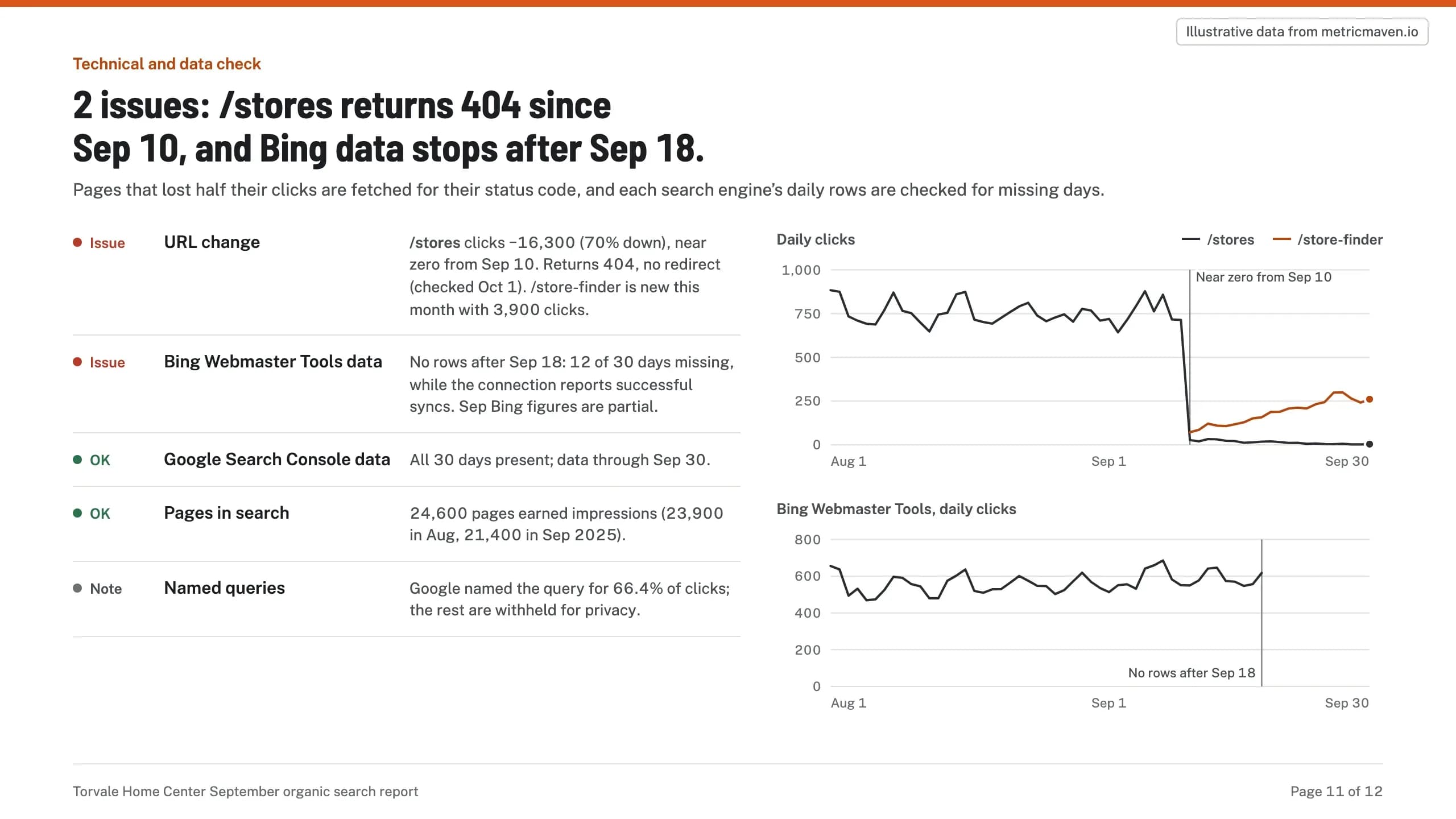
2 issues: /stores returns 404 since Sep 10, and Bing data stops after Sep 18.
- Issue URL change /stores clicks −16,300 (70% down), near zero from Sep 10. Returns 404, no redirect (checked Oct 1). /store-finder is new this month with 3,900 clicks.
- Issue Bing Webmaster Tools data No rows after Sep 18: 12 of 30 days missing, while the connection reports successful syncs. Sep Bing figures are partial.
- OK Google Search Console data All 30 days present; data through Sep 30.
- OK Pages in search 24,600 pages earned impressions (23,900 in Aug, 21,400 in Sep 2025).
- Note Named queries Google named the query for 66.4% of clicks; the rest are withheld for privacy.
Section 9 of 9Attached report, page 12 of 12
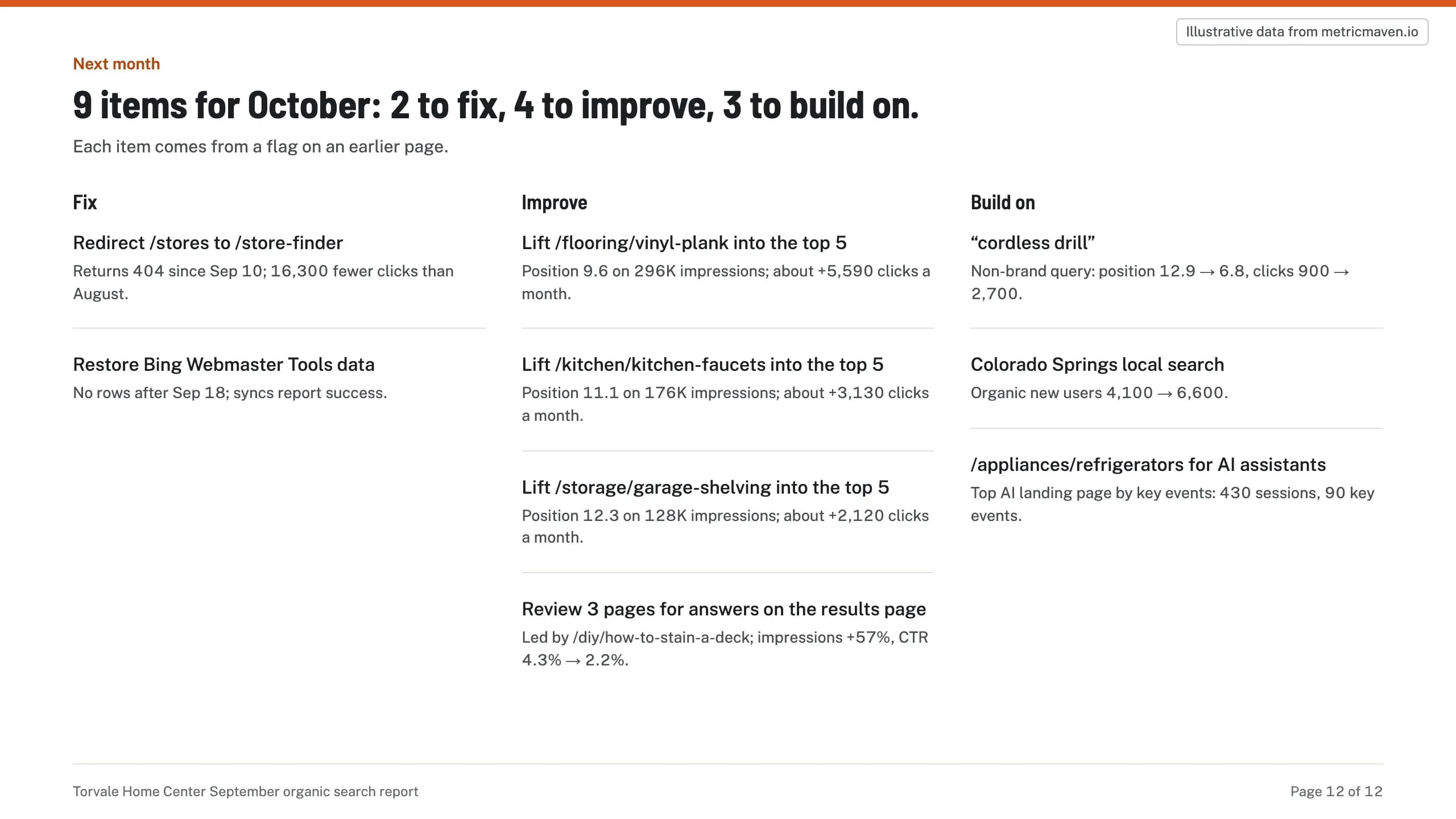
9 items for October: 2 to fix, 4 to improve, 3 to build on.
Each item comes from a flag on an earlier page.
- Redirect /stores to /store-finder Returns 404 since Sep 10; 16,300 fewer clicks than August.
- Restore Bing Webmaster Tools data No rows after Sep 18; syncs report success.
- Lift /flooring/vinyl-plank into the top 5 Position 9.6 on 296K impressions; about +5,590 clicks a month.
- Lift /kitchen/kitchen-faucets into the top 5 Position 11.1 on 176K impressions; about +3,130 clicks a month.
- Lift /storage/garage-shelving into the top 5 Position 12.3 on 128K impressions; about +2,120 clicks a month.
- Review 3 pages for answers on the results page Led by /diy/how-to-stain-a-deck; impressions +57%, CTR 4.3% → 2.2%.
- “cordless drill” Non-brand query: position 12.9 → 6.8, clicks 900 → 2,700.
- Colorado Springs local search Organic new users 4,100 → 6,600.
- /appliances/refrigerators for AI assistants Top AI landing page by key events: 430 sessions, 90 key events.
Get started
Three steps to your first monthly SEO email.
Connect once and schedule once. The email goes out on the 1st of every month.
- 1
Connect the client’s accounts.
Google Search Console, Bing Webmaster Tools and GA4, connected in Maven with the tracking checked. - 2
Add Maven to ChatGPT or Claude.
Claude: Settings → Connectors. ChatGPT: Settings → Apps & Connectors, as a custom connector. The steps are in the Maven connector guide. - 3
Schedule the email.
Open the recipe in Claude or ChatGPT with the prompt filled in, name the client and who gets the email, and approve the schedule. The first email goes out on the 1st.



Schedule your client’s monthly SEO email.
It opens Claude or ChatGPT with the prompt filled in. Maven needs to be connected there first.